
Chisel Mod in Minecraft: Guide to Block Modification and Decoration
Tools for Modifying Blocks The mod introduces three types of chisels that allow for block modification, with the main differences being…
Tools for Modifying Blocks
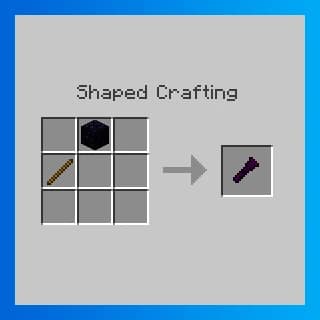
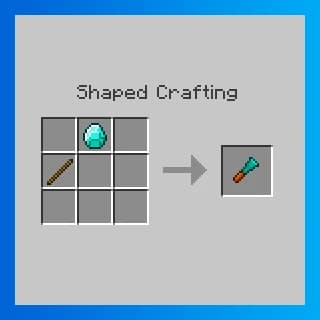
The mod introduces three types of chisels that allow for block modification, with the main differences being their durability:
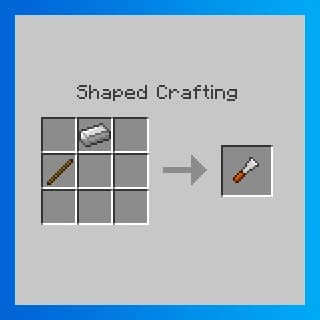 Iron Chisel — Durability: 500
Diamond Chisel — Durability: 5000
Obsidian Chisel — Durability: 2500
Modifying Blocks
To change the design of a block, simply hit it with a chisel (left-click). You can also modify blocks in your inventory using the chisel's interface.
Chisel Interface and Processing Modes
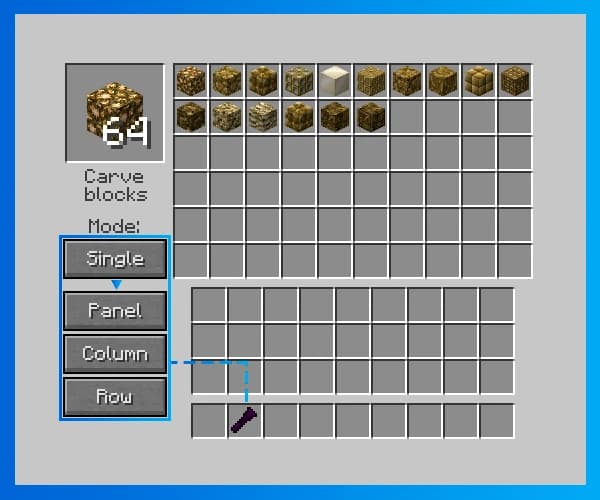 The chisel interface allows you to select a desired block design. Both the diamond and obsidian chisels offer the following processing modes:
-
Single — Modifies one block.
-
Panel — Modifies blocks in a 3x3 square.
-
Column — Modifies three blocks vertically.
-
Row — Modifies three blocks horizontally.
For larger-scale modifications, the mod provides an Automatic Chisel, which makes bulk editing easier.
Upgrades for the Automatic Chisel
The Automatic Chisel can be enhanced with the following upgrades:
-
Speed Upgrade
-
Automation Upgrade
-
Stacking Upgrade
-
Reversal Upgrade
These upgrades expand the capabilities of the Automatic Chisel, simplifying and speeding up the block processing.
Additional Mod Items
In addition to chisels, the mod also adds a few interesting items:
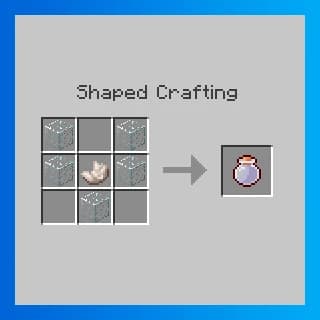 Cloud in a Bottle — Creates a cloud upon impact when used (right-click)
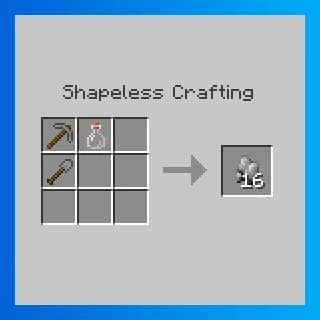 Smashing Rock — Converts cobblestone to gravel, gravel to sand, etc., upon contact when thrown (right-click)
Conclusion
Thank you for reading! I hope this guide helps you make the most of the Chisel mod's features.
Leave a comment
Links will be stripped
No comments yet. Be the first to share your thoughts.