
Guide to the Potion of Slowness in Minecraft
Learn how to brew the Potion of Slowness in Minecraft. Effects, ingredients, upgrades, and use in PvP and traps. Full guide!
1.2Kviews3 min
Effects of the Potion of Slowness
The potion reduces movement speed by 15% (level 1) or 60% (level 2). The effect duration depends on the potion variant:
- Regular Potion of Slowness (Level 1) — 1:30 minutes
- Strong Potion of Slowness (Level 2) — 0:40 minutes
- Extended Potion of Slowness (Level 1) — 4:00 minutes
How to make a Potion of Slowness?
You can brew a Potion of Slowness in two ways:
- From a Potion of Swiftness
- From a Potion of Leaping
1. Preparing the necessary ingredients
- Awkward Potion (brewed using Nether Wart)
- Sugar (for Potion of Swiftness)
- Rabbit's Foot (for Potion of Leaping)
- Fermented Spider Eye (main ingredient)
- Redstone (to increase duration, optional)
- Glowstone Dust (to increase effect level, optional)
- Gunpowder (to make it a splash potion)
- Dragon's Breath (to turn the splash potion into a lingering one)
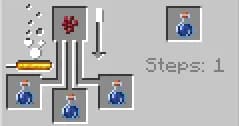
2. Brewing an Awkward Potion
- Open the brewing stand.
- Add Blaze Powder to the fuel slot.
- Place a Water Bottle in any of the three potion slots.
- Add Nether Wart.
- Wait for the brewing to finish — you'll get an Awkward Potion.
3. Brewing a base potion
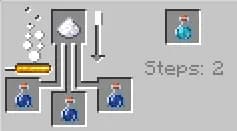
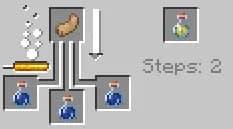
Choose one of two options:
- Potion of Swiftness (from Sugar)
- Potion of Leaping (from Rabbit's Foot)
- Place the Awkward Potion into the brewing stand.
- Add Sugar or Rabbit's Foot.
- Wait for the brewing to finish — you'll get a Potion of Swiftness or Potion of Leaping.
4. Turning it into a Potion of Slowness
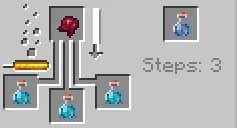
- Place the Potion of Swiftness or Potion of Leaping into the brewing stand.
- Add a Fermented Spider Eye.
- Once brewing is complete, you'll get a Potion of Slowness.
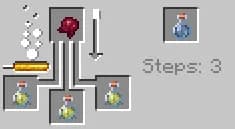
How to enhance the potion?
- Increase duration: add Redstone to make the potion last longer.
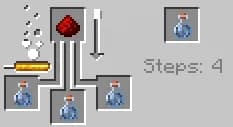
- Increase effect level: add Glowstone Dust to make the slowness effect stronger.
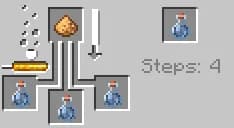
- Make it a splash potion: add Gunpowder to make the potion throwable.
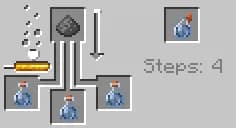
- Make a lingering potion: add Dragon's Breath to the splash potion of slowness to create a lingering Potion of Slowness.
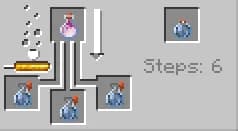
How to use the Potion of Slowness?
- Drink it yourself (not recommended).
- Throw a Splash Potion of Slowness at mobs or players to slow them down.
- Use it in dispenser traps to delay enemies.
- Apply a Lingering Potion of Slowness to create a slowing cloud.
Where to use the Potion of Slowness?
- In PvP battles to reduce enemy mobility.
- In fights against fast mobs (like witches or phantoms).
- When defending your base from raiders and pillagers.
- In traps and redstone mechanisms using dispensers.
Conclusion
The Potion of Slowness reduces enemy speed and is useful in PvP and traps. Splash and lingering variants help affect groups effectively. A great tool for movement control in combat.
Leave a comment
Links will be stripped
No comments yet. Be the first to share your thoughts.