
How to Make a Beacon in Minecraft and Activate It
A complete guide on how to craft, build a pyramid for, and activate a beacon in Minecraft. Learn about beacon effects, requirements, and…
How to Make a Beacon in Minecraft and Activate It
A Beacon is a block placed on top of a pyramid made of precious mineral blocks to provide constant effects to all nearby players and shoot a beam of light into the sky. In vanilla Minecraft, this is one of the few ways to get a continuous buff without potions, so a beacon usually appears in the game only in the late stages. The difficulty lies not in the crafting itself, but in the materials: it requires a Nether Star, which drops only from the Wither. This guide will walk you through the entire process — from gathering resources to choosing an effect and changing the beam color.
What You Will Need
For one beacon, you need three types of materials plus an item for activation.
Item | Quantity | How to obtain |
Glass | 5 | smelt sand in a furnace |
Obsidian | 3 | cool lava with water, mine with a diamond or netherite pickaxe |
Nether Star | 1 | kill a Wither |
Mineral blocks | 9–164 | blocks of iron, gold, diamond, emerald, or netherite |
Ingot or gem | 1 | iron/gold/netherite ingot, diamond, or emerald |
The number of mineral blocks depends on how powerful the beacon should be — from 9 to 164. More on this in the pyramid section.
How to Get a Nether Star
A Nether Star drops only from a Wither and nowhere else. The Wither is summoned manually: on a flat surface, place four blocks of Soul Sand or Soul Soil in a "T" shape, and place three Wither Skeleton Skulls on top of the three upper blocks. The last block placed must always be a skull — after that, the boss will begin to spawn.
Wither Skeleton Skulls are dropped by Wither Skeletons in Nether fortresses. The drop chance is low — about 2.5%, so getting three skulls usually takes a noticeable amount of time; the Looting enchantment increases this chance. The fight with the Wither itself is a separate large topic, but for the beacon, one thing is important: every defeated Wither drops exactly one star.
Summoning destroys everything around: immediately after spawning, the Wither explodes, and during the fight, it breaks most blocks. Summon it away from your base — in an open field or in a tunnel made of durable blocks.
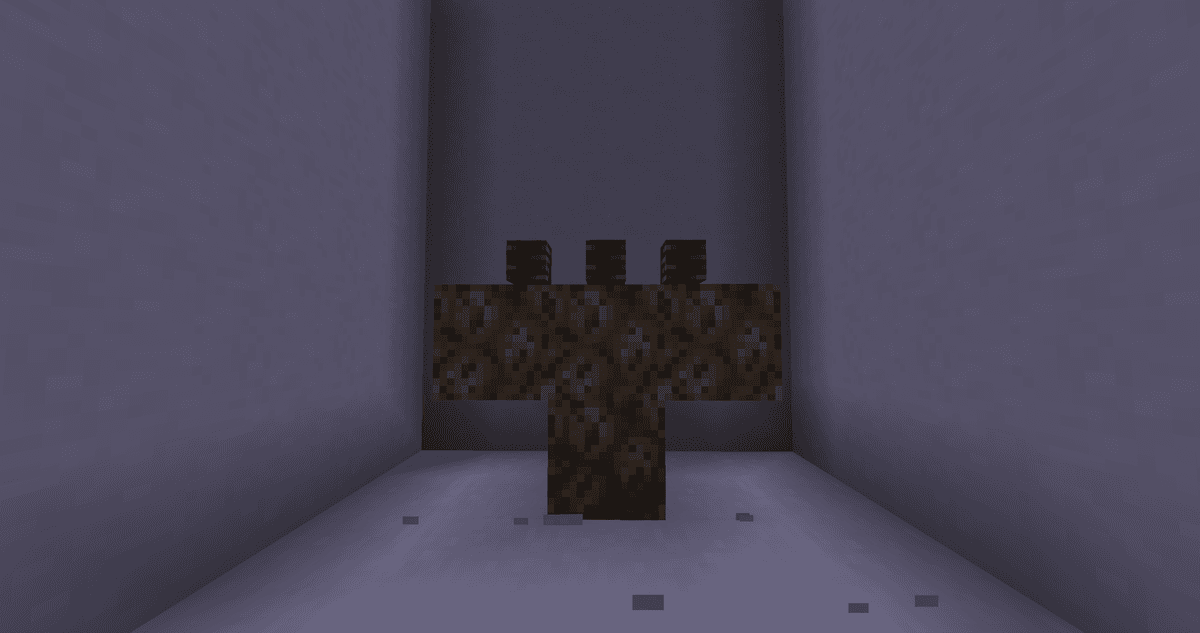
A T-shaped structure of three Soul Sand blocks with a fourth block at the bottom center and three Wither Skeleton Skulls on top
Step 1. Crafting the Beacon
The beacon is crafted at a crafting table. The layout is as follows: the top row is entirely Glass, the middle row is Glass — Nether Star — Glass, and the bottom row is entirely Obsidian. The output is one Beacon block.
Glass is obtained by smelting sand. Obsidian forms when flowing lava is cooled by water; it can only be mined with a diamond or netherite pickaxe, otherwise the block will break without dropping.
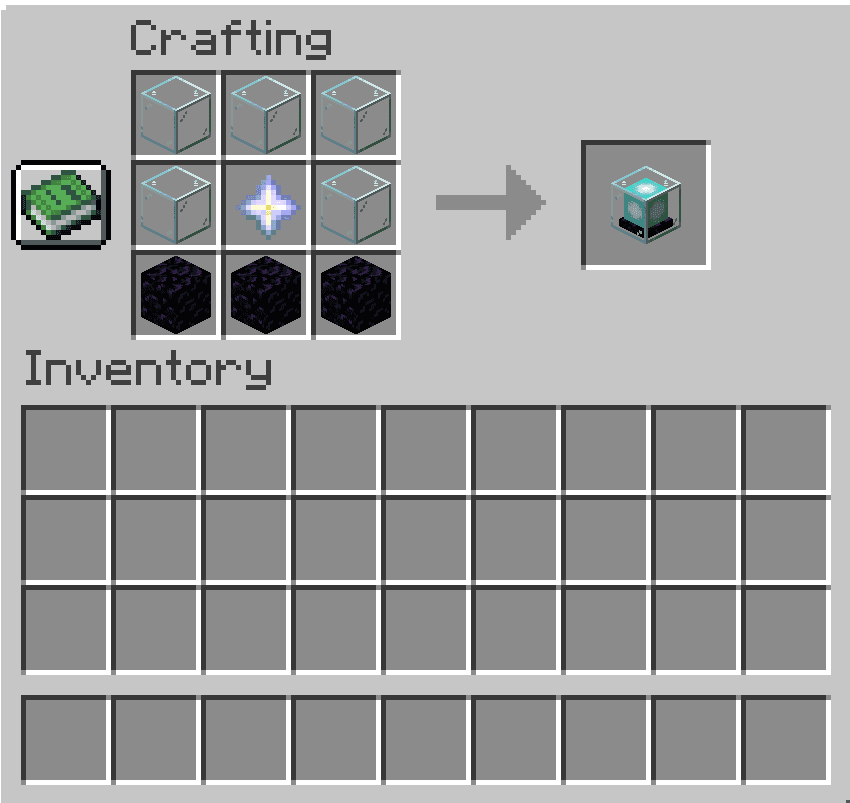
Crafting table window showing the beacon recipe — five Glass blocks, a Nether Star in the center, and three Obsidian blocks at the bottom, with a Beacon block in the result slot
Step 2. Building the Pyramid
By itself, the beacon doesn't work — it must be placed on top of a pyramid made of mineral blocks. Iron, gold, diamond, emerald, and netherite blocks are all suitable. The type of block only affects the appearance: it doesn't influence the strength or range of the effect, so you can mix different types of blocks freely. The cheapest option is iron.
The pyramid has from one to four levels. Each subsequent level is a wider square layer below the previous one, and the beacon always stands in the center of the top 3×3 layer.
Level | Base | Blocks per level | Total blocks | Effect radius |
1 | 3×3 | 9 | 9 | 20 blocks |
2 | 5×5 | 25 | 34 | 30 blocks |
3 | 7×7 | 49 | 83 | 40 blocks |
4 | 9×9 | 81 | 164 | 50 blocks |
For your first beacon, one level is enough — that's only 9 blocks. A full 164-block pyramid requires about 1476 ingots if built from iron, so players typically progress to the fourth level gradually. Netherite as a base material became available in version 1.16.
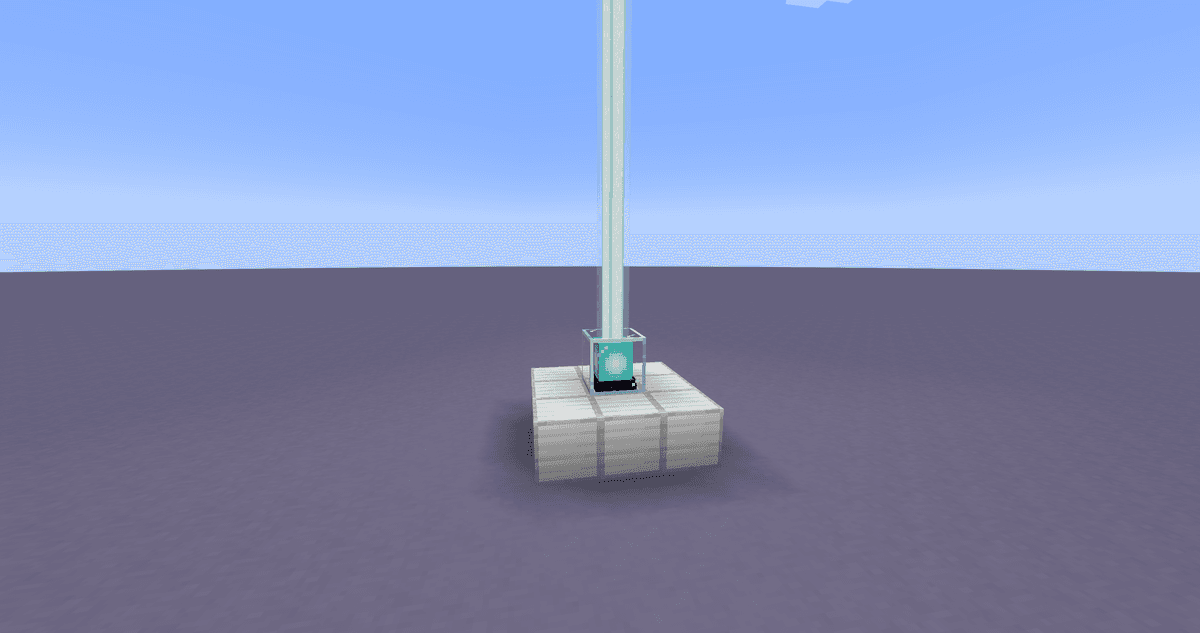
A first-level 3×3 pyramid made of iron blocks with a beacon in the center, shooting a beam into the sky
Step 3. Access to the Sky
A beacon only works when there is open sky above it. Any opaque block directly above the beacon blocks the beam and disables the effect. Transparent blocks — Glass, stained glass, water — let the beam through, so a beacon can be hidden underground, leaving a glass shaft above it reaching all the way to the sky.
An active beacon emits maximum light level (15) and is visible from afar, so the beam is often used as a landmark to find your base.
If the effect suddenly disappears, the cause is usually right here: a solid block was placed above it, for example, while finishing a ceiling or roof.
Step 4. Activation and Choosing an Effect
When the pyramid is complete and the sky above the beacon is clear, click on it to open the interface. Place one item in the empty slot — an iron, gold, or netherite ingot, a diamond, or an emerald (any of these will do), then choose an effect and click the green checkmark. The item is consumed, and the effect is activated.
You only pay once: after that, the beacon automatically renews the buff every few seconds as long as a player is within range, and consumes nothing else. A new ingot is only needed when you want to change the effect.
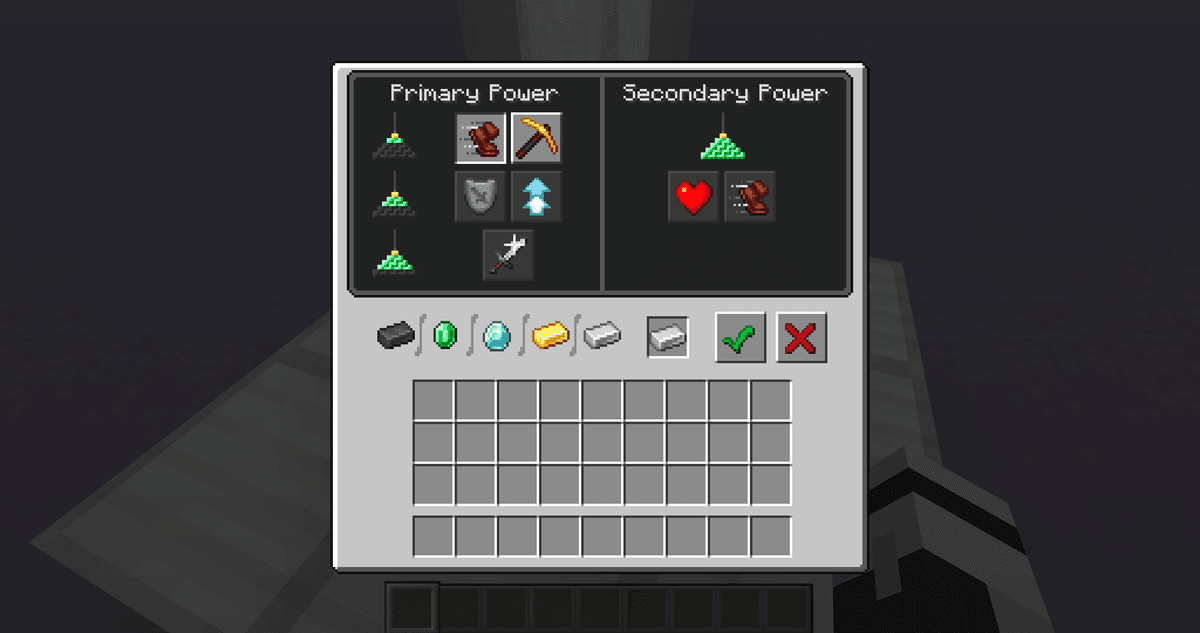
The beacon interface with an ingot in the slot, a selected effect, and the green confirmation button
What Effects the Beacon Provides
The set of available effects depends on the pyramid's height. Initially, one primary effect is chosen, and only a full pyramid unlocks the secondary slot.
Pyramid level | What becomes available |
1 | Speed, Haste |
2 | + Resistance, Jump Boost |
3 | + Strength |
4 | Secondary slot: Regeneration or upgrading the primary effect to level II |
At the fourth level, a secondary slot appears on the right side of the interface. There, you can either add Regeneration on top of the primary effect or upgrade the primary effect to level II — for example, Haste II for fast mining. Regeneration cannot be obtained from a beacon in any other way — only with a full pyramid.
Changing the Beam Color
The beam color is changed using stained glass. If you place a block or pane of stained glass above the beacon, the beam above that point will be tinted the corresponding color. Multiple layers of different glass mix together, so you can create intermediate shades from base colors. This does not affect the effect itself or its range — only its appearance.
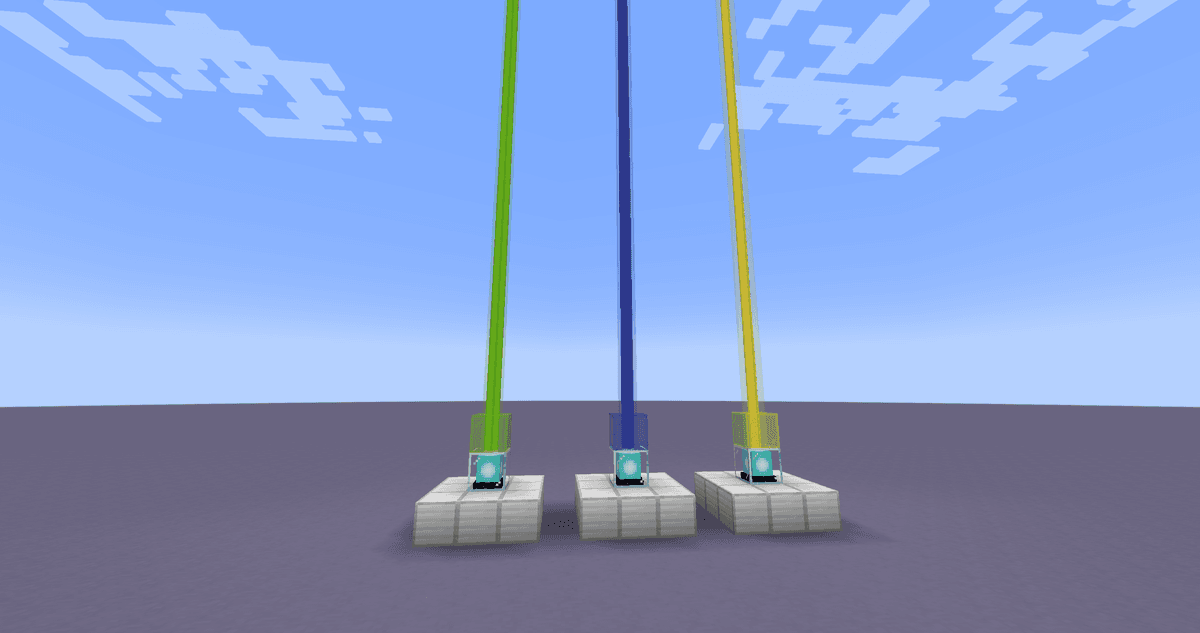
Several colored beacons in a row
How It Works: Technical Details
The effect range grows along with the pyramid: 20, 30, 40, and 50 blocks horizontally for levels one through four. The area of effect is a square column around the beacon that stretches both up and down, so the effect is received not only at the pyramid's level. The distance to the beacon does not affect the strength of the effect: the buff is the same at the base and at the edge of the radius.
The effect is renewed approximately every four seconds, so it is practically constant within the radius. As soon as a player steps out of bounds, the buff lasts for a few more seconds and then fades.
If part of the pyramid is dismantled, the beacon weakens or deactivates depending on which level became incomplete. After restoring the pyramid, the previously chosen effect returns automatically without needing to be paid for again. And if you expand a small pyramid into a larger one, the radius will increase automatically — but to upgrade the effect to level II, you will have to open the interface again.
Common Mistakes
Beacon not centered. The Beacon block must stand exactly in the middle of the top 3×3 layer, otherwise the pyramid won't count.
Block above the beacon. Anything opaque on top extinguishes the beam. Leave only open sky or transparent blocks above the beacon.
Wrong blocks in the pyramid. You need solid mineral blocks, not ores or individual ingots. Layers must be complete, with no holes.
Not enough resources for level 4. 164 blocks is over 1400 ingots. It's better to estimate what you'll build the base from in advance.
Summoning the Wither near your base. The explosion during its spawn and the fight will destroy everything nearby.
Conclusion
A beacon provides a constant buff within your base's radius and serves as a visible landmark thanks to its beam. Its main limitation is the cost: a Nether Star from a Wither and dozens to hundreds of mineral blocks make it a late-game goal, plus it requires open access to the sky. The beacon shines where a stable buff in one place is needed: Haste II in a mine, Resistance and Regeneration at a home base, or Speed for moving around a large structure.
Leave a comment
Links will be stripped
No comments yet. Be the first to share your thoughts.