Bountiful — a mod for village quest boards in Minecraft
Bountiful adds a quest system to Minecraft built around a single block — the Bounty Board. You walk up to the board, take a quest, complete…
Bountiful adds a quest system to Minecraft built around a single block — the Bounty Board. You walk up to the board, take a quest, complete it, and return for your reward. No complex interfaces, no character leveling: just a goal for each session and a concrete reward for…
Bountiful — a mod for village quest boards in Minecraft
Version the article is written for: 1.21.1
Loader: Fabric
Mod version: 8.0.0
Supported Minecraft versions: 1.17.1–1.21.1
Dependencies: Kambrik
Bountiful adds a quest system to Minecraft built around a single block — the Bounty Board. You walk up to the board, take a quest, complete it, and return for your reward. No complex interfaces, no character leveling: just a goal for each session and a concrete reward for completing it.
The Bounty Board
The Bounty Board is the mod's main block. You can find it in villages (if generation isn't disabled in the config) or craft one yourself.
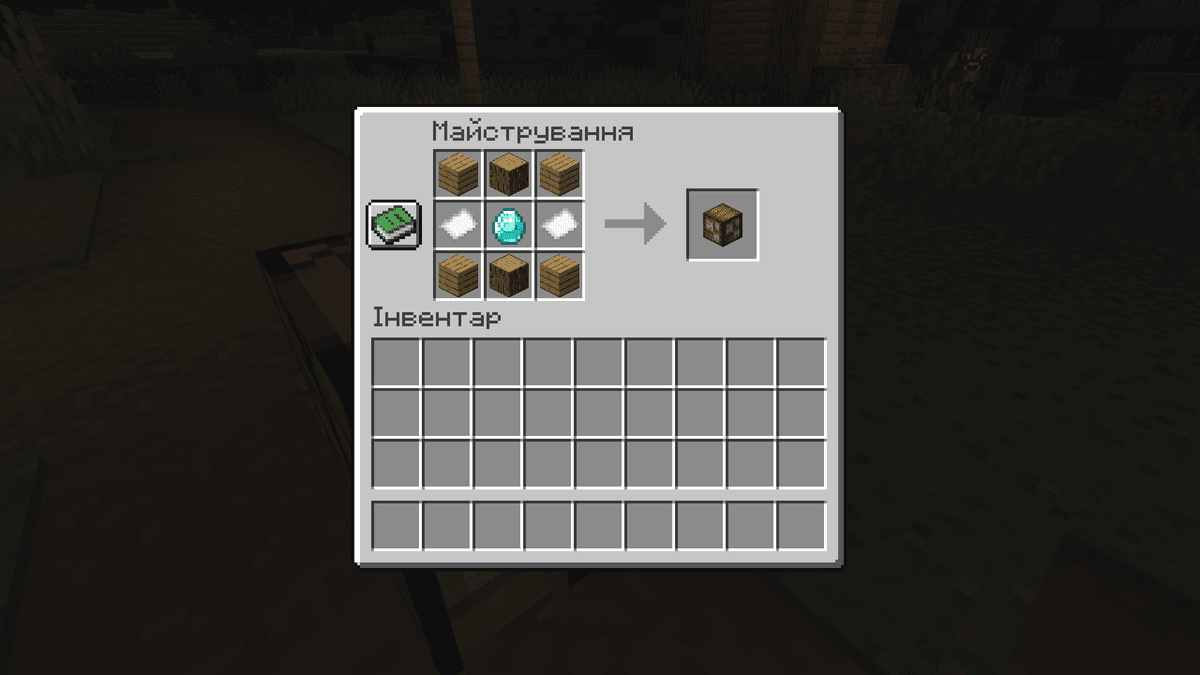
Crafting recipe for the quest board
The board's inventory opens with a right-click — it displays the current quests. Each quest is a separate note listing the objectives (what you need to gather, bring, or destroy) and a list of rewards. To complete a quest, take the note, fulfill the stated conditions, then return to the board and right-click again. After that the rewards appear in your inventory immediately.
Fresh quests appear over time — old ones are removed, new ones are generated. By default the refresh happens every 45 seconds.
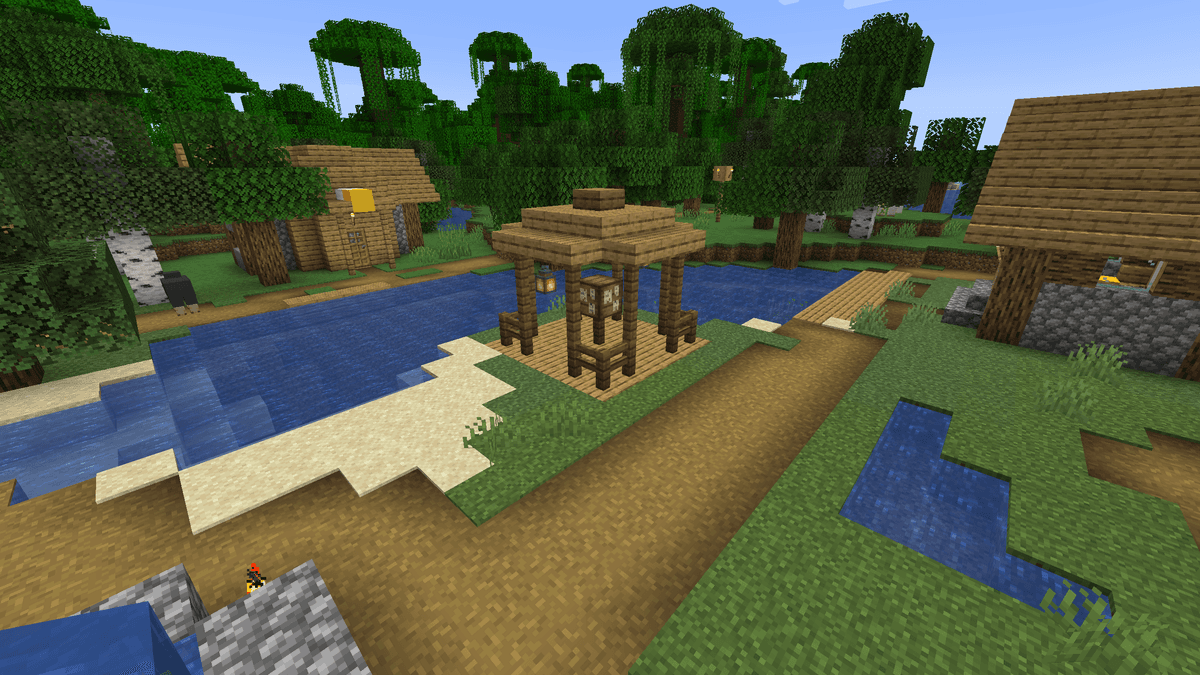
The bounty board in the center of a settlement
Quests
Each quest consists of two parts: the objectives (what you need to bring or kill) and the rewards (what you get after turning it in). The number of objectives and rewards depends on the settings and the quest's own rarity. By default a single quest has 1–2 rewards and just as many objectives.
The mod's value system is balanced: the total value of the rewards roughly matches the total value of the objectives. Every item in the quest pools has a numeric value unitWorth, and the generation algorithm picks objectives so that their total value approaches the value of the rewards. Exact balancing isn't always possible, so a small deviation in favor of the reward is considered normal.
Quest rarity
Bountiful uses the same rarity scale as vanilla Minecraft:
Common
Uncommon
Rare
Epic
The higher a quest's rarity, the greater the chance that items from a higher pool will appear among the rewards. At first the board's reputation is low and common quests dominate. Over time their quality grows.
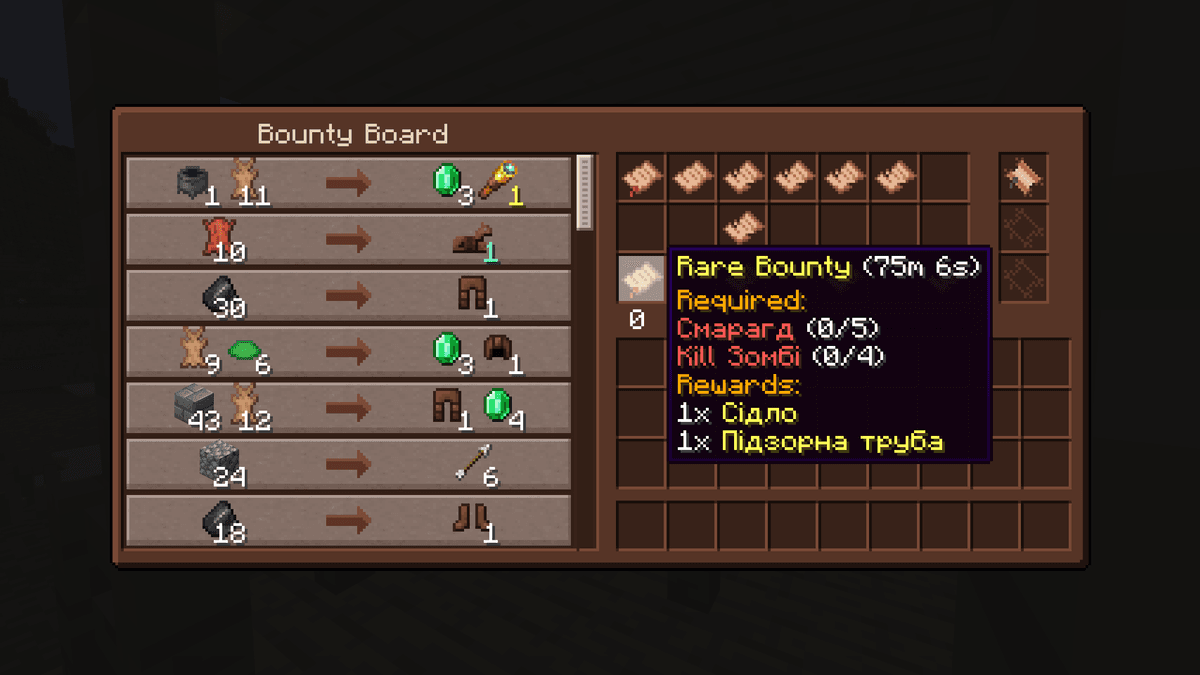
An open bounty board with quests of different rarities
Reputation
Each bounty board has its own reputation value. It rises every time someone turns in a quest at that specific board. Higher reputation gives two things:
More frequent rare rewards. Starting from reputation level 5, uncommon items appear twice as often.
A discount on quest objectives. The higher the reputation, the less you need to turn in for the same reward. With a 10% discount, for rewards worth 1000 you only need to bring objectives worth 900.
On servers, reputation is tied to a specific board, not to the player globally. If you keep turning in quests at one and the same board, that's where more favorable conditions will appear.
Decrees
A Decree is an item that defines the theme of the quests on a specific bounty board. For example, a Blacksmith's Decree fills the board with quests for leather, iron, and armor. A Farmer's Decree — wheat, melons, mushrooms, and other agricultural produce.
When a crafted decree is placed on a board, it assigns it a random theme. Decrees can also be found as a reward for completed quests.
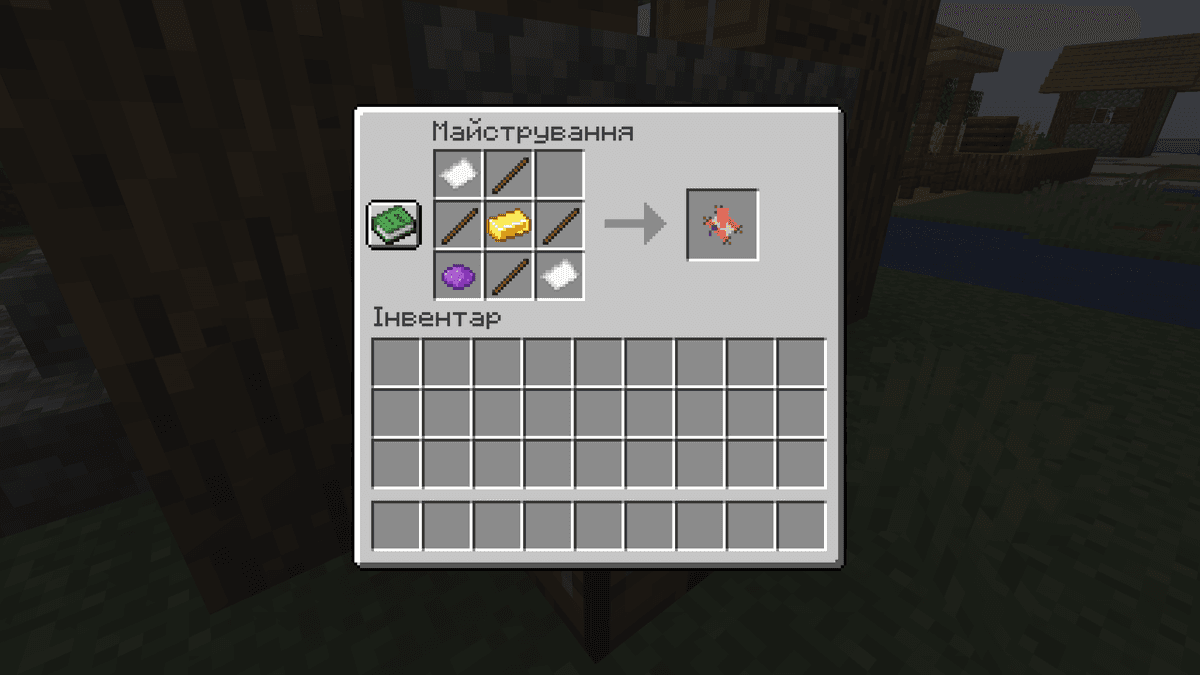
Crafting recipe for a decree
Up to three decrees can be placed on a single board at once. If you set up, say, a Blacksmith's Decree and a Farmer's Decree, the new quests may mix themes: bring wheat in exchange for an iron chestplate. This mixing is enabled by the bounty.allowDecreeMixing parameter and is active by default.
Configuration
The mod's config is located at config/bountiful.json. Below are all the parameters with explanations.
The board section
Parameter | Description |
| The interval for refreshing quests on the board (in seconds). A lower value means quests change more often. |
| How often bounty boards appear in generated villages. A value of 0 disables generation in villages. |
| true — the bounty board can be broken and picked up. false — the board cannot be removed by any tool (useful for servers where boards must stay fixed). |
The bounty section
Parameter | Description |
| A fixed number of seconds added to the time of each quest. 0 — no bonus. Increase this value if you want to give players more time to complete quests. |
| true — quests have a timer and disappear once time runs out. false — quests have no time limit and remain until a manual refresh. |
| The percentage by which the difficulty of filler quests is increased. 0 — difficulty is unchanged. A positive value raises the objective requirements relative to the reward's value. |
| true — if several decrees are placed on a board, objectives and rewards from different themes can mix within a single quest. false — each quest is generated strictly within a single decree. |
| false — the algorithm first picks the rewards, then selects objectives to match their value (default behavior). true — the logic is inverted: the objectives are determined first, then rewards are picked to match them. |
| The minimum number of initial quests that appear on a freshly placed board. |
| The maximum number of initial quests. |
| The minimum number of filler quests added when the board refreshes. |
| The maximum number of filler quests at refresh. |
| The name of the pool from which "currency" rewards for filler quests are drawn. null — the default pools are used. Relevant for custom builds with their own reward pools. |
The client section
Parameter | Description |
| true — after a quest is successfully turned in, a notification (toast) appears in the corner of the screen. false — no notification is shown. |
The dbg section
Parameter | Description |
| true — enables debug mode (prints extra information to the console). Useful only when developing custom pools. In normal play, leave it false. |
The general section
Parameter | Description |
| Paths to data files that the mod ignores when loading. By default the demonstration files are excluded. Supports the wildcard *. |
Conclusion
Bountiful gives the player a goal for every session without needing to come up with something to do on their own. The reputation system stretches interaction with the boards out over the long term — the more you turn in, the more favorable the conditions you get.
The mod is best suited for group survival on a server: shared board reputation, the ability for several players to take the same quest at once, and difficulty adjustable through the config make it convenient for a cooperative experience. It works for single-player too, but without the social component part of the mechanics — particularly shared reputation — doesn't fully unfold.
Installation
A typical installation takes about 5 minutes. The flow is the same; only the loader and the matching build differ.
- 1Install a mod loader (Forge, Fabric or NeoForge) that matches your Minecraft version.
- 2Download the mod file (.jar) built for that same version.
- 3Place the .jar into your .minecraft/mods folder.
- 4Launch Minecraft with the modded profile and check the mod loads in-game.
 Installing Mods in Minecraft: A Guide for Forge, FabricLearn how to install mods in Minecraft with this step-by-step guide for Forge and Fabric. Improve your game with new features, tools, and mechanics!Open the install guide