CICADA (CicadaLib) in Minecraft: What This Mod Is and How to Remove the "Please update Cicada" Cape
Dependencies: Loader: Fabric Minecraft version: 1.16 – 26.1+ Despite its name, the CICADA modification (also known as CicadaLib) does not…
Dependencies: Loader: Fabric Minecraft version: 1.16 – 26.1+ Despite its name, the CICADA modification (also known as CicadaLib) does not add insects or new nature sounds to your Minecraft world. It is a purely technica
Dependencies:
Loader: Fabric
Minecraft version: 1.16 – 26.1+
Despite its name, the CICADA modification (also known as CicadaLib) does not add insects or new nature sounds to your Minecraft world. It is a purely technical library (Library Mod) created by the developer enjarai to optimize and support their own content modifications (for example, the popular flight mod Do a Barrel Roll). This engine works entirely "under the hood" and contains no items for the average player, with the exception of one very specific and amusing "sanction" for those who forget to update their builds.
The "Please update Cicada" cape problem and how to solve it
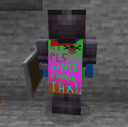
If you are playing survival and suddenly notice that, instead of your favorite elytra or vanilla cape, a strange pixelated texture with the huge inscription "PLEASE UPDATE CICADA" has appeared, you have fallen victim to a peculiar "punishment" from the developer. This topic has been widely discussed by players on Reddit and often causes panic among newcomers.
Why does this happen? Old versions of the library contained analytics code that periodically sent requests to the developer's server. Over time, the author changed the architecture of their servers, and this stream of requests from old clients began to act like an unintentional DDOS attack, creating a critical load. To force players to update and save their server, the developer implemented a radical solution: they forcibly replaced the cape and elytra textures for all players using outdated versions of the mod.
How do you remove this cape?
Update the mod (Recommended method): You need to download the new version of the CICADA library (0.13.1 or higher) and replace the old file in the mods folder with it. After restarting the game, the intrusive cape will instantly disappear.
Install a third-party fix: If you are playing a complex modpack where updating one core breaks compatibility with a dozen other add-ons, the community has created a micro-mod called CICADA Cape Fix (available on Modrinth). It forcibly strips the cape-changing function out of the code of old library versions, allowing you to keep playing without updating the base.
Analysis of developer tools (API)
For programmers in the Fabric ecosystem, this library is a useful set of utilities that significantly reduce the amount of boilerplate code. Here is exactly what the CicadaLib core does:
Configuration system (GSON Configs): Provides a ready-made template system for saving settings. The developer only needs to describe the variables in code, and the library automatically generates a .json file in the config folder and takes care of reading the parameters.
Compatibility management (Mixin Plugins): Contains an abstract toolkit (MixinPlugin) that allows the developer to dynamically manage mixin loading. This makes it possible to automatically disable certain conflicting sections of code if the game detects the presence of another global mod in the build.
Independent rendering (Rendering Utilities): Provides specialized utilities for working with the player's visual model (Player Rendering). This allows you to safely manipulate the camera and character animations even when the game world context is not yet available.
Inter-mod communication (Inter-mod Conversations): A special API that allows different mods to recognize each other during game loading and output pre-written dialog messages or jokes to the console (log file).
Conclusion
CICADA is a classic helper library created to make programmers' lives easier. For the player, it is just another mandatory file in the mods folder that guarantees the stable operation of cool mechanics in their favorite modifications. The main lesson the community takes away from using this library: always update technical mods on time, unless you want the developer to forcibly repaint your elytra.
Installation
A typical installation takes about 5 minutes. The flow is the same; only the loader and the matching build differ.
- 1Install a mod loader (Forge, Fabric or NeoForge) that matches your Minecraft version.
- 2Download the mod file (.jar) built for that same version.
- 3Place the .jar into your .minecraft/mods folder.
- 4Launch Minecraft with the modded profile and check the mod loads in-game.
 Installing Mods in Minecraft: A Guide for Forge, FabricLearn how to install mods in Minecraft with this step-by-step guide for Forge and Fabric. Improve your game with new features, tools, and mechanics!Open the install guide