Cloth Config API — a mod for settings screens in Minecraft
Cloth Config API is a library required by dozens of Minecraft mods so they can present their settings as an in-game menu instead of a text…
Cloth Config API is a library required by dozens of Minecraft mods so they can present their settings as an in-game menu instead of a text file. It adds nothing to the game on its own: no items, no blocks, no new mechanics. It is a dependency — without it, the mods that rely on…
Cloth Config API — a mod for settings screens in Minecraft
Minecraft version this overview is based on: 1.21.3
Range of supported versions: 1.14.x – 26.1.2
Mod version this article was written for: 17.0.144
Cloth Config API is a library required by dozens of Minecraft mods so they can present their settings as an in-game menu instead of a text file. It adds nothing to the game on its own: no items, no blocks, no new mechanics. It is a dependency — without it, the mods that rely on it won't launch and will report an error in the mod list.
When the mod is needed
The library isn't installed on its own, but together with other mods. There are two ways to tell whether it's needed for a particular modpack:
The mod's description on CurseForge lists Cloth Config API under Dependencies.
The game closes when launching the modpack, and the log (
logs/latest.log) mentions a missingcloth-configorcloth-config-2.
The internal name cloth-config-2 belongs to the very same mod — it's the identifier that appeared starting with the library's second major version. If someone says "you need cloth-config-2", they mean the modern version of Cloth Config API.
The library version must exactly match the game version. Cloth Config for 1.21.4 in a 1.21.5 modpack will either prevent the game from launching or simply ignore the mods that depend on it. This is a common case when a modpack throws the "mod requires cloth-config" error.
How to open a mod's settings
On Forge and NeoForge, the list of installed mods is built into the game's main menu — the Mods entry. Next to every mod that has Cloth Config hooked up, a settings icon appears. Clicking it opens a separate screen with all the options for that specific mod.
On Fabric there is no standard mod list in the loader, so access to the Cloth Config screens is provided through a third-party mod-viewing tool — it shows the list of installed mods and lets you click a button next to the entry you need.
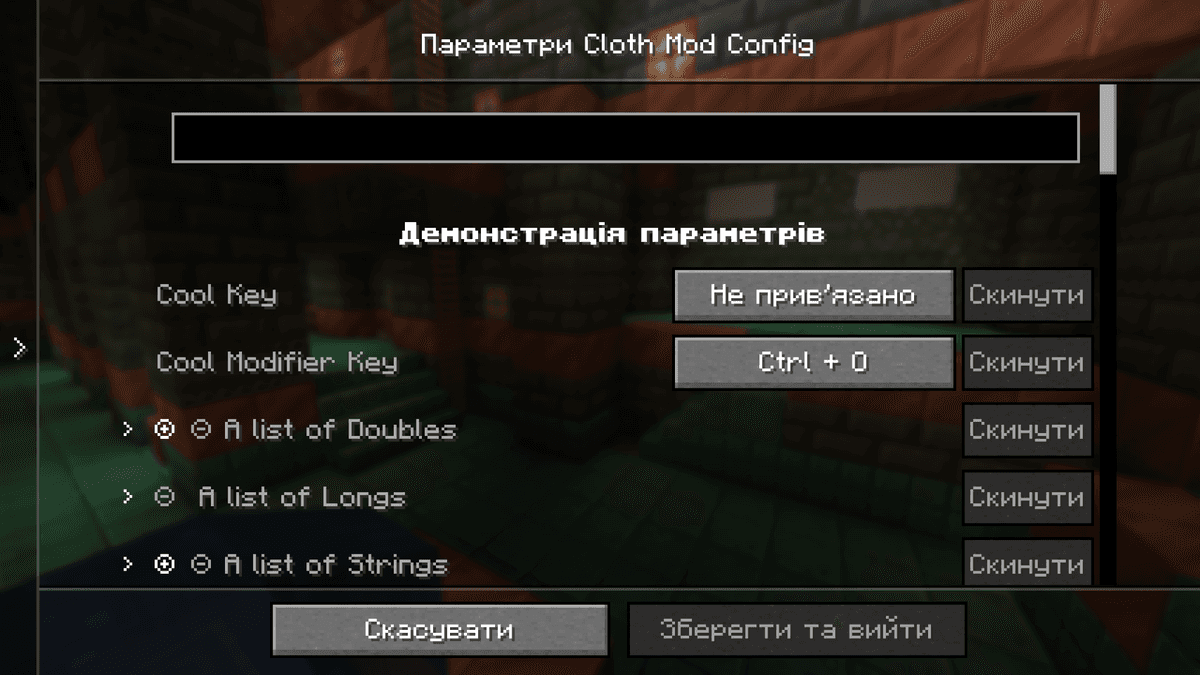
A mod's settings via Cloth Config
What the screen itself looks like
All of the mod's screens follow the same layout: categories of options on the left, the options themselves in the center, and Save and Cancel buttons at the bottom. Each option is shown with an interface element that matches the type of its value.
At the top of the screen, configs with dozens of options have a search field — it filters the list by name. Next to options for which the mod author provided a description, a tooltip with an explanation appears on hover.
If you enter a value outside the allowed range or in an invalid format, the field is highlighted and the save button stays disabled until the error is fixed. Next to every option there is a reset button — it returns the value to whatever the mod author marked as the default.
Conclusion
Cloth Config API is an infrastructure dependency: without it, some mods simply won't launch, but the mod itself gives you nothing visible in the game without other mods hooked up. Its role is to bring the settings of different Minecraft mods down to a common visual standard instead of a dozen mismatched interfaces. On Fabric and in multi-platform modpacks, Cloth Config API remains the most widespread shared standard.
Installation
A typical installation takes about 5 minutes. The flow is the same; only the loader and the matching build differ.
- 1Install a mod loader (Forge, Fabric or NeoForge) that matches your Minecraft version.
- 2Download the mod file (.jar) built for that same version.
- 3Place the .jar into your .minecraft/mods folder.
- 4Launch Minecraft with the modded profile and check the mod loads in-game.
 Installing Mods in Minecraft: A Guide for Forge, FabricLearn how to install mods in Minecraft with this step-by-step guide for Forge and Fabric. Improve your game with new features, tools, and mechanics!Open the install guide