Cobblemon Pokenav — a mod for finding Pokémon and predicting spawns in Minecraft
Cobblemon Pokenav is a side mod for Cobblemon that adds the PokéNav device to Minecraft, inspired by the pocket gadgets from Pokémon…
Cobblemon Pokenav is a side mod for Cobblemon that adds the PokéNav device to Minecraft, inspired by the pocket gadgets from Pokémon Ruby/Sapphire/Emerald and Omega Ruby/Alpha Sapphire. Base Cobblemon shows Pokémon spawn conditions only through server commands or external wiki…
Cobblemon Pokenav — a mod for finding Pokémon and predicting spawns in Minecraft
Minecraft version the article was tested and written on: 1.21.1
Supported Minecraft versions: 1.20.1, 1.21.1
Mod version: 2.3.3
Required dependency: Cobblemon, Fabric API (for Fabric builds)
Cobblemon Pokenav is a side mod for Cobblemon that adds the PokéNav device to Minecraft, inspired by the pocket gadgets from Pokémon Ruby/Sapphire/Emerald and Omega Ruby/Alpha Sapphire. Base Cobblemon shows Pokémon spawn conditions only through server commands or external wiki tables. Pokenav solves this problem inside the game: the player opens a single screen and sees which species can appear in the current location, with what probability, and under what conditions. In addition to the PokéNav itself, the mod adds a PokéFinder radar item, a specialized FishingNav for fishing, and a cosmetic Gholdengo PokéNav variant.
PokéNav: the location screen and the finder screen
PokéNav is the mod's main item. It has two display modes: the Location Screen and the Finder Screen.
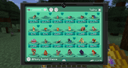
The Location Screen shows the full list of Pokémon that can spawn within a radius around the player. For each species it displays the spawn probability and the conditions — biome, time of day, height by Y coordinate, moon phase, weather, the type of block underfoot, whether there is open sky overhead, and the light level. The list updates in real time: if the player descends into a cave or enters a new biome, the screen adjusts instantly.
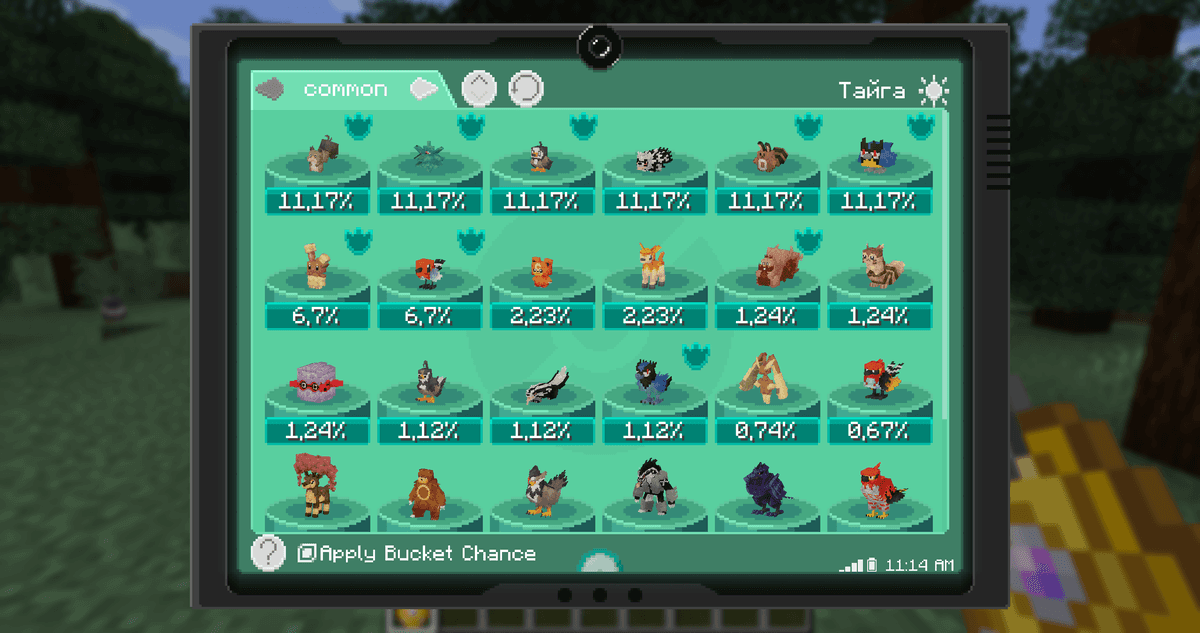
The open PokéNav screen with the list of Pokémon and spawn conditions;
The Finder Screen is the mode for actively searching for a specific target. On this screen you set criteria: Pokémon species, shininess, Hidden Ability, the number of perfect IV stats, and the presence of an egg move. The system scans the area around the player, looking for matching specimens. If a Pokémon is found, a three-dimensional arrow appears, pointing toward the target. It rotates along with the player's camera and changes its tilt, so you can orient yourself both horizontally and vertically.
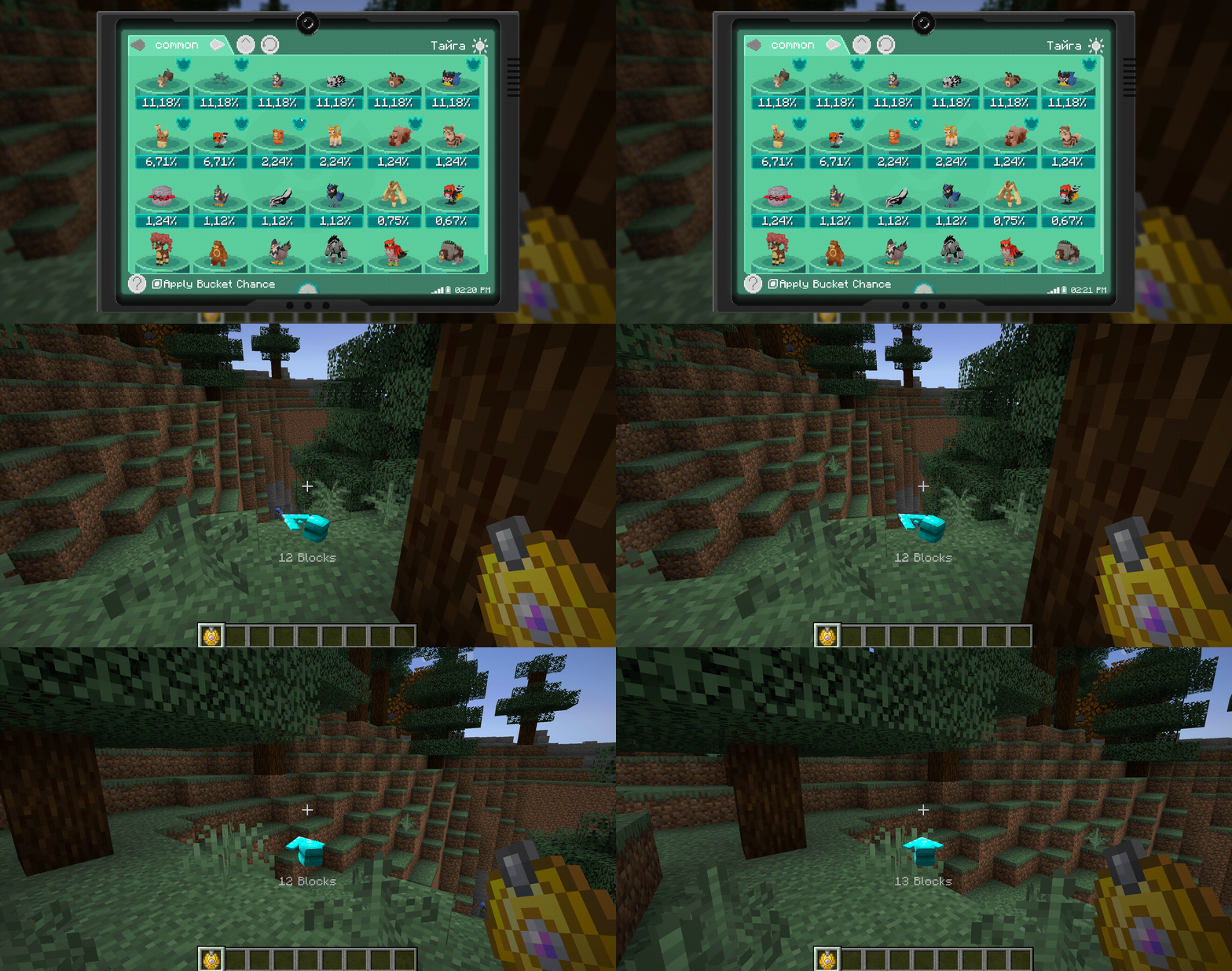
Tracking a Pokémon with the three-dimensional arrow; the player moves toward the target, and the arrow rotates and changes its tilt
PokéFinder: a radar instead of a minimap
PokéFinder is a separate radar item. It is intended for servers and players who, for one reason or another, do not use minimaps: because of server rules, aesthetic reasons, or the limitations of adventure maps. It works as an overlay: the radar is displayed on top of the in-game HUD and shows the dots of Pokémon within range.
The radar itself is configured through the client config — you can change the scale of the main screen and the overlay, the margins from the edges, and the display of name labels above the dots. Unlike a regular minimap, PokéFinder shows only Pokémon entities — no blocks, structures, or other mobs.
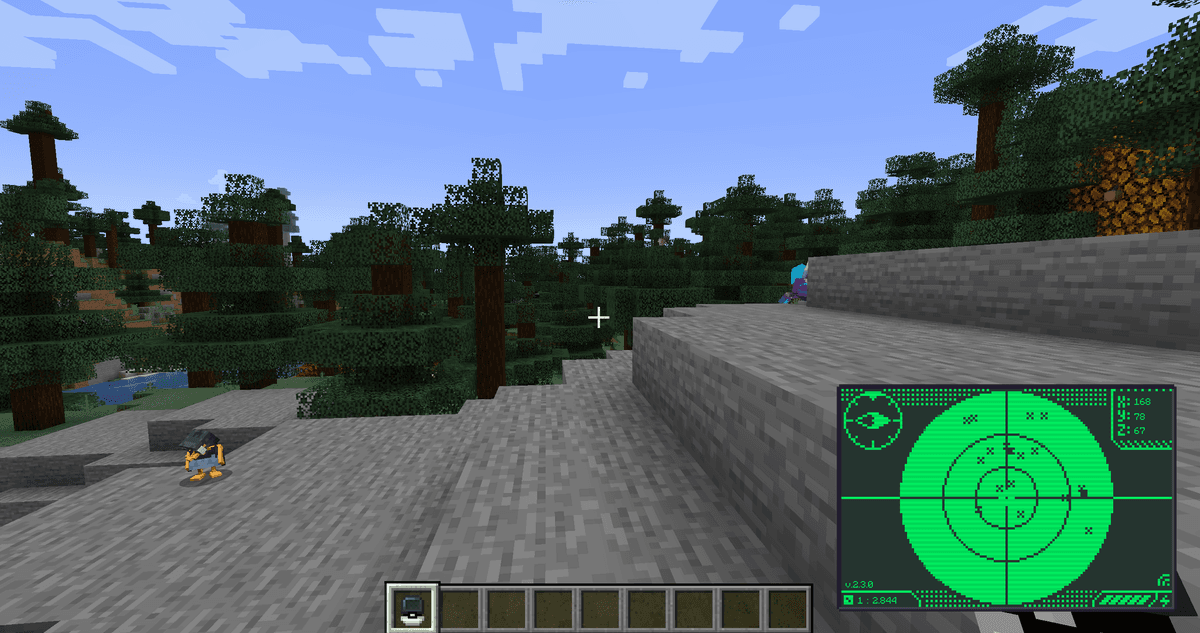
PokéFinder active in the bottom corner of the screen
FishingNav: a forecast for fishing
FishingNav is a specialized device for those who plan to catch aquatic Pokémon. The regular Location Screen does not show data about spawns through fishing — the mod separates this mechanic into a distinct item. FishingNav shows the list of Pokémon that can be caught in the current body of water, taking into account the type of water body, the type of rod, the lure level, and the bait.
The FishingNav interface is given a stylized look with decorative clouds in the background — the number and speed of the clouds are adjusted in the client config via maxCloudNumber and maxCloudVelocity.
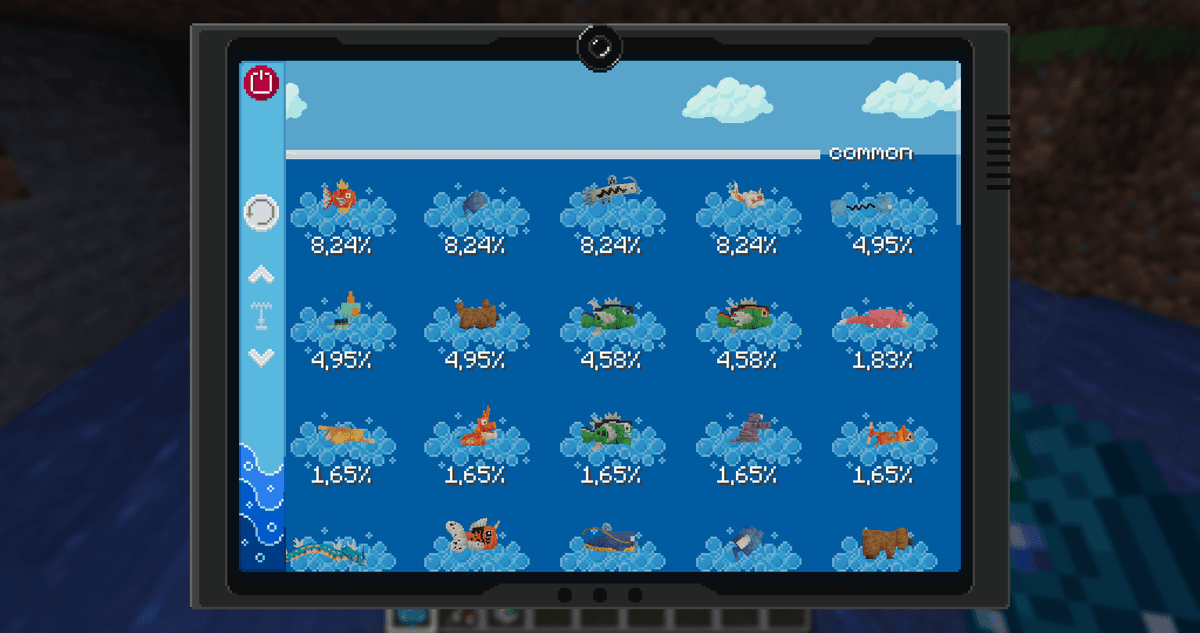
The FishingNav screen; you can see the interface with the list of fish and the clouds in the background
Gholdengo PokéNav: a combined version
Gholdengo PokéNav is a themed reskin of the main PokéNav, styled after the Pokémon of the same name. Functionally it does not differ from the base version: it shows the same location and finder screens. The only difference is the item's appearance and a separate crafting recipe.
Crafting
Each of the four devices is crafted at a crafting table with its own recipe. The exact crafting layouts for PokéNav, PokéFinder, FishingNav, and Gholdengo PokéNav are shown below.
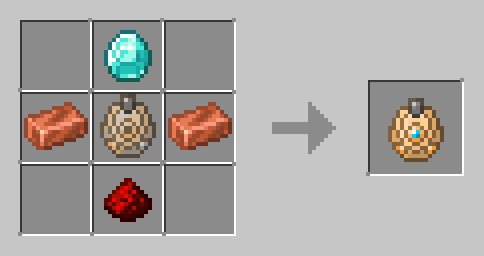
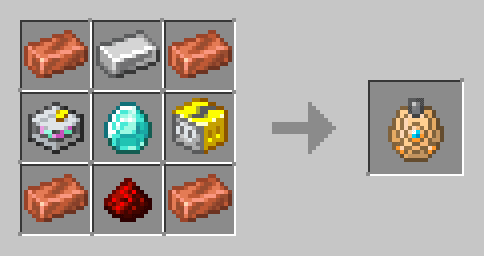
Crafting variations of PokéNav
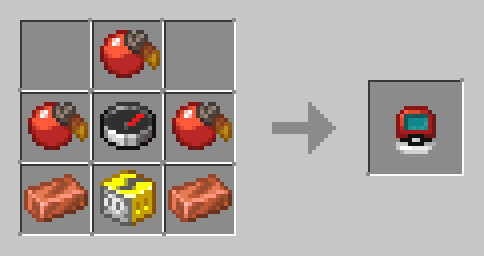
Crafting PokéFinder
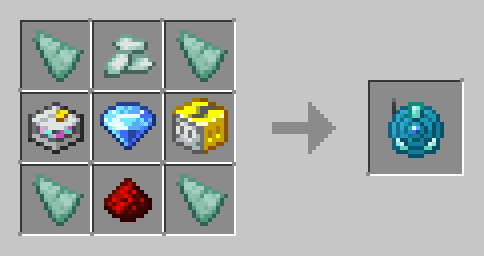
Crafting FishingNav
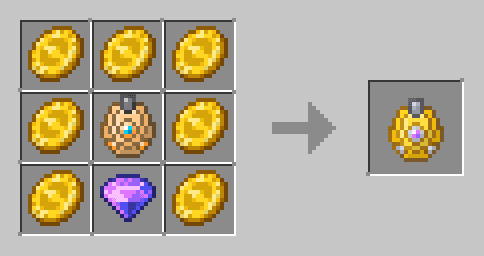
Crafting Gholdengo PokéNav
Config — the main parameters
Pokenav stores its settings in two files: the server server-config.json and the client client-config.json. Below are the parameters that actually affect the gameplay experience.
Server config (server-config.json)
Parameter | What it does |
| If true — Pokémon not yet registered in the player's Pokédex do not appear in the Location Screen. |
| When true, hides the spawn conditions for unidentified species — only silhouettes are shown without details. |
| When true, blocks with the natural tag are not shown in the tooltips — this shortens the huge block lists and keeps the screen uncluttered. |
| Passes Pokémon labels from the server to the client. Without this parameter, the label filters in PokéFinder do not work on a dedicated server. |
| Synchronizes EV yield data from Pokémon — needed to display EV values in the tooltips. |
| The horizontal radius, in blocks, in which PokéNav searches for spawns through the Finder Screen. |
| The vertical search radius. Increasing both values yields more targets but loads the processor. |
| A threshold from 0.0 to 1.0: what percentage of a herd must be encountered for the whole group to be considered "known". |
| Weights for the Finder Screen — how to rate the "best" Pokémon. The higher the weight, the higher the Pokémon ranks in the list of results. |
| The list of condition types that are taken into account when building the tooltips (biomes, moon phase, height, coordinates, light level, weather, time, structures, water type, rod type, lure level, and so on). |
Client config (client-config.json)
Parameter | What it does |
| The overall scale multiplier for the PokéNav interface. Increasing it helps on 4K screens. |
| Enables the background blur effect when a screen is open. If artifacts appear in the interface from a conflict with other mods, it is worth disabling. |
| Outputs errors about broken animation models to the chat. When false, errors are silently ignored. |
| The scale of the main PokéFinder screen when opened. |
| The scale of the radar's HUD overlay while moving through the world. |
| The radar's offset from the left or right edge of the screen, in pixels. |
| The radar's offset from the top or bottom edge. |
| When true, names are shown above the Pokémon dots on the radar. With a large number of targets, this can clutter the screen. |
| The vertical offset of the three-dimensional marker arrow from the bottom of the screen, in pixels. |
| The maximum number of decorative clouds on the FishingNav screen. |
| The maximum movement speed of the clouds. Lower it if the animation is distracting. |
| A subtle shaking animation of the item icons in the list. Can be disabled for a static list. |
| Allows several 3D Pokémon models to be shown in the list at the same time. |
Conclusion
Cobblemon Pokenav closes one specific and tangible problem of base Cobblemon — the complete obscurity of the spawn mechanics. Instead of the command line or an external wiki to answer the question "where to find Charmander in this biome", the player opens PokéNav and gets the data in a second, along with all the conditions. Unlike minimap mods, PokéFinder shows only Pokémon and gives no advantage in navigating the terrain. It suits players who are seriously into collecting in Cobblemon, as well as the administration of large Pokémon servers.
Installation
A typical installation takes about 5 minutes. The flow is the same; only the loader and the matching build differ.
- 1Install a mod loader (Forge, Fabric or NeoForge) that matches your Minecraft version.
- 2Download the mod file (.jar) built for that same version.
- 3Place the .jar into your .minecraft/mods folder.
- 4Launch Minecraft with the modded profile and check the mod loads in-game.
 Installing Mods in Minecraft: A Guide for Forge, FabricLearn how to install mods in Minecraft with this step-by-step guide for Forge and Fabric. Improve your game with new features, tools, and mechanics!Open the install guide