

Embeddium — Minecraft Java Edition 1.21.1
Review of the Embeddium mod for Minecraft Java Edition — Sodium for NeoForge and Forge with FPS improvements, a rewritten chunk renderer…
Review of the Embeddium mod for Minecraft Java Edition — Sodium for NeoForge and Forge with FPS improvements, a rewritten chunk renderer, and better mod comp...
Dependencies:
Loader: NeoForge (1.20.1+), Forge (1.20.1 and older), Fabric (1.20.1–1.20.6)
Minecraft version: 1.16.5, 1.18.2, 1.19.2, 1.20.1–1.20.6, 1.21–1.21.1, 1.21.4
Mod version: supported at the time of review — 1.0.x for 1.21.4
Embeddium is a fork of the Sodium 0.5.8 renderer (the last version under a FOSS license) by developers FiniteReality and embeddedt. The mod rewrites the chunk rendering system and the immediate-mode rendering pipeline for block entities, mobs, and GUI. However, unlike the original Sodium, it intentionally supports NeoForge and focuses on compatibility with other mods. On versions below 1.20.1, Embeddium has effectively replaced the previous Rubidium fork, which has ceased development.
What the Mod Changes in Rendering
Embeddium offloads GPU command uploads from the main game thread to a pool of background threads. Vanilla Minecraft rebuilds every chunk mesh on any block change, even when the camera is looking the other way — Embeddium culls invisible chunks during the build stage, groups adjacent faces of the same type, and batches them into a single GPU draw call.
Specific changes compared to vanilla:
Rewritten
ChunkRendererwith its own indexed buffer system — instead of 6 calls per chunk, it uses 1.Optimized immediate-mode pipeline for mobs and block entities (chests, furnaces, banners) — on scenes with 100+ entities, this eliminates most micro-stutters.
Internal translucency sorting system — optional, enabled in
Video Settings → Performance.Integrated support for the Fabric Rendering API on Forge/NeoForge platforms — the Indium mod is no longer needed and will not launch on top of Embeddium.
⚠️ Embeddium does not support OptiFine. If you have OptiFine installed, Embeddium must be removed — both mods modify the renderer at a low level and conflict during client initialization.
FPS Boost in Various Scenarios
Numbers depend on the configuration, below are approximate ranges on a typical mid-range build (RTX 3060, Ryzen 5 5600, 16 GB RAM, render distance 16).
Scenario | Vanilla | Embeddium | Boost |
|---|---|---|---|
Open biome, no entities | 90–110 FPS | 180–240 FPS | ~2× |
Village with villagers (40+ NPCs) | 45–60 FPS | 90–120 FPS | ~2× |
Mob farm (200+ entities) | 20–35 FPS | 60–90 FPS | ~2.5× |
Modpack with 200+ mods | 30–45 FPS | 70–100 FPS | ~2× |
4K resolution, ultra graphics | 40–55 FPS | 80–110 FPS | ~2× |
On weaker laptops with integrated graphics, the boost is more noticeable — the bottleneck there is precisely the CPU overhead for chunk mesh building, not the GPU.
Settings
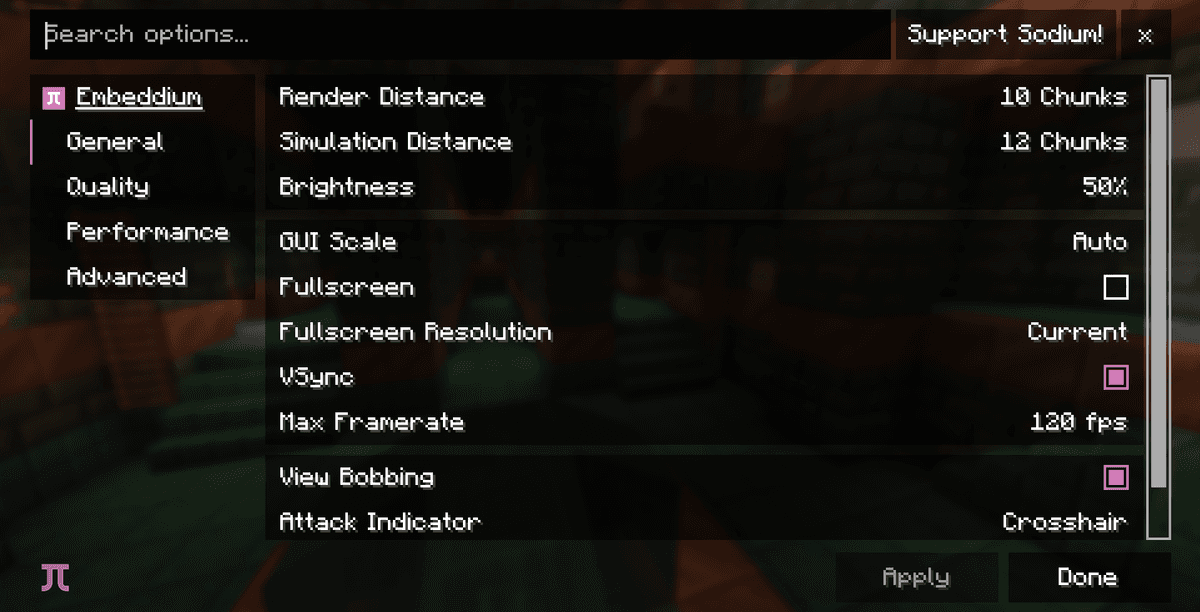
The Embeddium menu is accessed from Options → Video Settings. It replaces the vanilla screen with a custom one featuring Quality, Performance, and Mods tabs.
Quality Tab
Parameter | Value | What It Changes |
|---|---|---|
| Fast / Fancy | Global toggle for rendering leaves, water, clouds. |
| Off / Fast / Fancy | 2D or volumetric clouds. |
| Default / Fancy / Fast | Precipitation detail level. |
| Fast / Fancy | Transparency and inside rendering of leaves. |
| All / Decreased / Minimal | Number of concurrent particles. |
| None / Smooth / Maximum | Smooth lighting calculation. |
| 0×0 – 21×21 | Blending radius for biome grass and foliage colors. |
Performance Tab
Parameter | Value | What It Changes |
|---|---|---|
| 1 – 16 | Number of chunks rebuilt per frame. |
| On / Off | Accurate sorting of transparent faces by distance (on 1.20+). |
| On / Off | Speeds up OpenGL calls by disabling checks. |
| On / Off | Direct access to GPU buffers (requires OpenGL 4.4+). |
| On / Off | Allows the mod to bypass the Java heap when copying meshes. |
Mods Tab
A separate section for conflicts and custom APIs. It lists mods that interface with the Embeddium API directly (e.g., Oculus for shaders, Reese's Sodium Options for enhanced settings UI).
Disable the Use Persistent Mapping parameter if you have an AMD graphics card with a Mesa driver older than 23.x — enabling it on these drivers can result in black textures in the inventory or a complete client crash.
Compatibility with Other Mods
Embeddium was made specifically for complex modpacks, so it has several mandatory and recommended companions.
Mod | Purpose | Platform Version |
|---|---|---|
Oculus | Iris shaders support on top of Embeddium | Forge, NeoForge |
Embeddium++ | Advanced rendering settings (Sodium Extra equivalent) | Forge, NeoForge |
Reese's Sodium Options | Rebuilt settings menu with clear structure | All platforms |
Embeddium API | Extended integration points for mods | Included with the main JAR |
Conflicts:
OptiFine — complete incompatibility, will not launch together.
Sodium on the same Forge/NeoForge versions — unneeded and conflicts (Embeddium is a Sodium fork).
Rubidium — outdated, completely replaced by Embeddium.
Indium — will not launch on top of Embeddium because the Fabric Rendering API is integrated natively.
Why Embeddium instead of Sodium?
Sodium officially supports only Fabric (and since version 0.6 — partially NeoForge via CaffeineMC). Embeddium maintains a parallel fork based on the last version under the LGPL license and focuses on two things: supporting Forge/NeoForge for modpackers and ensuring compatibility with mods that hook into the renderer via non-standard APIs.
The CaffeineMC team does not officially support Embeddium — fork-related issues should be opened in FiniteReality's GitHub repository, not the Sodium bug tracker.
Conclusion
Embeddium solves one specific problem — FPS boosting on Forge and NeoForge in modpacks where the vanilla renderer is bottlenecked by the CPU. On 1.20.1 and below, it is virtually the only living Sodium fork for these loaders, as Rubidium has ceased development and official Sodium does not target them.
The main limitation is its client-side nature and incompatibility with OptiFine. If you need CIT, CEM, custom skies, or zoom — Embeddium doesn't provide them; you'll need separate mods (Continuity for CTM, ETF/EMF for custom mobs, Zoomify for zoom).
It is suitable for you if you play heavy modpacks on NeoForge 1.21.x, Forge 1.20.1, or older versions with complex farms and villages. If your setup is pure Fabric without needing the Fabric Rendering API on Forge, the simpler option is to install the original Sodium from CaffeineMC.
Installation
A typical installation takes about 5 minutes. The flow is the same; only the loader and the matching build differ.
- 1Install a mod loader (Forge, Fabric or NeoForge) that matches your Minecraft version.
- 2Download the mod file (.jar) built for that same version.
- 3Place the .jar into your .minecraft/mods folder.
- 4Launch Minecraft with the modded profile and check the mod loads in-game.
 Installing Mods in Minecraft: A Guide for Forge, FabricLearn how to install mods in Minecraft with this step-by-step guide for Forge and Fabric. Improve your game with new features, tools, and mechanics!Open the install guide










