

Iris Shaders — a mod for running shaders in Minecraft
Iris Shaders adds external shader packs to Minecraft with soft shadows, volumetric lighting, and water reflections, built on Sodium for…
Iris Shaders adds external shader packs to Minecraft with soft shadows, volumetric lighting, and water reflections, built on Sodium for performance and OptiFine-format compatibility.
Iris Shaders — a mod for running shaders in Minecraft
Minecraft version on which the article was tested and written: 1.21.10
Supported version range: 1.16.5 – 26.2
Dependencies: Sodium
Iris Shaders is a mod that connects external shader packs to Minecraft and replaces the standard game rendering with the graphics of the selected pack: soft shadows, volumetric lighting, reflections on water, volumetric clouds. The vanilla game does not provide this — its light and shadows are fixed. The mod loads packs in OptiFine format, as well as packs with extensions for Iris itself, and works as an open-source alternative to OptiFine with a focus on high frame rates.
How the mod works
Iris integrates into the game's graphics pipeline and transfers image calculation to the active shader pack. It is the pack that determines how light, shadows, water, and sky are calculated, so a single scene looks different with different packs. The mod doesn't draw anything "on its own" — it only runs and manages the pack.
The main feature is backward compatibility. Packs made for OptiFine or the old ShadersMod can be run without modification: the format is the same, no file conversion is needed. A separate direction is extensions for pack authors: Iris adds capabilities to the pipeline that are missing in OptiFine, which is why some modern packs are released in "Iris-specific" versions with effects unavailable elsewhere.
Performance and combination with Sodium
Iris is built on top of Sodium, a mod that rewrites chunk rendering and eliminates micro-stutters. Because of this, shaders remain playable for normal gameplay, not just for occasional screenshots. OptiFine is incompatible with Sodium, so the Iris + Sodium combo is a way to have both shaders and optimization at the same time. Sodium is bundled with Iris, so there are no extra steps to install the optimizer.
FPS depends on the pack and graphics card: heavy ray-tracing packs drop frames even on a powerful GPU. Lightweight (lite) pack profiles or a lower maxShadowRenderDistance value can restore performance.
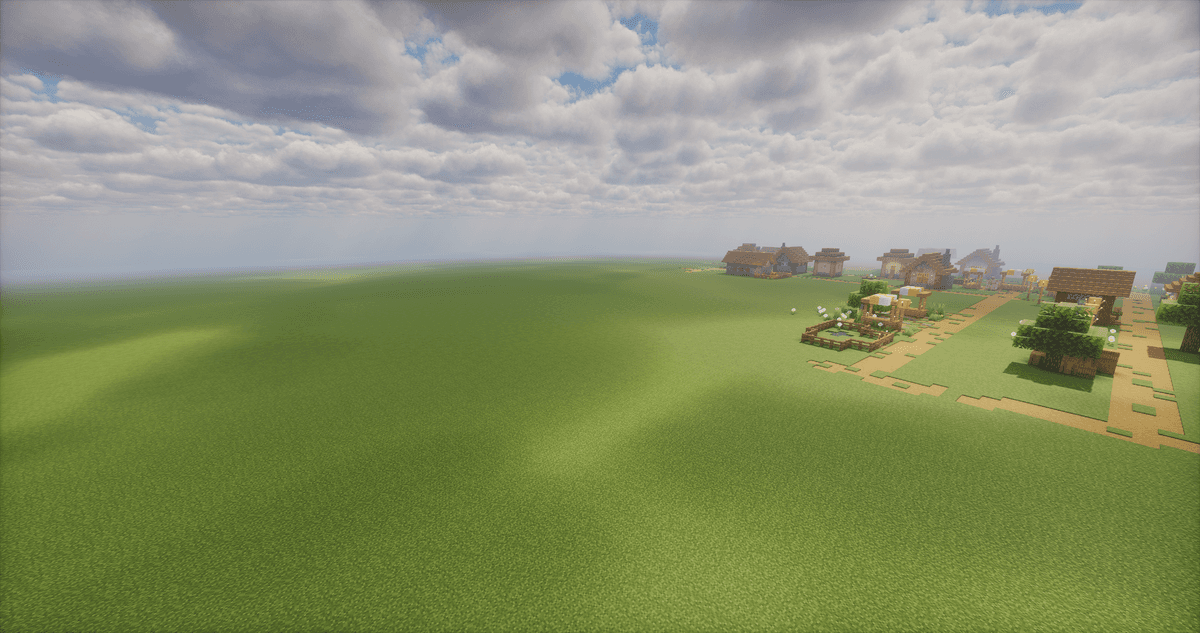
A field with shaders enabled
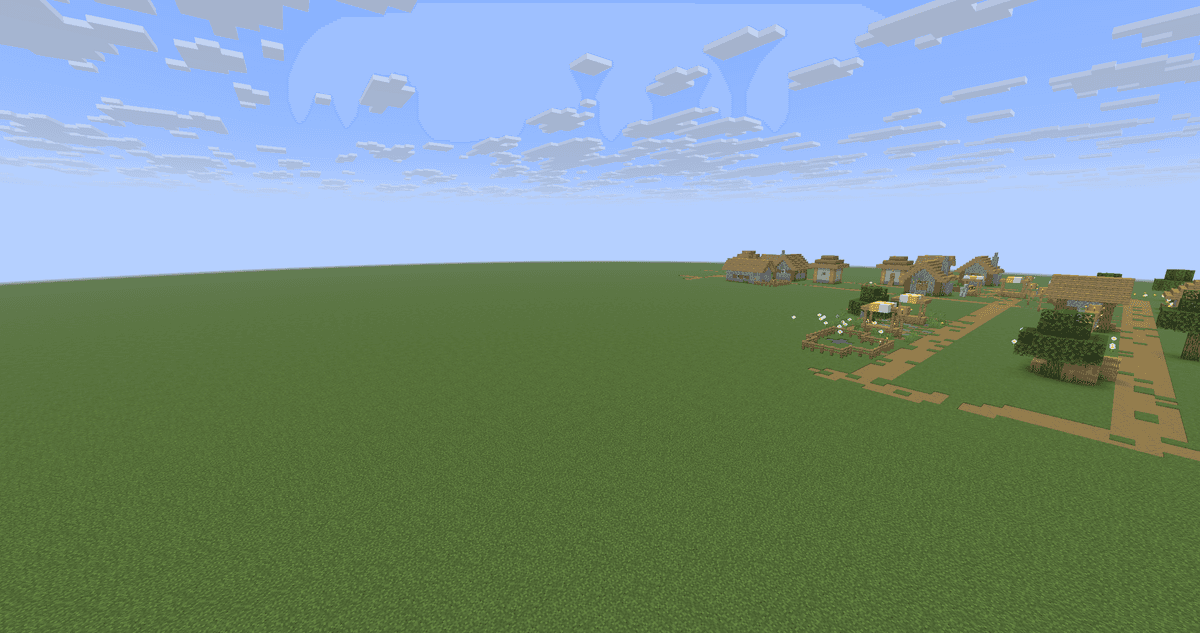
The same field with shaders disabled
Connecting and configuring shaders
Controls are integrated into the video settings. Sodium replaces the standard Video Settings menu with its own — featuring General, Quality, Performance, and Advanced tabs; the shader packs themselves are located in a separate tab.
How to add a pack
Path: Options → Video Settings → Shader Packs. A pack archive is added by dragging and dropping it directly into the menu window or via the "Open Shader Pack Folder…" button, which opens the shaderpacks folder. After adding it, click the refresh list button in the upper right corner. To enable effects, click on the "Shaders: Disabled" row, select the pack from the list, and apply it with the Apply button. The active pack is highlighted in the list.
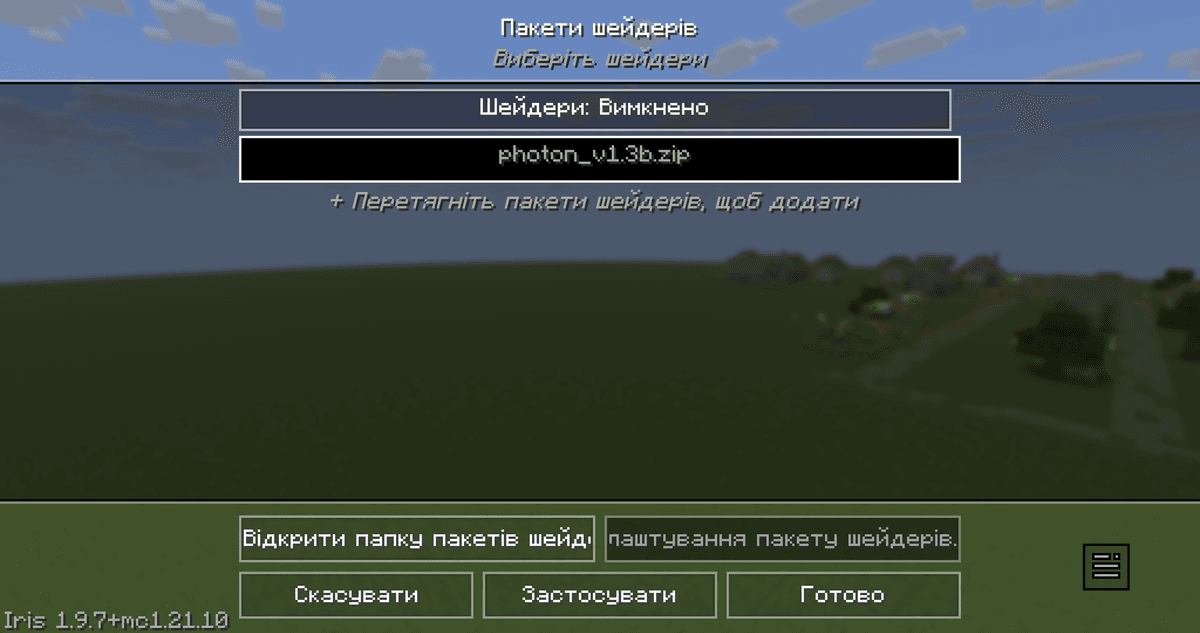
The Shader Packs menu in video settings with the list of added packs and the apply button
Configuring the active pack
The "Shader Pack Settings…" button opens the parameters specified by the pack itself — the exact same set of options as when loading this pack in OptiFine. Next to it are three actions: importing settings from a .txt file, exporting current settings to a .txt for sharing, and resetting to default (by holding Shift). This is convenient when you need to transfer someone else's pack configuration found online.
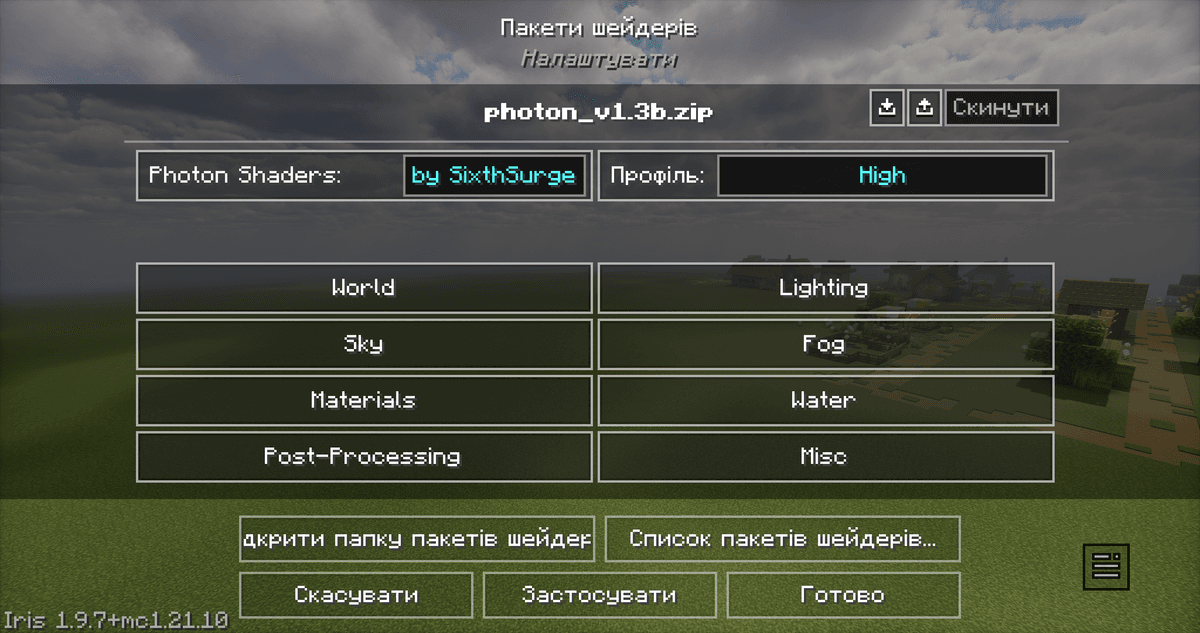
The Shader Pack Settings window with the active pack's parameters
Hotkeys
Three keybinds allow managing effects without opening the menu:
Key | Action |
K | toggles shaders on or off |
R | reloads the active pack |
O | opens the shader menu with a transparent background to see parameter changes in real time |
All three keys can be rebound in the Controls menu.
Color space
Iris outputs the image not only in standard sRGB. The colorSpace parameter allows choosing a wider gamut — DCI-P3, Display P3, REC2020, or Adobe RGB. For packs without their own color management, the mod applies tonemapping in the selected space over the finished frame, which eliminates oversaturation on wide-gamut displays (for example, on laptop screens with factory Display P3). HDR output is not enabled by this — only the target display space is changed.
Config (iris.properties)
The iris.properties file stores the basic mod settings: which pack is active, whether shaders are enabled, and in what color space the image is output. It is located in the config folder. Most values are set automatically through the menu, but the file can also be edited manually.
Parameter | What it does |
| Controls the loading of unrecognized packs. |
| Target color space for output. |
|
|
|
|
|
|
| The maximum shadow calculation distance in chunks. Limits the shadow distance regardless of pack settings. Higher value — shadows are visible further away, but more expensive per frame; lower — vice versa, for the sake of FPS. |
| The file name of the active pack. Empty field — no pack is selected. Populated automatically when a pack is enabled via the menu. |
Conclusion
Iris Shaders solves a specific task: running external shader packs on newer versions of the game without losing the performance provided by Sodium. Unlike OptiFine, the mod is open-source, compatible with Sodium, and does not conflict with most Fabric and NeoForge mods, but it doesn't duplicate the rest of OptiFine's features — connected textures, animations, or fog control have to be added separately. There is no Forge support, some packs do not yet run fully, and artifacts are possible on macOS. The combination is suitable for those who play with mods on Fabric or NeoForge and want shaders with acceptable FPS.
Installation
A typical installation takes about 5 minutes. The flow is the same; only the loader and the matching build differ.
- 1Install a mod loader (Forge, Fabric or NeoForge) that matches your Minecraft version.
- 2Download the mod file (.jar) built for that same version.
- 3Place the .jar into your .minecraft/mods folder.
- 4Launch Minecraft with the modded profile and check the mod loads in-game.
 Installing Mods in Minecraft: A Guide for Forge, FabricLearn how to install mods in Minecraft with this step-by-step guide for Forge and Fabric. Improve your game with new features, tools, and mechanics!Open the install guide










