Item Highlighter — a mod for highlighting drops in Minecraft
Item Highlighter adds an animated star to every item that has just been picked up. In Minecraft, after gathering resources — especially…
Item Highlighter adds an animated star to every item that has just been picked up. In Minecraft, after gathering resources — especially during mass farming or dungeon clearing — new items scatter across slots without any visual marker. The mod tags every new item, which…
Item Highlighter — a mod for highlighting drops in Minecraft
Minecraft version: 1.21.4
Loader: Fabric
Mod version: 1.1.11
Dependencies: Iceberg
Item Highlighter adds an animated star to every item that has just been picked up. In Minecraft, after gathering resources — especially during mass farming or dungeon clearing — new items scatter across slots without any visual marker. The mod tags every new item, which instantly draws your attention when you open the inventory.
How the highlighting works
The mod's mechanic is simple: as soon as an item enters the inventory, an animated golden marker appears on the corresponding slot. The star stays on the item until the player hovers the cursor over a new item or closes the inventory.
The highlighting works both on the hotbar and in the inventory window. The animation sways, so even with full slots, new items are noticeable at a glance. The mod tracks the exact moment loot is picked up, not interaction with it — so items that were already there before the mod was installed do not receive markers.
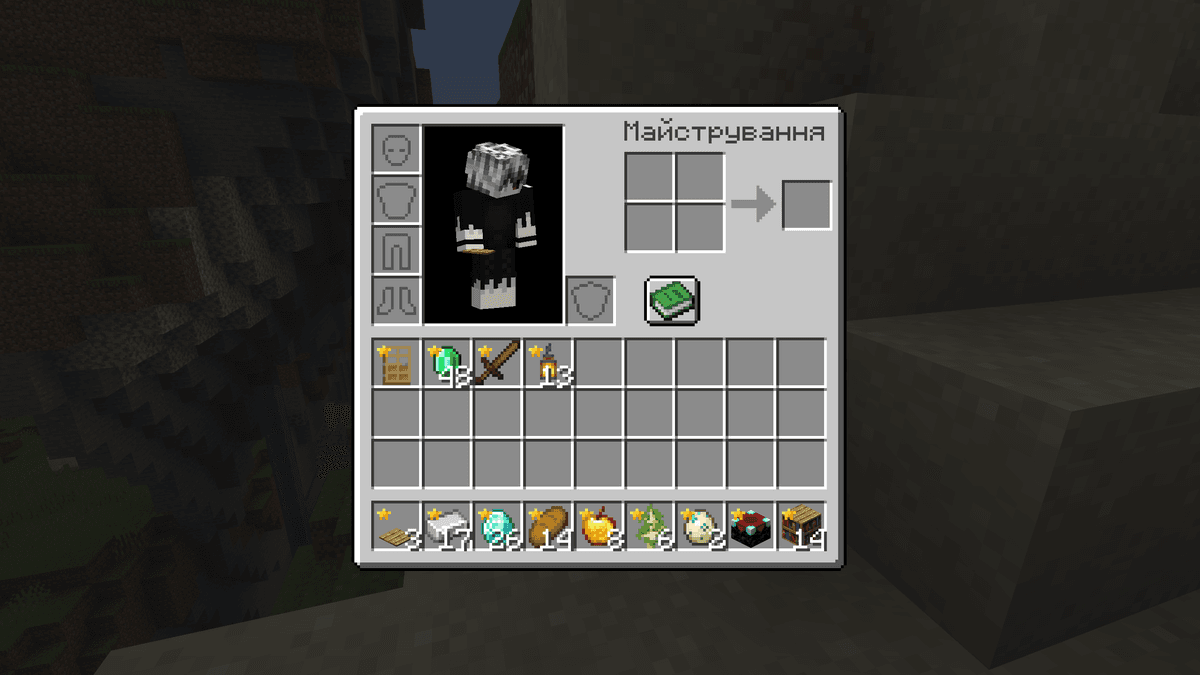
A player's inventory with just-picked-up items marked by a star
Configuration
The mod's configuration is stored in the highlighter.toml file in the config directory. All parameters are in the [client.options] section.
Removing markers
The mod offers three ways to remove a marker from an item:
Closing the inventory (clear_on_close) — once the inventory window is closed, all markers disappear. The next time it is opened, only the items that entered the inventory after the last close will remain marked.
Hovering the cursor (clear_on_hover) — the star disappears from a specific item as soon as its tooltip appears. The remaining markers stay in place.
Selecting on the hotbar (clear_on_select) — the star disappears from an item when the player switches to its slot on the hotbar.
All three methods are enabled by default and work independently of one another — each can be disabled separately.
Icon color
The item_name_color parameter determines the color of the markers. It is disabled by default (false) — all markers are golden. If enabled, the stars take on the color of the item's name from the tooltip. For example, items of Epic rarity will display a marker in the corresponding shade.
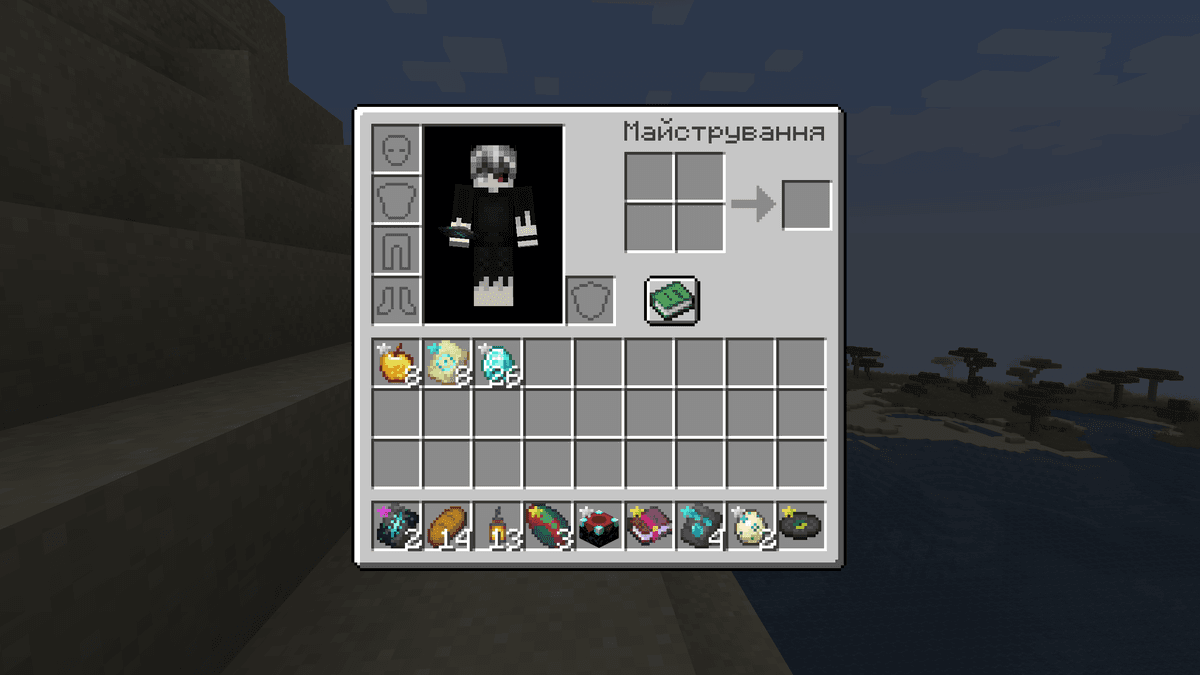
Rarity colors for markers enabled via the config
Marker position
The icon_position parameter determines which corner of the slot the marker is displayed in.
Value | Location |
| top-left corner (default) |
| top-right corner |
| bottom-left corner |
| bottom-right corner |
Changing the position is useful if the marker overlaps the stack count icon or other information.
Display on the hotbar
The show_on_hotbar parameter controls whether markers appear on the hotbar. It is enabled by default — the stars are visible both in the inventory and on the hotbar at the same time. If disabled, the markers will remain only in the inventory window and will not distract you during gameplay.
Conclusion
Item Highlighter adds visual marking of new items in the inventory. The mod is lightweight, has no impact on performance, and does not change game mechanics. Six parameters in the config give you enough control over the markers' behavior: from choosing the way stars are removed to their placement on the slot. Similar inventory solutions usually focus on filtering by rarity or enchantments, whereas this mod tracks the exact moment of pickup — a fundamentally different task. Item Highlighter is suited for survival, long mining sessions, structure clearing, and server play, where control over the inventory is critical.
Installation
A typical installation takes about 5 minutes. The flow is the same; only the loader and the matching build differ.
- 1Install a mod loader (Forge, Fabric or NeoForge) that matches your Minecraft version.
- 2Download the mod file (.jar) built for that same version.
- 3Place the .jar into your .minecraft/mods folder.
- 4Launch Minecraft with the modded profile and check the mod loads in-game.
 Installing Mods in Minecraft: A Guide for Forge, FabricLearn how to install mods in Minecraft with this step-by-step guide for Forge and Fabric. Improve your game with new features, tools, and mechanics!Open the install guide