

Just Enough Items (JEI)
View Items and Recipes
View Items and Recipes
Just Enough Items
JEI is an item and recipe viewing mod for Minecraft, built from the ground up for stability and performance.
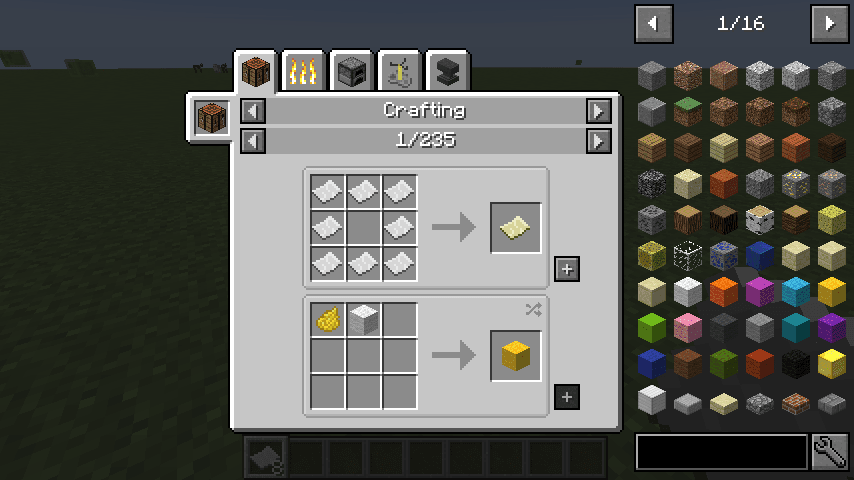
Controls
Inventory:
(Minecraft Options -> Controls)
Show Recipes: Hover over item + R
Show Uses: Hover over item + U
Toggle Item List Overlay: Control + O
Item List:
Show Recipes: Click Item or type R
Show Uses: Right-Click Item or type U
Next/Previous page: Scroll Wheel
Search:
Select Search Bar: Click or Control + F
Clear Search: Right Click
Previous Search: *Up Arrow *
Search by Mod Name: Type @ in front of a word (@thaum)
Multiple terms work together (wand @thaum)
Exclude search terms: Type - in front of a word (@thaum -wand)
Search terms that have spaces in them: Type "" around the words ("two words")
Recipe View:
Next/Previous page: Scroll Wheel
Show all Recipes: Click the recipe category's name
Move items into crafting area: Click the [+] button. Shift-Click to move multiple sets of items.
View advanced controls
Advanced Search:
Search by Tooltip Only: Type # in front of a word
Search by OreDict name: Type $ in front of a word
Search by Creative Tab: Type % in front of a word
Multiple Searches: Separate terms with | characters, like "wrench|hammer"
With Cheat Mode Active:
Get a full stack of Items: Click Item
Get one Item: Right-Click Item
Delete Item: Drop an Item into the Item List
With Item List Edit Mode Active:
(These controls are shown in-game on the item tooltip)
Hide Item: Control-Click Item
Hide Items and Sub-Items: Control-Right-Click Item
Hide all Items from a mod: Control-Shift-Click Item
FAQ
Can I include JEI in my mod pack?
Of course!
Can JEI run client-only, or with a vanilla server?
[1.21.1 or lower] Yes, with some features disabled:
- The "Move items into crafting area" [+] buttons.
- Cheating in items that have lots of NBT data.
- Deleting items.
[1.21.2+] Since Minecraft 1.21.2, recipes are stored on the server and not the client. Please install JEI and NeoForge/Fabric on the server to sync recipes to the client.
Where can I find the ___ feature from NEI?
The chart here shows which mods support each feature.
I have an issue / bug / crash / report / request, where can I send it?
Support
Installation
A typical installation takes about 5 minutes. The flow is the same; only the loader and the matching build differ.
- 1Install a mod loader (Forge, Fabric or NeoForge) that matches your Minecraft version.
- 2Download the mod file (.jar) built for that same version.
- 3Place the .jar into your .minecraft/mods folder.
- 4Launch Minecraft with the modded profile and check the mod loads in-game.
 Installing Mods in Minecraft: A Guide for Forge, FabricLearn how to install mods in Minecraft with this step-by-step guide for Forge and Fabric. Improve your game with new features, tools, and mechanics!Open the install guide










