

LAN World Plug-n-Play (mcwifipnp) — a mod for easy connection to a local world in Minecraft
The vanilla "Open to LAN" menu lets you launch the integrated server in three clicks — the game picks a random port and MOTD on its own and…
The vanilla "Open to LAN" menu lets you launch the integrated server in three clicks — the game picks a random port and MOTD on its own and turns on online account verification. LAN World Plug-n-Play (mcwifipnp) expands this menu into a full-featured settings panel and adds…
LAN World Plug-n-Play (mcwifipnp) — a mod for easy connection to a local world in Minecraft
Minecraft version this article was tested and written on: 26.1.2
Range of supported versions: 1.15.2 – 26.1
Mod version: 1.9.8
The vanilla "Open to LAN" menu lets you launch the integrated server in three clicks — the game picks a random port and MOTD on its own and turns on online account verification. LAN World Plug-n-Play (mcwifipnp) expands this menu into a full-featured settings panel and adds features that previously required setting up a separate dedicated server: a fixed port, port forwarding via UPnP, blacklist and whitelist, custom MOTD, and an Online Mode toggle with a UUID fixing system. All of this works inside Minecraft without editing server.properties and without external utilities.
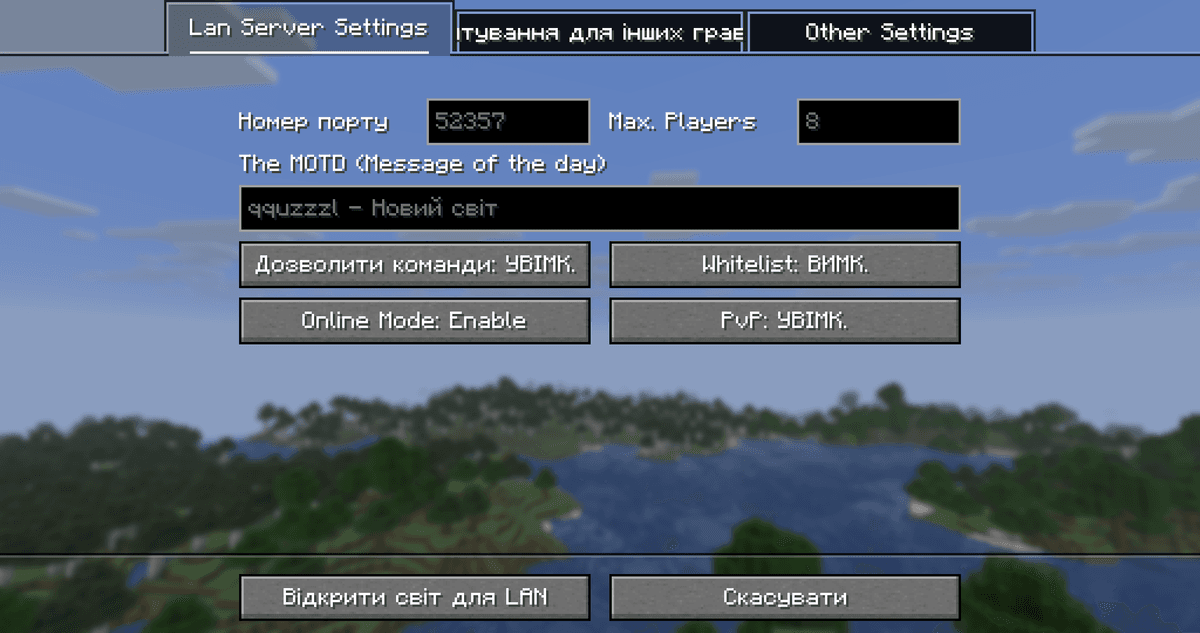
General view of the expanded "Open to LAN" screen — tabs and the mod's settings panel
The expanded "Open to LAN" window
The mod replaces the standard short screen with a multi-tab interface. The options are grouped by category: connection, players, other settings. The Back to Vanilla Screen button on the "Other" tab returns the usual vanilla menu — handy when you don't need the advanced options and just want to quickly launch LAN in classic mode. In the in-game pause menu, the "Report Player" button is replaced with quick access to the LAN settings.
Connection settings
Port and UPnP
When opening a world to the network, you can set a specific port instead of a random one. This is convenient when friends connect via an external IP address — the port stays the same from session to session and doesn't have to be shared again after every restart. A separate checkbox enables UPnP: if the router supports this protocol, the mod automatically forwards the port to the external network, and friends connect simply via the public IPv4 address. If UPnP is disabled or not implemented on the router, the option won't break anything — it just won't work, and you'll have to forward the port manually in the router settings. You can toggle UPnP quickly with the /upnp command without closing the world.
MOTD
The MOTD field sets the line that players see in the multiplayer list below the server name. In vanilla, the MOTD for a LAN world is generated automatically from the world name and the host's nickname — here you can replace it with your own.
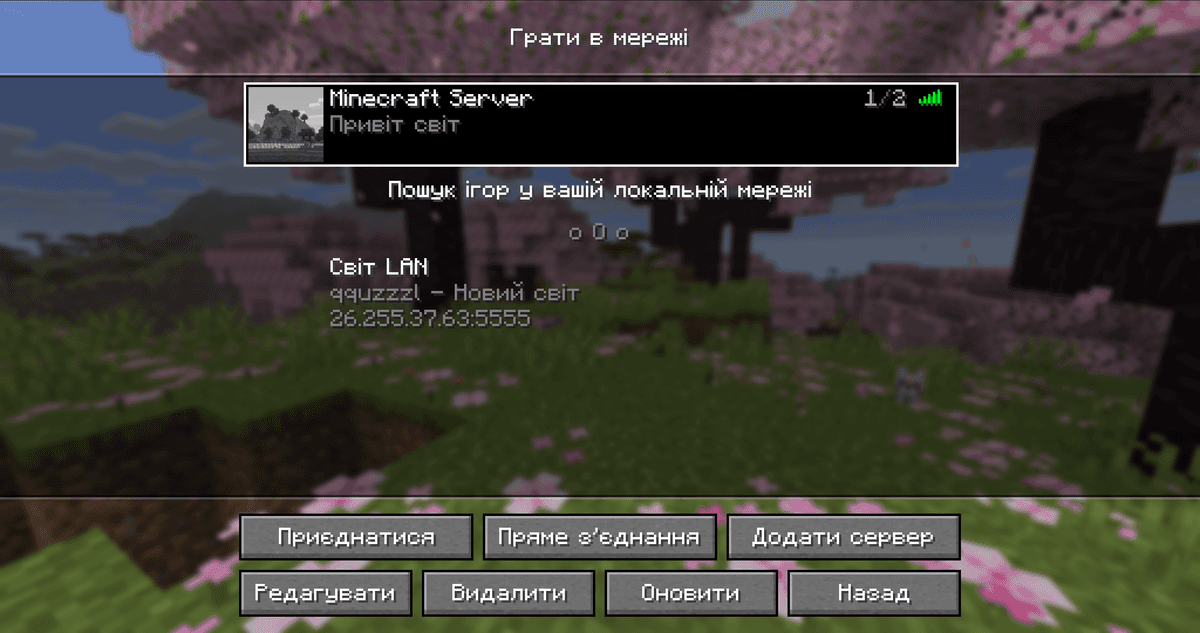
Your own server with a custom name
Account verification mode
The Online Mode toggle in the mod has three states rather than two:
Enable — the usual mode: on connection, the player's nickname is checked against the Mojang database, and only Microsoft accounts can join.
Disable — verification is off: you can connect with any nickname, including offline clients.
Disable + UUID Fixer — verification is off, but the UUID fixer is enabled. If a player's nickname matches one registered with Mojang, the mod substitutes their official UUID; for Microsoft accounts, their native UUID is preserved. This lets you switch between modes without losing inventory contents, ender chest, and UUID-bound data — in particular, backpacks from mods that store contents by the owner's UUID.
The /uuidfixer command
The UUID fixer is controlled by a separate command:
Subcommand | Action |
| enables or disables the fixer itself |
| lists all active "nickname ↔ UUID" matching rules |
| adds a new rule or overwrites an existing one |
| removes a rule from the list |
| shows which rule will apply for a specific nickname |
/uuidfixer force is needed when the standard logic isn't enough — for example, when a player plays with a nickname that is already taken by someone else's Mojang account, and the fixer would substitute the wrong UUID by default.
Player management
On the integrated LAN server, the mod enables the full set of administrative commands usually available only on a dedicated server:
/opand/deop— grant or revoke operator rights. Can also be granted directly from the GUI when starting LAN./whitelist— whitelist: together with the "Enable whitelist" option, it restricts connections to allowed players only./banand/pardon— blacklist by nickname./ban-ipand/pardon-ip— blacklist by IP address./banlist— view all banned players.
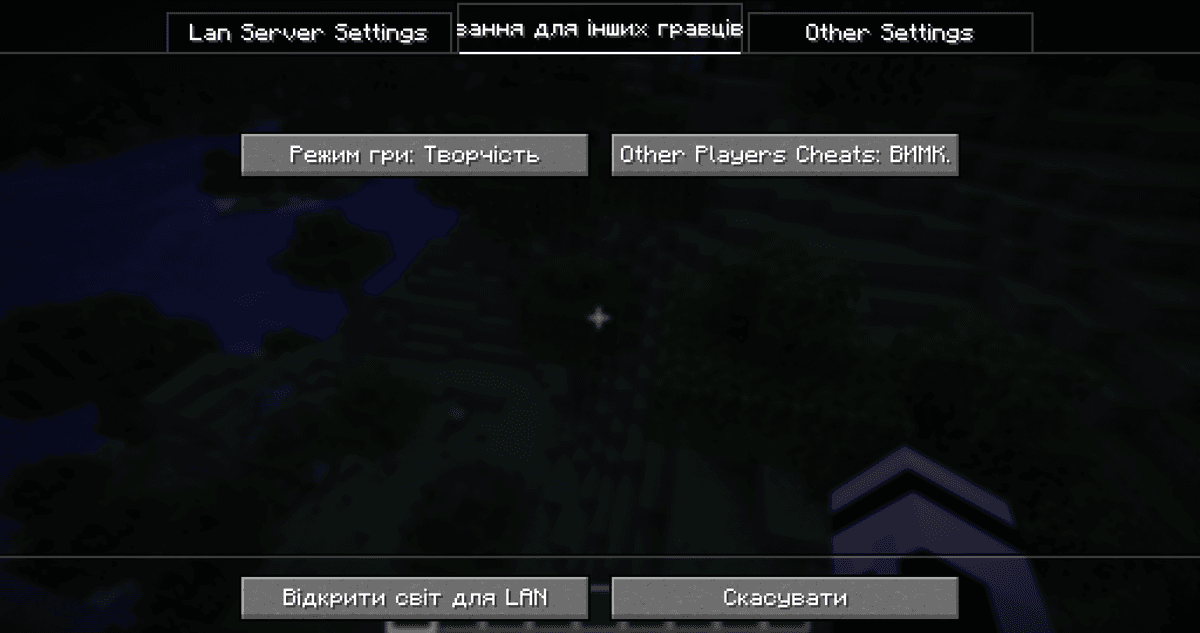
The "Players" tab with fields for game mode and whether cheats are available to others
IP address and copying
After launching LAN, the mod determines your address — the local IPv4 on the home network, the public IPv4, and IPv6 if they are available. After launch, all of this information is printed to chat; you can click the address you need, after which it is copied to the clipboard. The /ip command prints information about all found addresses again.
Config
The mod does not store its settings in a shared file in the config/ folder. Instead, the parameters are written separately for each world — to the mcwifipnp.json file inside the world's save folder (saves/<world_name>/mcwifipnp.json). The next time the same world is opened to LAN, all previous values (port, MOTD, verification mode, UPnP, UUID fixer, IP copying, etc.) are filled in automatically. Editing the file manually is usually not necessary — all fields are available from the GUI — but it is handy for scripted deployment when you need to disable verification in advance for offline sessions.
On a dedicated server, the mod works differently: only the UUID fixing module is active. The uuid_fixer.json file in the server's root folder serves at once as the activation flag and the rules database — without this file the module is off, with it it turns on. The /uuidfixer command is also available on the server console. The mod does not enable any other features (UPnP, MOTD, whitelist via GUI) on a dedicated server — the standard server.properties is already there for that.
Conclusion
LAN World Plug-n-Play (mcwifipnp) closes the gap between "Open to LAN" and a dedicated server: the key server settings — port, MOTD, online mode, whitelists and blacklists, OP — are available from a single screen, without edits to server.properties, without a restart, and without additional infrastructure. The most useful scenario is irregular play with friends: spin up a world, forward the port via UPnP, drop the IP into chat.
Installation
A typical installation takes about 5 minutes. The flow is the same; only the loader and the matching build differ.
- 1Install a mod loader (Forge, Fabric or NeoForge) that matches your Minecraft version.
- 2Download the mod file (.jar) built for that same version.
- 3Place the .jar into your .minecraft/mods folder.
- 4Launch Minecraft with the modded profile and check the mod loads in-game.
 Installing Mods in Minecraft: A Guide for Forge, FabricLearn how to install mods in Minecraft with this step-by-step guide for Forge and Fabric. Improve your game with new features, tools, and mechanics!Open the install guide










