

Load My F***ing Tags (LMFT) Mod: Protection against tag loading crashes in Minecraft
Technical review of the Load My F***ing Tags (LMFT) mod for Minecraft. Preventing critical crashes due to corrupted JSON tags in datapacks…
Technical review of the Load My F***ing Tags (LMFT) mod for Minecraft. Preventing critical crashes due to corrupted JSON tags in datapacks and analyzing logs...
Dependencies:
Loader: Fabric / Forge / NeoForge
Minecraft Version: 1.17.x – 1.21.x
The Load My F***ing Tags (LMFT) modification intercepts the standard process of registering game tags, preventing the complete cancellation of list loading when erroneous entries are detected. In the standard version of Minecraft, the detection of even one non-existent or incorrectly specified item or block in a tag JSON file causes the game to completely discard the entire tag. LMFT isolates corrupted elements, allowing all other valid objects to register successfully in the system, and thoroughly logs the source of the error for quick fixing.
Error isolation mechanism in tag registries
Game tags in Minecraft are used to combine various blocks, items, fluids, or functions into logical groups. For example, the tag minecraft:mineable/pickaxe defines a list of blocks that are broken by a pickaxe at the proper speed and drop loot. If a third-party datapack or modification adds an entry to this tag with a typo in the name (for example, minceraft:stone instead of minecraft:stone), the game's standard loader completely ignores the entire file. Because of this, all blocks specified in the tag lose the property of being broken by a pickaxe, which makes the game unplayable.
The LMFT modification modifies the behavior of the tag loading class using the Mixin tool. The algorithm of the system's operation:
During the startup of the client or server, the game reads all tag files from the
data/<namespace>/tags/folder.When it is time to process the list of objects, LMFT analyzes each line separately.
In case of detecting a link to a non-existent block or item (for example, due to the absence of another mod that was supposed to add this item), the system does not stop parsing.
The modification solely removes this invalid entry from RAM.
The remaining items in the list register successfully and receive the appropriate properties.
Thanks to this, players do not face a sudden loss of base tool functions or the inability to break blocks, and the server continues to run without crashing.
Error diagnostics via system logs
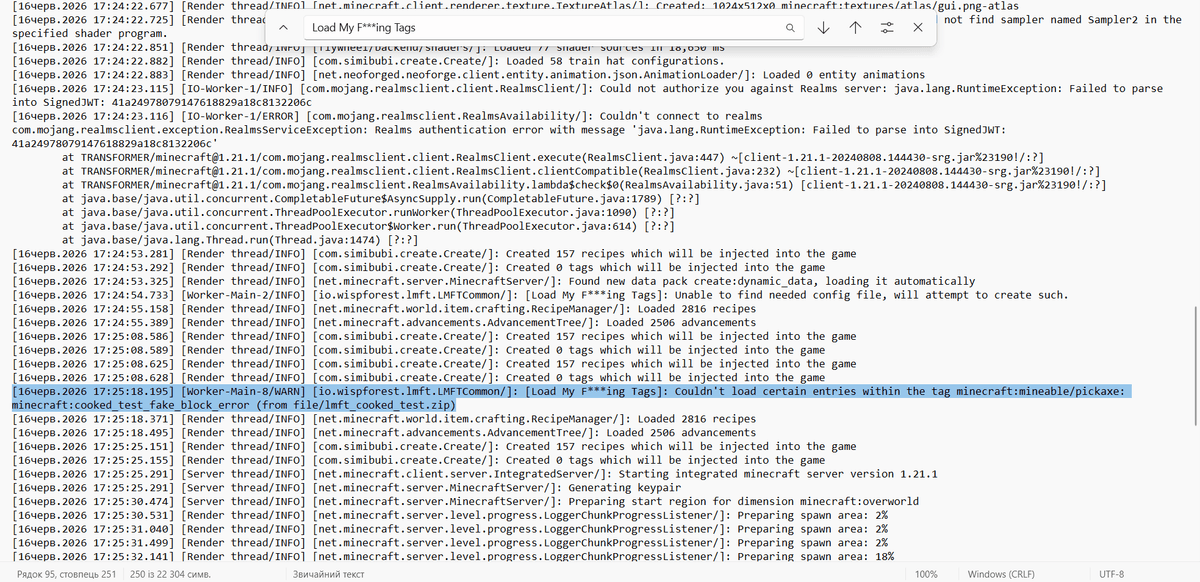
The main advantage of the modification lies in informing the modpack developer in detail about the detected problems. Instead of silently ignoring errors or sudden crashes, LMFT writes a detailed report directly to the logs/latest.log file in the root game folder.
You can find messages from the mod by filtering the log with the [Load My F***ing Tags] prefix. A typical log entry contains the following data:
The full name of the tag where the problem was detected (e.g.
minecraft:mineable/axe).The specific identifier of the corrupted or missing element that was attempted to be registered.
The namespace of the datapack or modification that sent this entry.
This approach allows you to quickly localize the malfunction. You don't need to manually sift through hundreds of JSON files looking for an error or remove mods one by one. It's enough to open the log, find the mod's prefix, read the name of the erroneous element, and update the corresponding configuration file or remove the conflicting datapack.
In-game warnings and chat notifications
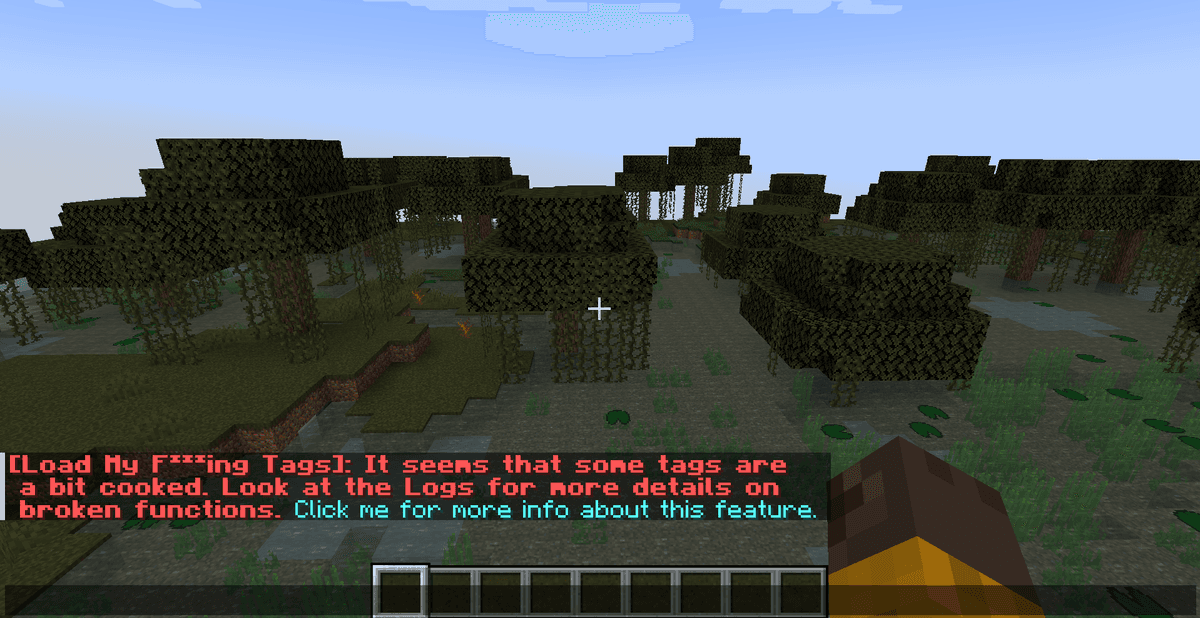
In addition to writing to the system logging files, the modification outputs a notification directly on the player's screen. When joining a world or loading new resources, a message appears in chat in red or orange stating that some tags are "cooked" (corrupted).
This notification acts as an indicator of the modpack's stability. Although the game continues to work and vanilla blocks break correctly, the presence of this message indicates that one of the modifications is working incorrectly. For example, custom weapons from a mod may not deal damage or receive bonuses from enchantments because their tag was discarded due to an error elsewhere in the file.
The modification works autonomously. It does not have a graphical settings menu or separate TOML/JSON configuration files for manual control. The mod's operation is fully integrated into the game's loader, ensuring the stability of the modpack without additional user intervention.
Compatibility and scope of application
The mod was developed as a universal solution for large modpacks and servers where conflicts between different content creators frequently arise.
Compatibility features:
Client and Server. The modification can be installed on both the client version of the game and the server. For servers, installation is critically important since all block and item registries for connected players are processed there.
Multi-platform. The mod supports all modern loaders (Fabric, Forge, NeoForge, Quilt) and is adapted for a wide range of game versions, starting from 1.17.1 up to the latest 1.21.x releases.
Interaction with other mods. LMFT is compatible with any rendering optimization modifications (Sodium, Iris) and technical libraries (Puzzles Lib, Cloth Config). It makes no changes to world rendering or physics, working exclusively with data registries.
Conclusion
Load My F***ing Tags successfully fixes a critical vanilla issue with the complete discard of object lists during errors in JSON files. The modification acts as an automatic safeguard: it filters tag registries, removing only corrupted entries, and logs the source of the crash in detail.
Compared to the vanilla loader, which simply silently breaks the logic of tool interaction with blocks, LMFT makes the debugging process transparent thanks to informative messages in the chat and logs. The main limitation of the mod is that it does not fix the error in another mod's code itself, but only localizes its consequences, so you will still have to update or fix the problematic addon. The mod is perfect for you if you are creating a large modpack, frequently experimenting with custom datapacks, or hosting your own server and want to avoid sudden bugs with unbreakable blocks.
Installation
A typical installation takes about 5 minutes. The flow is the same; only the loader and the matching build differ.
- 1Install a mod loader (Forge, Fabric or NeoForge) that matches your Minecraft version.
- 2Download the mod file (.jar) built for that same version.
- 3Place the .jar into your .minecraft/mods folder.
- 4Launch Minecraft with the modded profile and check the mod loads in-game.
 Installing Mods in Minecraft: A Guide for Forge, FabricLearn how to install mods in Minecraft with this step-by-step guide for Forge and Fabric. Improve your game with new features, tools, and mechanics!Open the install guide










