Paxi Mod: Automatic Loading of Data Packs in Minecraft
Dependencies: Loader: Fabric / Forge / NeoForge Minecraft version: 1.19.x – 1.21.x Mod version: 5.1.3 Required: YUNG’s API The Paxi…
Dependencies: Loader: Fabric / Forge / NeoForge Minecraft version: 1.19.x – 1.21.x Mod version: 5.1.3 Required: YUNG’s API The Paxi modification implements a system for automatically loading data packs and resource pack
Dependencies:
Loader: Fabric / Forge / NeoForge
Minecraft version: 1.19.x – 1.21.x
Mod version: 5.1.3
Required: YUNG’s API
The Paxi modification implements a system for automatically loading data packs and resource packs globally into every world created in Minecraft. Instead of manually copying files into each new world save folder, the mod creates a centralized paxi directory in the game's config folder. Any resources added there are automatically applied to every world and when the client launches, which simplifies building and distributing modpacks.
Folder Structure and Automatic Loading
After the first launch of the game with the mod, the corresponding subdirectories for resource files are created in the config folder .minecraft/config/paxi/.
The main folders and their functionality:
Directory | Content type | How it works |
|---|---|---|
| Data Packs | Automatically adds and enables data packs in every new or already created world. Both ZIP archives and unpacked folders are supported. |
| Resource Packs | Automatically loads textures, models, and sounds while the client is loading. On dedicated servers this directory is ignored. |
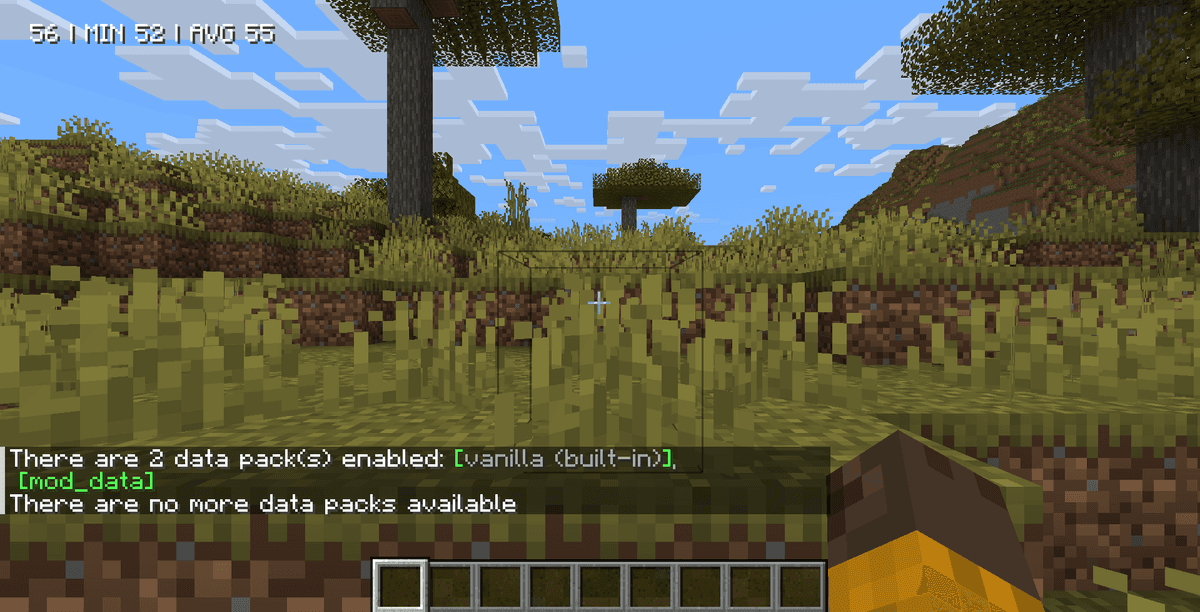
You can check all data packs connected through Paxi directly in the world using the standard /datapack list command. In the chat, the names of globally loaded packs are highlighted in pink, which makes it easier to diagnose the build.
Configuring the Load Order via JSON
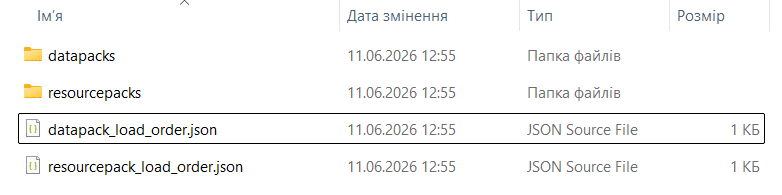
When a world is first created, the modification generates special configuration files in JSON format in the paxi folder, which let you set the loading priority of packs.
Configuration file | Content format | Function in the game |
|---|---|---|
| Array of folder/archive names | Defines a strict priority and read order for data packs. By default (with the file left empty) they are loaded alphabetically. |
| Array of folder/archive names | Sets the load order of texture packs in the client, determining which textures will override others. |
You can use both simple file names from the paxi folder and relative paths to any other folders in the game (for example, "datapacks/MyDataPack" or "resourcepacks/CustomTextures.zip"). These relative paths are counted from the root folder of the game instance .minecraft/.
Additional Configuration Options
In the mod's configuration file paxi.toml (or through the in-game settings menu) you can control additional integration options.
The main settings:
Loading from the base data packs folder. The
Load from base 'datapacks' directoryoption (enabled by default) automatically reads all data packs from the.minecraft/datapacksfolder. This is designed for integration with platforms like CurseForge, which automatically download data packs added to a build into this directory.Nested folder support. The mod correctly recognizes nested folders inside the loading directories, which lets you keep a large number of modifications neatly organized.
Compatibility and Requirements
Since data packs affect world logic (recipes, tags, structures), while resource packs affect the visual display, the mod has different requirements for the client and the server.
Compatibility notes:
For the server side (Dedicated Server), resource packs are not needed, since they do not affect server-side calculations. However, the
/datapacks/folder must be installed to ensure identical logic on the server and client sides.The mod is compatible with the Fabric (requires Fabric API installed), Forge, and NeoForge loaders.
It supports working with any other interface mods or custom world generation.
Conclusion
The Paxi modification is a convenient tool for build developers, as it solves the problem of automatically connecting data packs and resource packs for every new world. It lets you distribute customized recipes, loot tables, and textures without having to explain the installation rules to players.
Compared to manually transferring files into every save, Paxi saves time thanks to automatic global synchronization. The main limitation is the need to correctly specify relative paths in the JSON files when configuring a complex load order. The mod will suit you if you are creating a build of adventure maps or a large-scale modpack with your own modified recipes and graphic design.
Installation
A typical installation takes about 5 minutes. The flow is the same; only the loader and the matching build differ.
- 1Install a mod loader (Forge, Fabric or NeoForge) that matches your Minecraft version.
- 2Download the mod file (.jar) built for that same version.
- 3Place the .jar into your .minecraft/mods folder.
- 4Launch Minecraft with the modded profile and check the mod loads in-game.
 Installing Mods in Minecraft: A Guide for Forge, FabricLearn how to install mods in Minecraft with this step-by-step guide for Forge and Fabric. Improve your game with new features, tools, and mechanics!Open the install guide