

Pick Up Notifier — a mod for adding notifications about picked up items and blocks in Minecraft
Pick Up Notifier adds informational animation when picking up items in Minecraft. The mod is lightweight, does not change gameplay, and…
Pick Up Notifier adds informational animation when picking up items in Minecraft. The mod is lightweight, does not change gameplay, and gives full control.
Pick Up Notifier — a mod for adding notifications about picked up items and blocks in Minecraft
Article written for version: 26.1.2
Supported Minecraft versions: 1.19.x – 26.1.2
Dependencies: Puzzles Lib (Fabric and NeoForge), Fabric API, Forge Config API Port (Fabric)
In vanilla Minecraft, the only way to know exactly what entered your inventory after gathering items from the ground is to open it. Pick Up Notifier solves this problem: the mod displays a compact list of recently picked up items and experience right on the screen. The list appears in the corner of the screen, stays for a few seconds, and disappears with a smooth animation — without the need to get distracted from the game.
Pickup Log
Every item picked up from the ground creates an entry in the log — a small list in the corner of the screen. The entry contains the item's icon, its name, and the quantity. After 4 seconds, the entry fades out and moves off the screen.
The mod records three types of pickups: items, experience orbs, and retrieved arrows. For experience orbs, the total number of points is displayed by default, rather than the number of individual orbs. Each of the three types can be turned on and off separately in the config.
If you pick up another block of the same item while the entry is still visible, the quantity is updated instead of creating a new row. Items renamed on an anvil do not merge with items of the same type by default.
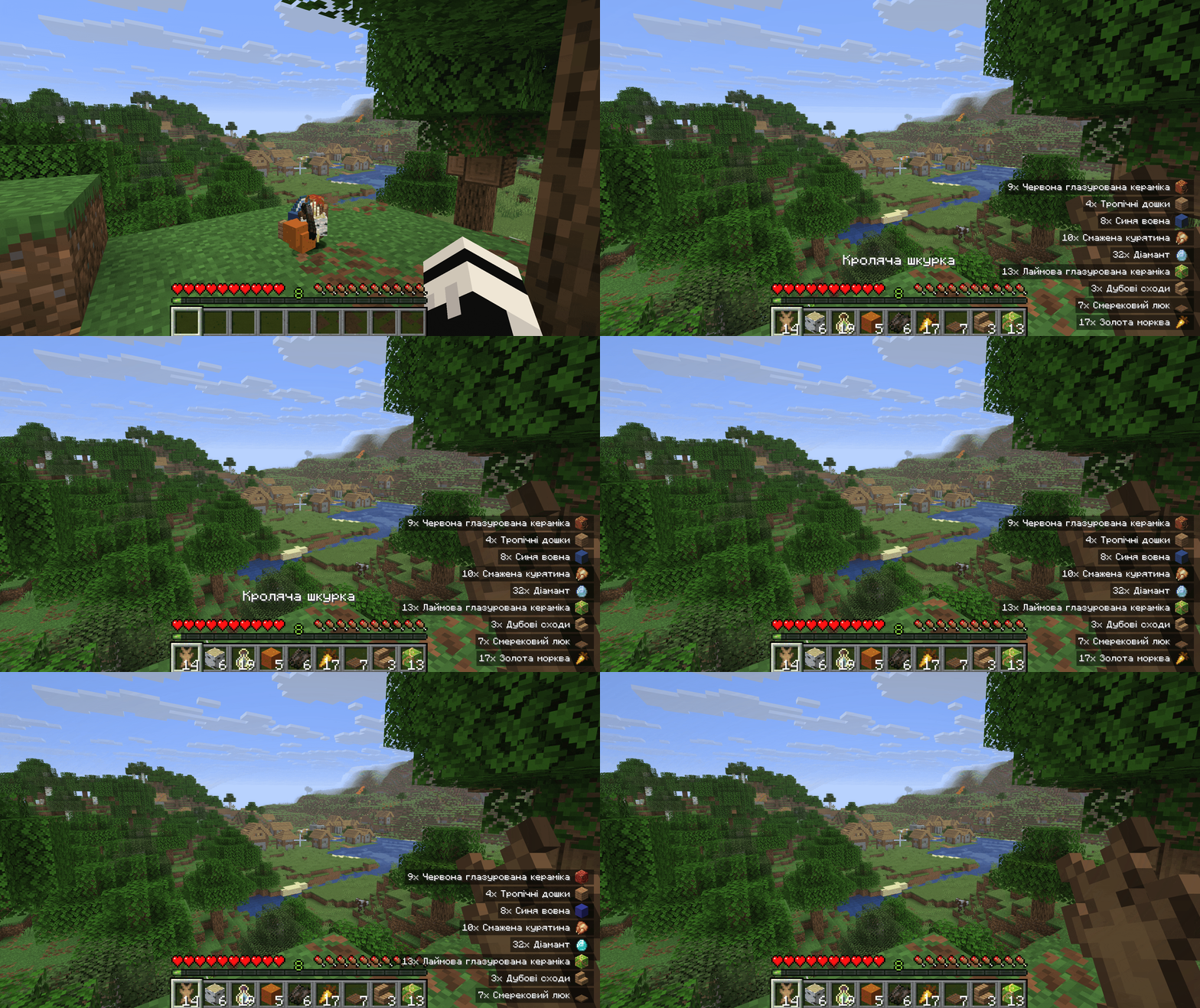
Picking up several items from the ground — the pickup log appears in the lower right corner of the screen
Item Filtering
Through the hidden_items parameter in the client config, you can hide individual items or entire categories from being displayed in the log. The format of the entries is <namespace>:<path>. Tags (format #<namespace>:<path>) and wildcards with the * symbol are supported. If no namespace is specified, minecraft is used by default. An entry with a ! at the beginning excludes an item from the match — useful for refining after a broad wildcard.
Example — hide all shulker boxes:
hidden_items = ["minecraft:*_shulker_box"]
Server-side
The mod works without the server side as well — the client is enough. A server installation adds one feature: logging partial pickups (when there is not enough space in the inventory for a full stack and only a portion is picked up). This is controlled by the partial_pick_ups parameter. A side effect is that it may accidentally log items that were not actually picked up.
The client_only parameter in the client config forces the mod into client mode. It activates automatically if the server side is not installed on the server. Manual activation may be needed in case of double logging of the same pickups — but then partial pickups and compatibility with backpacks stop working.
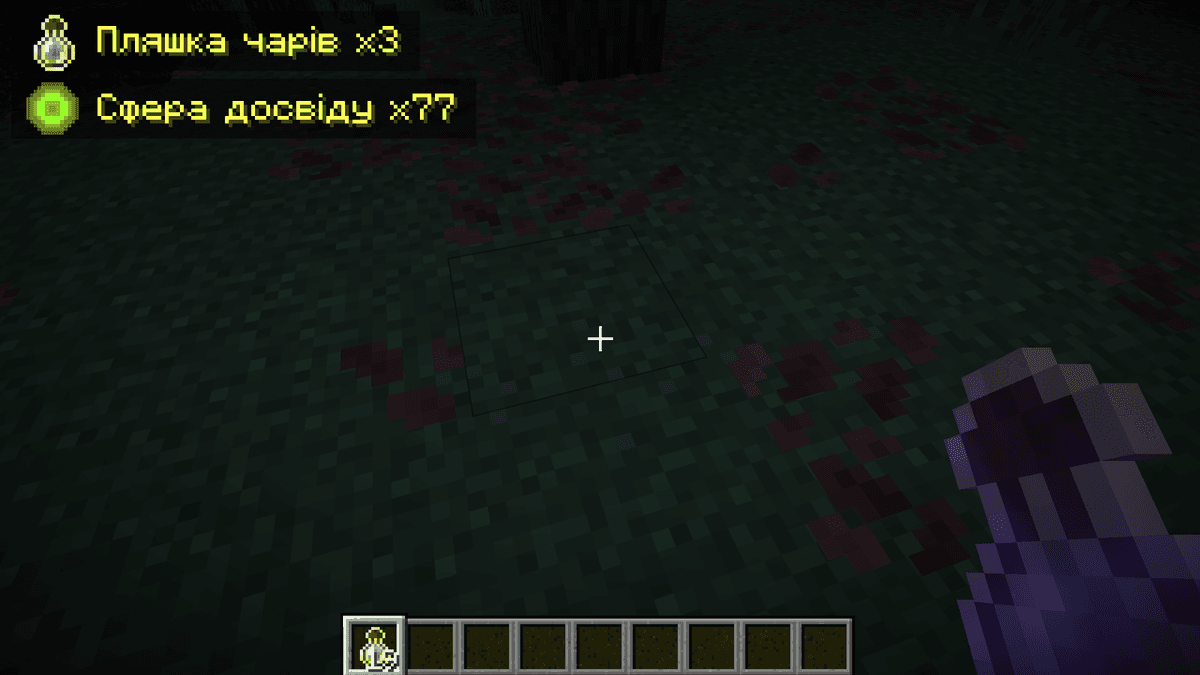
Modified item pickup interface through the config file
Config
Configuration files are located in .minecraft/config. They can be edited with a text editor.
Client Config — [display] section
Appearance parameters of log entries.
Parameter | Description |
| Show amount even if 1 item is picked up |
| Add the total quantity of this item in the inventory to the entry |
| Background behind the entry. |
| Show the item's text name |
| How to display the amount. |
| Show the item icon next to the entry |
| Text color |
| When |
| Screen corner |
| Horizontal offset from the edge of the screen |
| Vertical offset from the edge of the screen |
| Maximum fraction of the screen height for the list |
| Entry scale (1 – 24). Smaller value — smaller entries, more rows |
Client Config — [general] section
General pickup tracking parameters.
Parameter | Description |
| Forced client mode. Partial pickups and compatibility with backpacks do not work |
|
|
| Track picked up items |
| Disable log in creative mode |
| Track experience orbs |
| Item blacklist. Format: "namespace:path", supports tags ( |
| Track retrieved arrows |
Client Config — [behavior] section
Animation and time interval parameters.
Parameter | Description |
| Smooth text fading before disappearing |
| Move out animation. |
| Entry visibility time in ticks (≥ 0). 0 — disappears only when out of space |
| Move out animation duration in ticks (> 0) |
| Entry combining. |
Server config
Parameter | Description |
| Log partial pickups. May mistakenly log items not picked up |
Conclusion
Pick Up Notifier adds informational animation when picking up items in Minecraft. The mod is lightweight, does not change the gameplay, and gives full control over the appearance and behavior of the log through the config. The mod is suitable for long-term survival, resource farming, and large modpacks, where controlling inventory contents without unnecessarily opening the menu saves time.
Installation
A typical installation takes about 5 minutes. The flow is the same; only the loader and the matching build differ.
- 1Install a mod loader (Forge, Fabric or NeoForge) that matches your Minecraft version.
- 2Download the mod file (.jar) built for that same version.
- 3Place the .jar into your .minecraft/mods folder.
- 4Launch Minecraft with the modded profile and check the mod loads in-game.
 Installing Mods in Minecraft: A Guide for Forge, FabricLearn how to install mods in Minecraft with this step-by-step guide for Forge and Fabric. Improve your game with new features, tools, and mechanics!Open the install guide










