

Ping Wheel — mod for adding a radial menu of quick pings and signals in Minecraft
Ping Wheel is a Minecraft mod that adds a quick ping system, allowing players to mark locations, blocks, and entities for allies without…
Ping Wheel is a Minecraft mod that adds a quick ping system, allowing players to mark locations, blocks, and entities for allies without opening chat.
Ping Wheel — mod for adding a radial menu of quick pings and signals in Minecraft
Minecraft version on which the article was tested and written: 26.1.2
Supported versions range: 1.18.x – 26.1.2
Dependencies: Fabric API (for Fabric)
Ping Wheel brings the ping mechanic from modern co-op games into Minecraft — a way to temporarily mark a point on the terrain or an object that all nearby players can see. The mod allows you to quickly show allies where to look, where an item is dropped, or exactly which mob to target, without opening chat and dictating coordinates. The marker appears as an icon, is visible through blocks, and automatically disappears after a set number of seconds.
Ping mechanics
The basic action is bound to the Mouse5 key (mouse side button) by default. The keybind can be changed in the standard controls menu. Pressing it creates a marker at the point where the cursor is aimed. The logic differs slightly depending on the target:
When aimed at a block, the marker is fixed to the coordinates of this block.
When aimed at an entity, the marker sticks to it and moves with the target.
If the itemIconVisible option is enabled in the config, for items and blocks with a corresponding item, the marker shows the texture of the item itself instead of the standard icon.
The numerical distance in blocks is displayed next to the marker. When the target goes off-screen, a direction indicator appears at the edge of the screen, which helps to orient where to turn the camera.
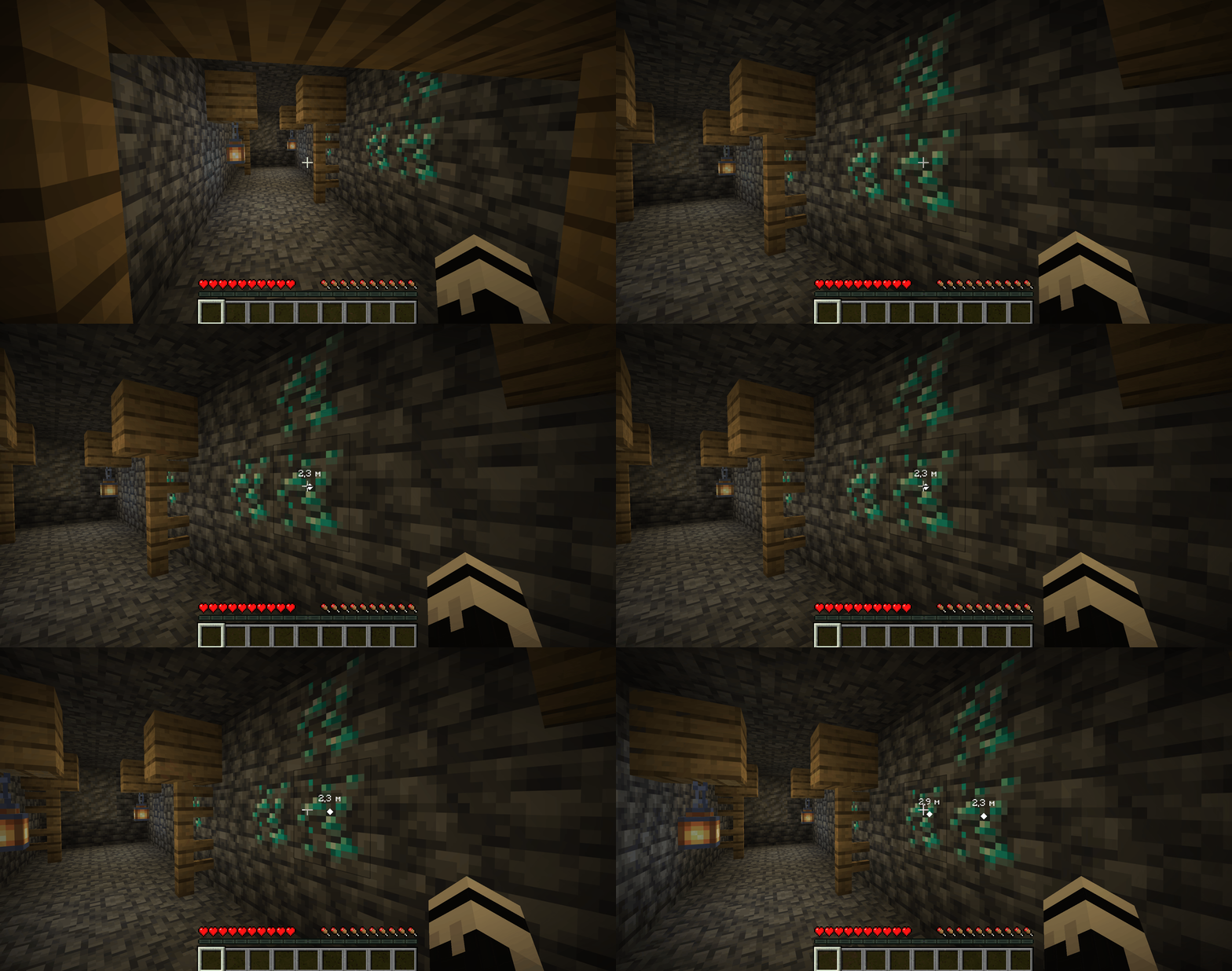
Creating a ping on a diamond ore block in a mineshaft
To remove your own marker, you need to aim at it and press the ping key again. Deletion is only enabled after the marker has existed for more than 1 second — this prevents accidental cancellation immediately after creation.
Player names and team colors
The name of the player who placed the marker can be displayed above it. By default, the name is shown when the Tab key is held. This reduces visual noise when the information is not needed. Other modes can be selected in the /pingwheel config menu.
The color of the marker outline and the name text is automatically taken from the player's vanilla team color (/team modify <team> color). This works without additional configuration if teams are set up on the server.
Communication channels
Channels are a separate layer that determines who can see a specific ping. Use cases:
Default channel (empty name, channel: ""). Behavior is determined by the server via
defaultChannelMode— ranging from global to team-bound.Custom channel. Members of the same channel see each other's pings regardless of vanilla teams. Suitable for raid groups or subgroups within a single server.
Switching to a channel is done with the command /pingwheel channel <name> or via the corresponding menu option. The current channel is saved separately for each server address.
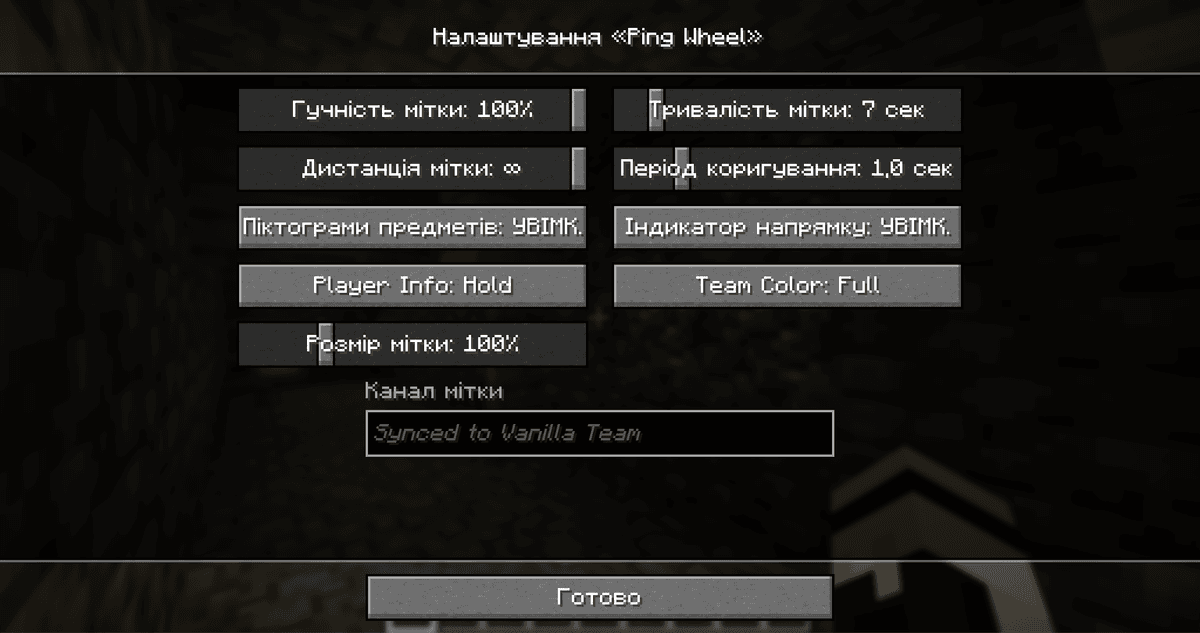
Ping Wheel settings menu, opened via /pingwheel config
Main client config parameters
The file is located in — config/. Below are the most frequently adjusted parameters.
Parameter | What it does |
| Volume of the ping sound in percentages. 0 — completely silent. |
| How many seconds the marker remains visible after creation. |
| Maximum distance in blocks at which the marker is still rendered. Pings beyond this distance are invisible. |
|
|
|
|
|
|
| Marker scale in percentages. |
| Radius in pixels around the cursor within which a second press removes the existing ping. |
Server config
The file is also located in — config/. Operators can change values in-game with the command /pingwheel:server.
Parameter | What it does |
| Default channel mode. |
|
|
| Interval in milliseconds to regenerate one ping "charge". |
| How many pings in a row can be made before running out of charges. 1 — normal cooldown. 0 — limit disabled completely. |
Conclusion
Ping Wheel adds quick non-verbal target marking for teammates, without excessive communication. The mod is well suited for active co-op gameplay: raids, cooperative survival, PvP skirmishes — scenarios where reaction in the heat of the moment is more important than a constant mark on the map.
Installation
A typical installation takes about 5 minutes. The flow is the same; only the loader and the matching build differ.
- 1Install a mod loader (Forge, Fabric or NeoForge) that matches your Minecraft version.
- 2Download the mod file (.jar) built for that same version.
- 3Place the .jar into your .minecraft/mods folder.
- 4Launch Minecraft with the modded profile and check the mod loads in-game.
 Installing Mods in Minecraft: A Guide for Forge, FabricLearn how to install mods in Minecraft with this step-by-step guide for Forge and Fabric. Improve your game with new features, tools, and mechanics!Open the install guide










