
Rebind Narrator — Mod to Rebind or Disable the Screen Narrator Hotkey in Minecraft
Rebind Narrator lets you reassign or fully disable Minecraft's Ctrl+B narrator hotkey through the standard key binds menu or a config file.
Rebind Narrator lets you reassign or fully disable Minecraft's Ctrl+B narrator hotkey through the standard key binds menu or a config file.
Rebind Narrator — Mod to Rebind or Disable the Screen Narrator Hotkey in Minecraft
Minecraft version this article was tested and written on: 1.21.11
Supported version range: 1.16.1 – 1.21.11
Dependencies: Fabric API (for Fabric builds)
Rebind Narrator is a Minecraft mod that adds a rebindable entry for the narrator toggle to the controls menu. In vanilla Minecraft this binding is hard-coded to Ctrl + B and handled separately from the main input system, so the standard "Controls" screen doesn't let you change it. The mod removes that restriction and moves the bind into the regular settings interface.
Why you'd want this
The narrator reads Minecraft's text out loud: chat messages, screen titles, selected interface elements. The feature is valuable for players with visual impairments, but its Ctrl + B hotkey causes problems for everyone else. First, B is frequently rebound to dropping an item stack, opening a modded inventory, or other mod actions. Second, Ctrl is bound to sneaking in many setups. An accidental press triggers the interface narration, and on older versions there's no built-in way to turn the combination off.
Behavior with and without Ctrl
By default the mod keeps the vanilla logic: to trigger the narrator, you still need to hold Ctrl along with your chosen key. For example, after binding to K, the narrator activates with Ctrl + K. This is the out-of-the-box behavior, even though the menu shows only a single letter.
This requirement can be removed through the config, so the chosen bind triggers without the modifier.
What the mod changes in the menu
After installation, a new entry appears under Options → Controls → Key Binds, in the Miscellaneous section. This is the narrator rebind. There you can:
assign any keyboard key;
leave the field empty — then the combination won't trigger at all (effectively disabling the feature completely);
keep the default B with the Ctrl prefix — behavior stays unchanged.
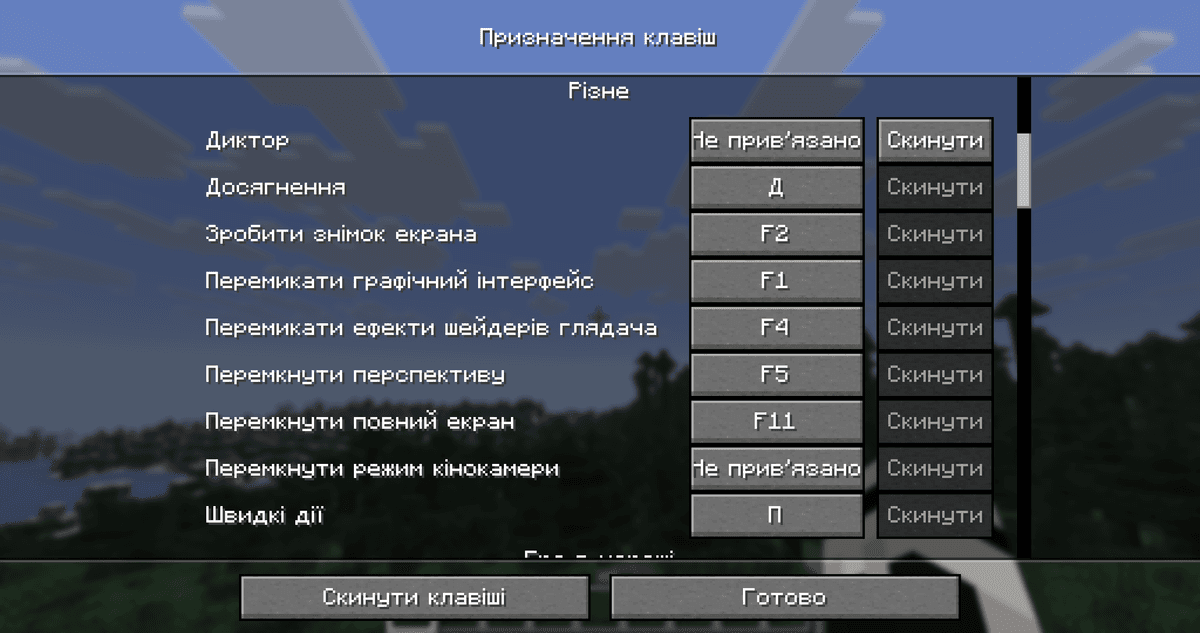
The Miscellaneous section of the "Key Binds" menu with the new narrator entry
Config
The config/rebind_narrator.txt file contains a single parameter.
Parameter | What it does |
| Whether Ctrl must be held for the rebound key to trigger the narrator. |
Conclusion
Rebind Narrator solves one small problem: it moves the narrator hotkey setting into Minecraft's standard controls menu, where it can be rebound or cleared. On modern versions vanilla already lets you fully disable the combination through the accessibility menu — for simply turning it off, the mod offers no advantage. But if you need to actually rebind the feature to a different, more convenient key rather than just remove it, there's no built-in way to do that. It's useful for heavily modded setups where Ctrl + B conflicts with other binds, as well as for players on older versions where the vanilla disable option didn't exist yet.
Installation
A typical installation takes about 5 minutes. The flow is the same; only the loader and the matching build differ.
- 1Install a mod loader (Forge, Fabric or NeoForge) that matches your Minecraft version.
- 2Download the mod file (.jar) built for that same version.
- 3Place the .jar into your .minecraft/mods folder.
- 4Launch Minecraft with the modded profile and check the mod loads in-game.
 Installing Mods in Minecraft: A Guide for Forge, FabricLearn how to install mods in Minecraft with this step-by-step guide for Forge and Fabric. Improve your game with new features, tools, and mechanics!Open the install guide










