
Skyboxify — a graphical mod for replacing and customizing sky textures (skyboxes) in Minecraft
Skyboxify is a Fabric mod that adds support for custom skyboxes in OptiFine format to Minecraft.
Skyboxify is a Fabric mod that adds support for custom skyboxes in OptiFine format to Minecraft.
Skyboxify — a graphical mod for replacing and customizing sky textures (skyboxes) in Minecraft
Minecraft version tested and written for this article: 26.1.2
Supported versions range: 1.21.x — 26.1.2
Dependencies: Fabric API, YetAnotherConfigLib
Skyboxify is a client-side mod that brings back support for custom skies in OptiFine format to Fabric in Minecraft. The vanilla sky is limited to a procedural render of the sun, moon, stars, and a background color gradient, meaning it is impossible to add a custom night sky with a nebula or an animated layer above the clouds using a resource pack. The mod reads .properties files inside the pack and renders additional layers over the vanilla sky according to the specified parameters.
How it works
At its core lies layered composition. Each file like sky1.properties, sky2.properties describes its own sky layer. The vanilla layer is rendered first, and custom layers are applied sequentially on top of it — according to the number in the file name. The layers are blended with the background using one of nine blend modes, fade in and out at specific in-game hours, rotate around their own axis, and react to the biome, weather, and player height.
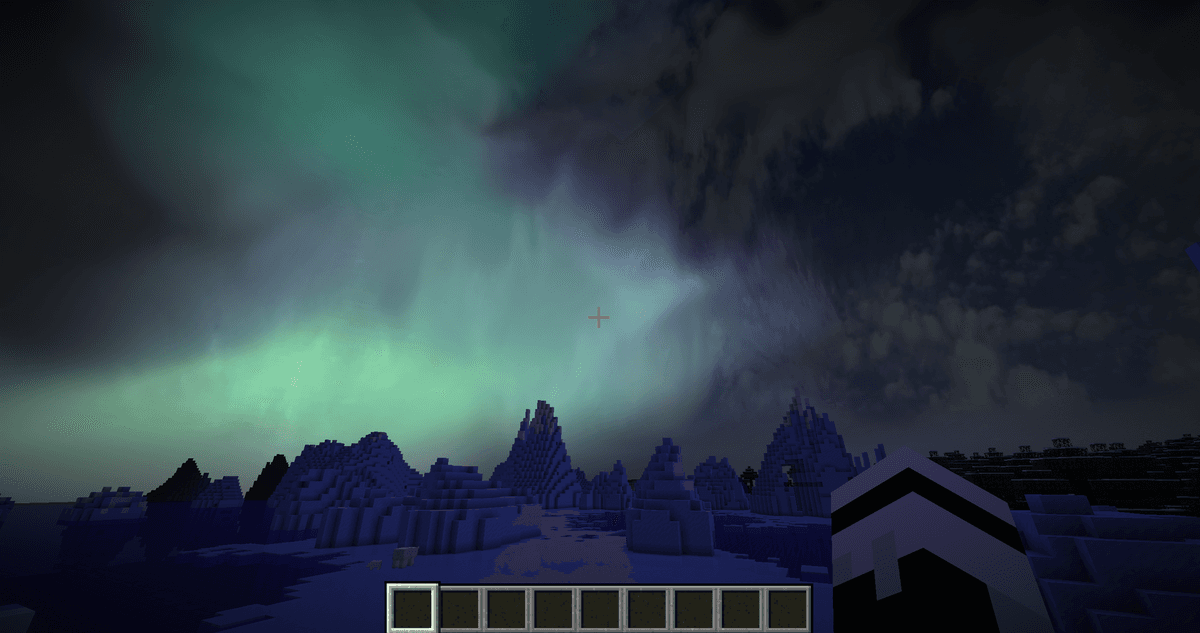
A custom sky in a Fabric modpack, added using the mod
Binding to a dimension is determined by the name of the folder where the .properties files are placed: world0 — the Overworld, world-1 — the Nether, world1 — the End. These names are enough: there is no separate "dimension" field inside the file itself. The dimension folder is placed inside the resource pack in optifine/sky/ (the native path of the OptiFine format, which the mod implements). As a fallback, the mod also reads a similar structure from mcpatcher/sky/ — a legacy of MCPatcher packs. If both branches exist in one pack, only optifine/sky/ is used; the mod accesses mcpatcher/sky/ only if the first one is missing.
For modded dimensions with a custom identifier, the behavior is controlled by a separate parameter in the client config (see below).
Single layer parameters
Each layer is a texture plus a set of conditions under which it is rendered. The main fields in a .properties file:
source— the path to the sky texture. The only required field.blend— the blending mode of the layer with the background:alpha,screen,dodge,add,multiply,burn,overlay,subtract,replace. Default isadd.startFadeIn,endFadeIn,startFadeOut,endFadeOut— layer appearance and disappearance time inhh:mmformat (in-game time). AtstartFadeIn, the layer opacity is 0%, atendFadeInit is 100%, and then mirrored for fading out.axis— the rotation axis vector (three numbers separated by spaces). The length of the vector must equal 1, otherwise the rotation will have artifacts. Default is 0.0 0.0 1.0 (axis facing south).weather— the weather during which the layer is visible:clear,rain,thunder, or a combination of them separated by spaces. Default is onlyclear.biomes— a list of biomes. The!prefix inverts the condition:!plains forestmeans "everywhere except the specified ones".
A layer with no conditions (only source) is shown constantly — as a static background above the standard sky. The more restrictions added, the more accurately the pack reacts to the world's state.
Mod config
The config/skyboxify.json file stores client switches that affect rendering regardless of the installed pack. There are few parameters:
Parameter | What it does |
| Globally enables or disables the rendering of custom skies. If |
| Renders the vanilla sun and moon over custom layers. If |
| Renders standard stars. If |
| Behavior in dimensions for which the pack has not described the sky (mods with custom dimensions). If |
| Technical flag for diagnostics and logging. Remains |
| Experimental switch added in Release 2.4, returns the previous layer rotation logic. Breaks modern packs, so it is disabled by default; should only be enabled for old skybox packs written for the early render. |
Conclusion
Skyboxify adds custom sky rendering in a format that has existed in the OptiFine community for years, plus a fallback structure for older packs. Suitable for those building a Fabric modpack with an emphasis on visual style and want to port old skybox packs without switching to Forge.
Installation
A typical installation takes about 5 minutes. The flow is the same; only the loader and the matching build differ.
- 1Install a mod loader (Forge, Fabric or NeoForge) that matches your Minecraft version.
- 2Download the mod file (.jar) built for that same version.
- 3Place the .jar into your .minecraft/mods folder.
- 4Launch Minecraft with the modded profile and check the mod loads in-game.
 Installing Mods in Minecraft: A Guide for Forge, FabricLearn how to install mods in Minecraft with this step-by-step guide for Forge and Fabric. Improve your game with new features, tools, and mechanics!Open the install guide










