
Traveler's Titles — Atmospheric Mod to Display Beautiful Biome and Location Names on Screen in Minecraft
Traveler's Titles is a client-side mod that displays beautiful text titles for biomes and dimensions directly on your screen in Minecraft.
Traveler's Titles is a client-side mod that displays beautiful text titles for biomes and dimensions directly on your screen in Minecraft.
Traveler's Titles — Atmospheric Mod to Display Beautiful Biome and Location Names on Screen in Minecraft
Minecraft version tested and used for the article: 1.21
Supported versions range: 1.19.2 – 1.21.4
Dependencies: YUNG's API, Cloth Config API, and Fabric API (for Fabric builds)
Traveler's Titles displays a large name of a new biome or dimension on the screen every time the player enters it. In Minecraft without this mod, the name is only available via F3. It works client-side — installed only for yourself on servers, other players won't notice anything.
How It Works
When crossing a biome border, its name appears in the center of the screen, stays for a few seconds, and smoothly fades out. The same happens when moving to another dimension — through a portal or via a command. The text size for dimensions is larger by default than for biomes, as the event is more significant.
The mod remembers the last few visited biomes so it doesn't show their names again when returning. The list is reset upon moving to another dimension.
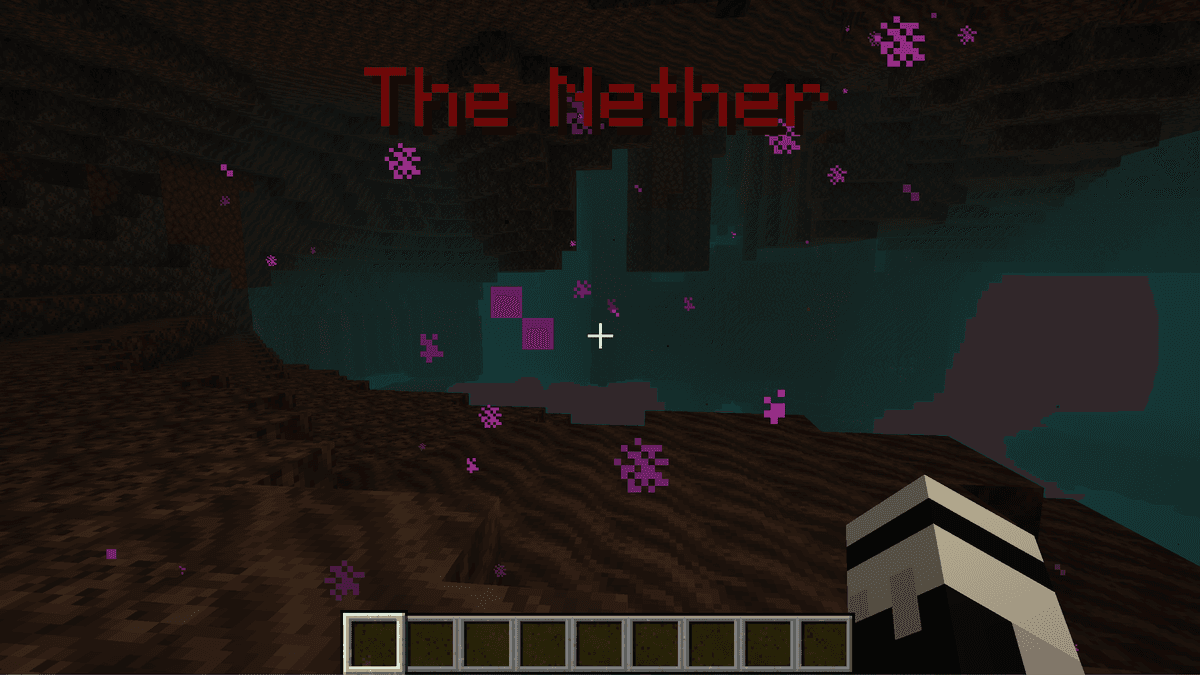
Nether message after exiting the portal
Underground biome titles do not appear by default — this is done so the mod doesn't trigger titles while mining in layered biomes, where the lower layers are formally considered separate. This restriction does not apply to dimensions: the Nether title will appear immediately after the portal, even from a cave.
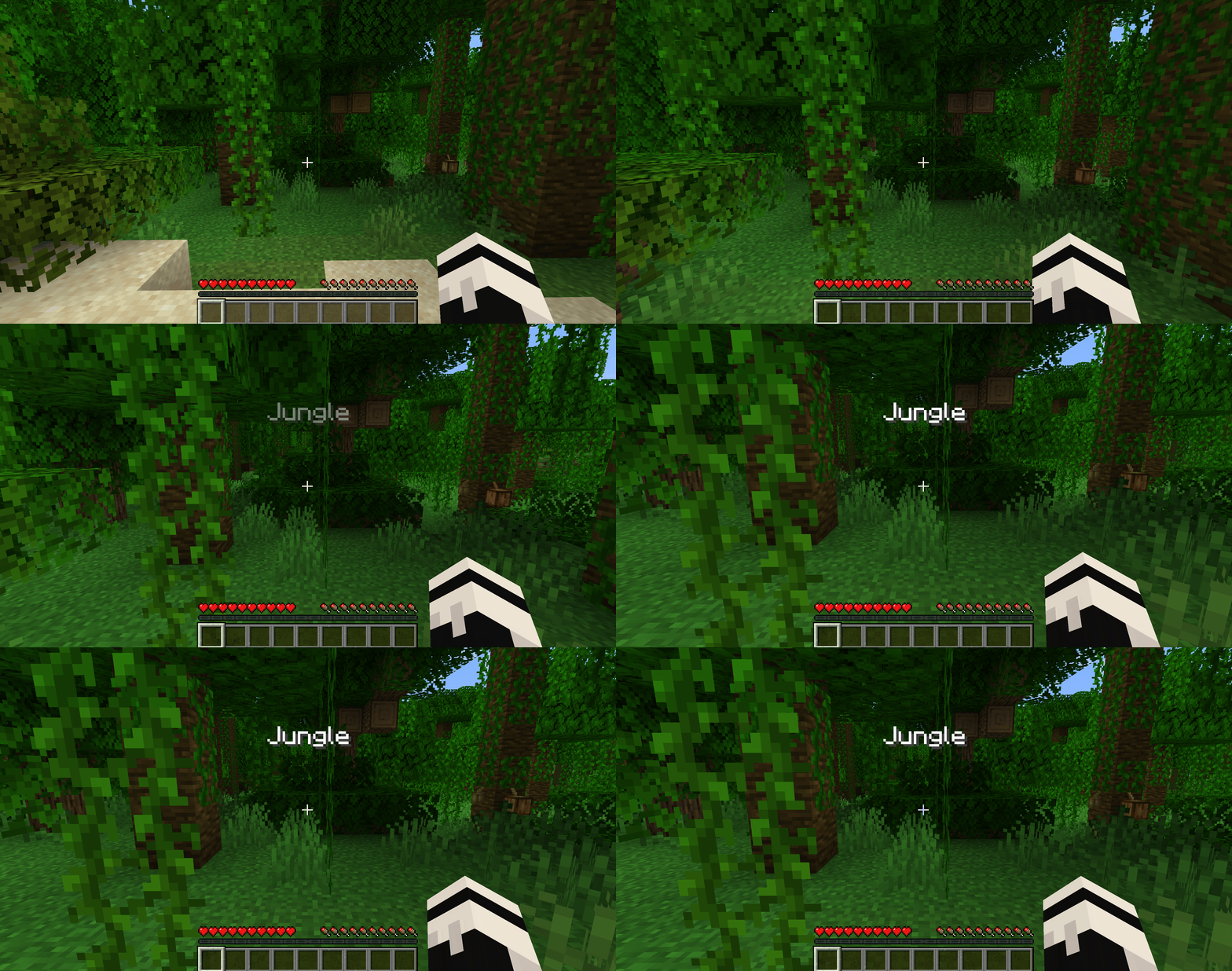
A player walks from a desert into a jungle, and a white text of the biome's name smoothly appears in the center of the screen
Support for Modded Dimensions and Biomes
The mod has built-in titles for a number of extra dimensions. For other mods that add their own biomes, the name is taken automatically from their localization file — no additional work is required. If the donor mod lacks a translation for your language, the title will display in English — Traveler's Titles does not translate names itself.
Sounds and Custom Names via Resource Pack
By default, titles appear without accompanying sound. To add a custom sound, files named biome.ogg, dimension.ogg, and waystone.ogg are placed in a resource pack with the travelerstitles namespace — each triggers on the corresponding event. If the file is absent, the mod simply stays silent.
Through the resource pack's lang file, you can set a custom name for a specific biome or dimension, and even a distinct text color for it — using the .color entry with an RGB hex code. This is handy, for example, for making a red title for the Nether and a green one for plains.
Commands for Testing
In singleplayer with appropriate permissions, two commands are available for previewing:
/biometitle <biome>— show the title of a specified biome/dimensiontitle <dimension>— show the title of a specified dimension
Useful when tweaking colors and display times — you don't have to run around the map to see what the title looks like.
Configuration
The config is divided into [biomes], [dimensions], and [sound] blocks — settings for biomes and dimensions are duplicated in meaning, but configured separately. In practice, only a small part is really needed:
Parameter | What It Does |
| Enables or disables titles separately for biomes and dimensions. |
| Text color in HEX. |
| Text size. Larger by default for dimensions. |
| Display duration in ticks (20 ticks = 1 second). |
| IDs of biomes and dimensions for which titles are not shown. The End and rivers are excluded from biomes by default. |
| If |
| Sound volume. 0 disables the respective sound type. Only works if the resource pack with the |
Conclusion
Traveler's Titles solves one specific problem — providing feedback when exploring the map. In vanilla Minecraft, the biome name is only visible on the F3 screen or via third-party minimaps; the mod makes it obvious without the need to keep the debug menu open. It works client-side and can be installed without coordinating with the server. Perfect for playthroughs with modded dimensions, for recording content where zone transitions need to be shown, and for players who don't like keeping F3 open just for a biome name.
Installation
A typical installation takes about 5 minutes. The flow is the same; only the loader and the matching build differ.
- 1Install a mod loader (Forge, Fabric or NeoForge) that matches your Minecraft version.
- 2Download the mod file (.jar) built for that same version.
- 3Place the .jar into your .minecraft/mods folder.
- 4Launch Minecraft with the modded profile and check the mod loads in-game.
 Installing Mods in Minecraft: A Guide for Forge, FabricLearn how to install mods in Minecraft with this step-by-step guide for Forge and Fabric. Improve your game with new features, tools, and mechanics!Open the install guide










