

ukulib — a mod for Minecraft
ukulib is a helper library mod for Minecraft that gives uku3lig's other mods a unified settings menu and shared utilities.
ukulib is a helper library mod for Minecraft that gives uku3lig's other mods a unified settings menu and shared utilities.
ukulib — a mod for Minecraft
Minecraft version the article was tested and written on: 26.1.2
Range of supported versions: b1.7.3 – 26.1.2
Dependencies: Fabric API (for Fabric builds)
ukulib is a helper mod-library for Minecraft by developer uku3lig. On its own it's just a code framework that other client-side mods by the same author are built on. It lands in the mods folder as a required dependency: without it, the main mod simply won't let the game start.
Role within a modpack
The library contains ready-made settings-interface components and basic utilities for working with commands, positioning, and text. Authors writing mods on top of it don't implement an options menu from scratch — they hook into ukulib and use its ready-made widgets. All mods built on this library share the same configuration style, close to Minecraft's vanilla screens, without third-party UI frameworks.
The library contains ready-made settings-interface components. Authors writing mods on top of it don't implement an options menu from scratch — they hook into ukulib and use its ready-made widgets.
Shared mod-list screen
The only part of the library the player interacts with directly is a separate menu listing the mods integrated with ukulib. It opens through the loader's standard mod-browsing interface. The screen only shows mods that registered their entry point in the manifest — clicking an entry takes you straight to that mod's settings page.
What the settings look like
Configuration pages built on the library share a common, unified look: a list of parameters in the center, Cancel and Done buttons at the bottom. Values are changed through standard elements — toggles for boolean values, sliders for numeric ranges, input fields for string values, cycle buttons for enumerable options.
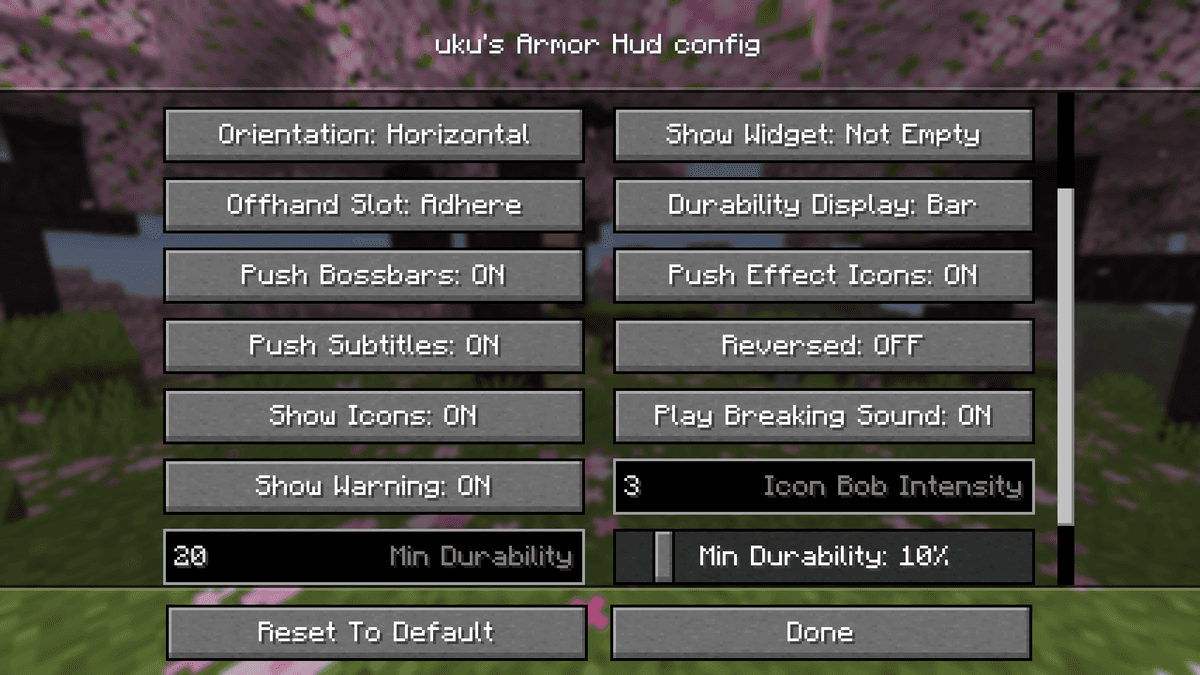
A fragment of a mod's settings screen built on ukulib
The consuming mod writes its settings file in TOML format and places it in the config folder next to its own config. The library itself has no settings of its own to change — any .toml in the folder belongs to the consuming mod, not to ukulib.
Conclusion
ukulib solves one task — by giving developers a ready-made template for a settings menu and basic utilities, it removes code copy-pasting between mods from the same author and brings their settings to a common style. It suits anyone who already has a client assembled with uku3lig's mods and wants the game to launch without crashing over a missing dependency.
Installation
A typical installation takes about 5 minutes. The flow is the same; only the loader and the matching build differ.
- 1Install a mod loader (Forge, Fabric or NeoForge) that matches your Minecraft version.
- 2Download the mod file (.jar) built for that same version.
- 3Place the .jar into your .minecraft/mods folder.
- 4Launch Minecraft with the modded profile and check the mod loads in-game.
 Installing Mods in Minecraft: A Guide for Forge, FabricLearn how to install mods in Minecraft with this step-by-step guide for Forge and Fabric. Improve your game with new features, tools, and mechanics!Open the install guide










