
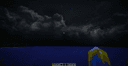
Dramatic Skys — HD Sky for Minecraft (Resource Pack)
Dramatic Skys is a Minecraft resource pack that replaces the default sky with beautiful, custom HD textures for clouds, day/night cycles…
Dramatic Skys is a Minecraft resource pack that replaces the default sky with beautiful, custom HD textures for clouds, day/night cycles, and weather.
Dependencies:
Minecraft version: 1.6.1 – 1.21.x and newer
Resolutions: options available from 16x to 512x and higher
Required skybox mod: OptiFine, Optiboxes, Nuit (FabricSkyBoxes) or Celestial
Dramatic Skys is an addon pack that replaces only the sky: clouds, lighting, and the night sky. It does not touch blocks, items, or mobs, so it can be applied on top of any other pack — simply place it higher in the resource pack list on the selection screen. The vanilla sky is a flat gradient with primitive clouds; Dramatic Skys replaces it with HD skybox textures that vary for day, sunset, and night.
What the Pack Does
The main feature is that the sky is biome-dependent. As of 1.20, there are 79 biomes in the game, and the pack defines three sky states for each: day, sunrise/sunset, and night. When moving between biomes, the view above you changes, so deserts, taigas, and swamps all have different skies.
In addition to static textures, the pack includes animated and weather effects:
aurora (animated);
shooting stars and meteor showers;
animated sun;
tornadoes;
blood and blue moons;
color and fog maps, as well as high-altitude sky textures (the look changes depending on the player's altitude).
Without a skybox mod, the pack will not work fully. Custom skyboxes are not part of the vanilla engine — they are enabled by OptiFine, Optiboxes, Nuit (FabricSkyBoxes for Fabric), or Celestial. Without one of these mods, the sky will remain vanilla.
Resolution and Performance
The pack is released in several resolutions — from 16x to 512x and higher. Since it only replaces the sky and not the textures of the entire world, the load on the graphics card is moderate even at high resolutions, and there is no noticeable drop in FPS on weak PCs. For very old laptops, it is worth choosing a lower option (16x–32x).
Compatibility
Dramatic Skys does not conflict with block and item packs — it is loaded as a separate layer on top of them. It is compatible with shaders, but there is a catch: some shaders render their own sky and clouds, which overlays the pack's textures with the shader sky. To see Dramatic Skys, disable custom skies/clouds in the shader settings, or run the pack without demanding shaders.
Conclusion
Dramatic Skys addresses a specific task — replacing the sky without touching the rest of the world — making it ideal for builders, screenshot creators, and filmmakers. Thanks to biome-specific configurations and weather effects (tornadoes, meteors, auroras), it offers more variety than simple static skybox packs. The main limitation is its dependency on a skybox mod: without OptiFine or FabricSkyBoxes, the effects won't render. Another aspect is the conflict with shaders over sky rendering: if a shader draws its own sky, the pack's textures will be overridden unless you manually disable the shader's sky.
FAQ
Does Dramatic Skys work without OptiFine? Only with an alternative skybox mod like Optiboxes, Nuit (FabricSkyBoxes), or Celestial. Without one, the sky will remain vanilla.
Can I load this pack on top of another resource pack? Yes. It is an addon pack — just place it above the main pack in your selection screen list.
Does the pack lower FPS? Minimal. It only replaces the sky, so the performance impact is low even at high resolutions. For low-end PCs, 16x–32x versions are available.
Is Dramatic Skys compatible with shaders? Partially. If the shader renders its own sky and clouds, it will override the pack's textures. Disable custom skies in the shader settings to see the pack.
How many different skies are in the pack? The sky is configured separately for each biome (79 in version 1.20) in three states: day, sunrise/sunset, and night.
Installation
A typical installation takes about 5 minutes. The flow is the same; only the loader and the matching build differ.
- 1Download the resource pack (.zip) — keep it zipped.
- 2In Minecraft open Options -> Resource Packs -> Open Pack Folder.
- 3Move the .zip into that resourcepacks folder.
- 4Select the pack so it moves to the right column, then click Done.
 How to Install a Texture Pack in MinecraftLearn how to install a texture pack in Minecraft with a simple step-by-step guide. Personalize your game with ease.Open the install guide