
Jicklus: Texture Pack Review for a Cozy Rustic Atmosphere in Minecraft
An in-depth review of the Jicklus texture pack for Minecraft Java Edition: its warm color palette, cozy interface design, and mod…
An in-depth review of the Jicklus texture pack for Minecraft Java Edition: its warm color palette, cozy interface design, and mod compatibility.
Dependencies:
Minecraft version: 1.21.1 (supports versions from 1.16.x to 1.21.x)
Resolution: 16x
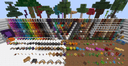
The Jicklus texture pack transforms Minecraft's look, turning the vanilla world into a cozy, rustic, and classic setting with a warm color palette. The developer merges the eco-friendly design of the earlier Green edition with the updated interfaces from the Orange edition into one unified system. This pack keeps the original 16x resolution, but softens and naturalizes the textures, giving the game a countryside or fantasy-village feel.
Style
The core of Jicklus's visual style is its use of warm browns, deep oranges, and soft greens. The author smooths out harsh color transitions and tones down the brightness of the vanilla blocks, which reduces eye strain during long play sessions. The textures take on a subtle hand-painted look, with every block appearing detailed and organic.
The interface fonts and icons round out the rustic concept. Menus and panels take on the look of worked wood or rough stone, creating a medieval or fantasy-style interface.
What's been reworked
The pack completely overhauls the game's visuals, broken down by category:
Blocks: natural materials get a more textured, organic look. Leaves become denser, and grass takes on a warm olive tone. Cobblestone and stone look like unevenly stacked boulders of varying sizes, making builds feel less repetitive. Wooden planks look handcrafted, with visible cracks and seams.
Items: tools, weapons, and armor get a medieval makeover. Swords look like broad knightly blades, while bows and arrows feature detailed fletching and a wooden frame. Food and potion ingredients look cozier and resemble homemade provisions.
Mobs: animal and monster models get new, detailed skins. Cows, for example, show varied brown patch patterns, pigs look muddier with patches of grime on their bodies, and wolves get thicker, darker fur.
GUI: every interaction screen (crafting table, chest, furnace, inventory) gets a wooden frame and warm gray-brown backdrops that replace the standard light-gray vanilla panels.
Integration with animation mods
For full immersion, you can install optional compatibility packs for the Fresh Animations mod. This gives animals and monsters wearing Jicklus's rustic textures realistic facial expressions and smooth head, ear, and tail movement, making the game world feel alive and atmospheric.
Technical requirements and performance
Since Jicklus keeps the standard 16x16 resolution, it places virtually no load on your computer and runs at a stable FPS on any system. You don't need a powerful graphics card or a large amount of RAM to use this resource pack.
Using extra features: to see randomized mob textures (such as different cow variants), volumetric entity models, and a realistic sky, you'll need to install OptiFine, or the combination of Entity Model Features (EMF) and Entity Texture Features (ETF) on the Fabric loader.
Shader compatibility
The Jicklus texture pack pairs beautifully with shaders that support soft, warm lighting, such as Complementary Shaders or BSL Shaders. With these shaders enabled, sunlight filtering through the yellowish leaves creates a golden-hour effect, highlighting the wood and stone textures. You can also use the separate Jicklus Modded Ores addon for compatibility with ores from other mods, so they share the same stone background as the base pack.
Conclusion
Unlike Bare Bones, which simplifies the game down to flat, cartoonish colors, Jicklus makes the world more detailed, warm, and natural. The pack's main limitation is its distinctive warm olive-brown tint, which may not suit fans of modern high-tech builds or cold winter landscapes. This resource pack is a perfect fit for players building farms, medieval fortresses, or cozy countryside homes in survival mode.
Installation
A typical installation takes about 5 minutes. The flow is the same; only the loader and the matching build differ.
- 1Download the resource pack (.zip) — keep it zipped.
- 2In Minecraft open Options -> Resource Packs -> Open Pack Folder.
- 3Move the .zip into that resourcepacks folder.
- 4Select the pack so it moves to the right column, then click Done.
 How to Install a Texture Pack in MinecraftLearn how to install a texture pack in Minecraft with a simple step-by-step guide. Personalize your game with ease.Open the install guide