

Lithos 32x: review of the detailed resource pack for Minecraft Java Edition
Review of the Lithos 32x resource pack for Minecraft — detailed vanilla textures, randomized block variants, 3D geometry and compatibility…
Review of the Lithos 32x resource pack for Minecraft — detailed vanilla textures, randomized block variants, 3D geometry and compatibility with shaders
Dependencies:
Minecraft version: 1.21.11 (also 1.21.4–1.21.9, 1.20.x, 1.19.x, experimental snapshots 26.1.x)
Resolution: 32x
OptiFine or Entity Model Features + Entity Texture Features — for random mob skins (not required for random block variants)
The Lithos resource pack doubles the resolution of vanilla textures to 32x and stays close to the original Mojang style. The author John W. Bjerk keeps the recognizable cubic block palette, so a building constructed according to a vanilla color plan looks the same in Lithos in terms of color scheme — only the surface detail changes. A distinct advantage of the pack — randomized alternative block textures work without mods via the native resource pack mechanism, rather than through CIT/CEM.
Style
Lithos stays within the canonical style of Minecraft: grass remains green with the same saturation shade, oak has warm brown rings, stone is neutral gray without color shift. The detail is increased through microstructure: fine chips are visible on stones, longitudinal furrows on bark, crystal facets on metal ores. Color contrast within a single texture is reduced, so large facades made of cobblestone or quartz do not flicker when moving the camera quickly.
The pack's font is custom, with rectangular serifs; the HUD numbers are wider than vanilla, making them easier to read at low screen resolutions. Inventory icons retain their original silhouettes — you won't confuse a Lithos iron pickaxe with a vanilla one.
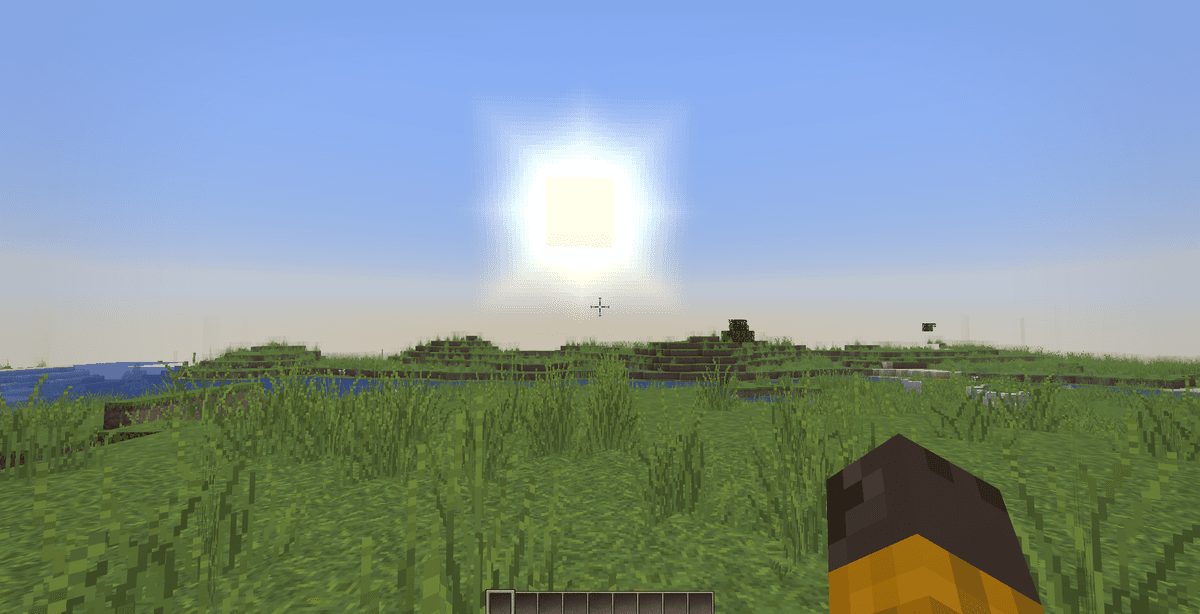
What's reworked
Lithos rewrites the texture of every vanilla category, with some blocks receiving their own 3D geometry through resource pack models (without mods):
Blocks: building blocks (cobblestone, bricks, all wood planks, quartz, smooth stone) receive from 2 to 4 randomized variants. Rails, torches, chains, iron bars, lanterns have a 3D model instead of a flat cross sprite. Natural blocks (grass, leaves, sand, gravel) — are also randomized, so large surfaces do not repeat as tiles.
Items: tools, weapons, armor are redrawn at the same scale of detail — the stone facets are visible on a diamond pickaxe, the texture of a wooden handle with wrapped tape on a shovel. Food uses icons from the Stock32 pack (with permission from author Dack105): raw/cooked meat, cakes, cookies, cake.
Mobs: random skin variants have been added for some standard mobs — cows, pigs, chickens, zombies, skeletons. This feature requires OptiFine or an EMF + ETF combo.
GUI: the inventory, crafting table, furnace, barrel, ender chest have a unified light gray panel with a thin frame. Slots are marked with a soft shadow, without a noisy pattern. Paintings use the HD Art (Default Paintings Scaled Up) pack by ghost2.
Environment: water uses an animated texture from Ornate5 (sevenfour) — with transparent reflections over a blue layer, without artificial wave-like noise.
Randomized textures without mods
Lithos uses the vanilla mechanism of blockstates and models: a single block (like cobblestone) refers to several randomly selected models via a JSON file. Therefore, variability works even on a fresh client without OptiFine and without Fabric/Forge. This is a separate advantage of the pack — most 32x alternatives (Faithful, John Smith Legacy) on top of vanilla output monotone tiles until the user manually installs a CIT mod.
Random mob skins are a different story. Without OptiFine (for versions 1.20.x and below) or EMF + ETF (for 1.21.x on Fabric), all cows, pigs, zombies will have a single skin. This is a client limitation, not the pack's.
Technical requirements and performance
32x is 4 times more pixels per block than vanilla, and this affects VRAM. On integrated graphics, expect an FPS drop of 15–25% compared to a 16x pack. On a discrete GPU (GTX 1060 and above), you won't notice a difference in regular survival; a noticeable drop is only possible in shader-heavy farms with hundreds of active entities.
If you play on versions 1.20.x and above, make sure to install Sodium (for Fabric) or Embeddium (for NeoForge). Without an optimized renderer, 32x looks choppy on weak systems.
Compatibility with shaders and mods
Lithos is compatible with Iris shaders (Complementary, BSL, Sildur's Vibrant) without additional configuration — the textures do not contain PBR maps, so the shader interprets them standardly. If you want PBR effects (normal maps, specular), the pack won't provide them — you need a separate LabPBR addon for this, which Lithos does not publish.
Mod support is targeted: addons for some popular modifications (Twilight Forest, Aether, Biomes O' Plenty) are published on the pack's official Discord server. Without an addon, modded blocks remain in the vanilla 16x style — this is visually noticeable next to the 32x textures of Lithos.
Conclusion
Unlike Faithful, which scales vanilla textures almost without changing the pattern, Lithos reworks every sprite with added micro-detail and 3D models for thin blocks. It differs from Bare Bones in a completely opposite direction — Lithos deepens details, rather than simplifying them. From Jicklus — a neutral color balance instead of a warm rustic hue.
The main limitation of the pack is the GPU load at 32x and the closed ARR license, because of which you cannot make derivative works without the author's permission. For servers and videos, usage is allowed with credit to the original.
Lithos is right for you if you need a 32x upgrade without a drastic style change — for long-term survival, screenshot building, limited modding (1–3 mods with official addons). If you play heavy modpacks with 200+ mods, a portion of the blocks will remain in vanilla 16x — this is worth considering in advance.
Installation
A typical installation takes about 5 minutes. The flow is the same; only the loader and the matching build differ.
- 1Download the resource pack (.zip) — keep it zipped.
- 2In Minecraft open Options -> Resource Packs -> Open Pack Folder.
- 3Move the .zip into that resourcepacks folder.
- 4Select the pack so it moves to the right column, then click Done.
 How to Install a Texture Pack in MinecraftLearn how to install a texture pack in Minecraft with a simple step-by-step guide. Personalize your game with ease.Open the install guide