
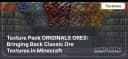
Texture Pack ORIGINALS ORES: Bringing Back Classic Ore Textures in Minecraft
Restore classic ore textures in Minecraft with the Originals Ores texture pack. Perfect for nostalgic players who prefer the pre-1.17 ore…
Restore classic ore textures in Minecraft with the Originals Ores texture pack. Perfect for nostalgic players who prefer the pre-1.17 ore design.
Main Features of the Texture Pack
-
Restoration of Old Textures: This texture pack replaces the new ore textures with their original versions that existed before the 1.17 update.
-
Updated Deepslate Ores: Deepslate ores now have a look that matches the original textures, ensuring consistency in underground environments.
Conclusion
The ORIGINALS ORES texture pack allows players to bring back the classic ore textures in Minecraft, making it a great choice for those nostalgic for the older versions of the game.
Published under All Rights Reserved (free distribution allowed)
Installation
A typical installation takes about 5 minutes. The flow is the same; only the loader and the matching build differ.
- 1Download the resource pack (.zip) — keep it zipped.
- 2In Minecraft open Options -> Resource Packs -> Open Pack Folder.
- 3Move the .zip into that resourcepacks folder.
- 4Select the pack so it moves to the right column, then click Done.
 How to Install a Texture Pack in MinecraftLearn how to install a texture pack in Minecraft with a simple step-by-step guide. Personalize your game with ease.Open the install guide
Gallery
Found: 10