
How to install Fabric for Minecraft: a detailed step-by-step guide
Step-by-step guide to installing Fabric Loader for Minecraft 1.14–26.1.x: matching the Java version, downloading the installer from…
Technical parameters:
Minecraft versions: 1.14 – 26.1.x
Loader version: Fabric Loader
Adding modifications to Minecraft Java Edition requires using a special loader environment. Recently, the Fabric loader has become the main competitor to the classic Forge thanks to its high speed, low RAM consumption, and fast updates for new game versions. This guide provides detailed step-by-step instructions on installing Fabric, setting up the required Java version, and related components for optimal game performance.
Step 1. Checking and installing a compatible Java version
Fabric works on the Java programming language, so to run the installer and ensure the stable operation of the modified client, your computer must have the correct version of the Java Development Kit (JDK) installed. Different versions of the Minecraft game require different generations of Java.
Minecraft and Java version compatibility table
Minecraft Versions | Required Java Version | Download Links |
|---|---|---|
1.14 – 1.16.5 | Java 8 (JRE 8) | |
1.17 – 1.17.1 | Java 16 / Java 17 | |
1.18 – 1.20.4 | Java 17 | |
1.20.5 and newer | Java 21 |
Download the installer for your operating system (Windows, macOS, or Linux) from the official website, run the file, and complete the installation by following the standard on-screen instructions.
Step 2. Downloading the Fabric installer
Official loader files should be taken exclusively from the original source to avoid infecting your computer with viruses.
Go to the official project website: fabricmc.net.
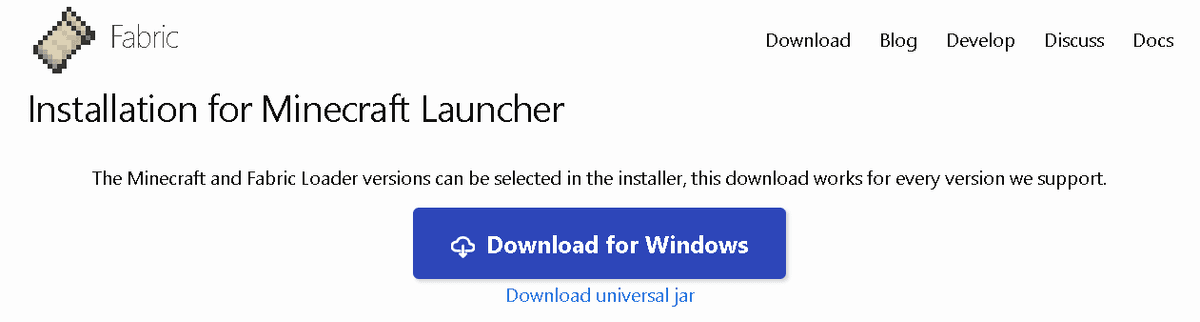
On the main page, click the large blue Download Here button.
For the Windows operating system, it is recommended to download the file with the
.exeextension (the Download for Windows button), as it runs directly without needing to set up Java file associations.For macOS or Linux, download the universal
.jarversion (the Download universal jar link).
Step 3. Running the installer and installing the client
Before running the installer, ensure that the official Minecraft launcher and the game itself are completely closed.
Double-click to run the downloaded installer file.
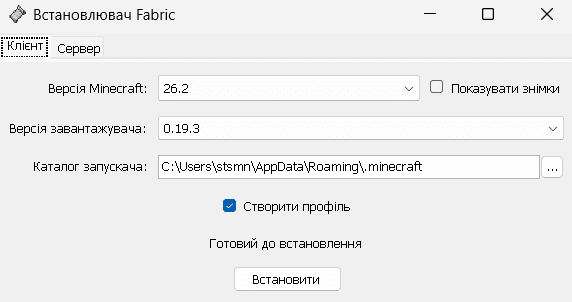
In the Client tab, select the following settings:
Minecraft Version: Select the game version you plan to install mods on.
Loader Version: Leave the latest stable default version.
Select Install Location: The path to the game folder. For Windows, the default is the
AppData\\Roaming\\.minecraftfolder.Make sure the Create profile checkbox is ticked.
Click the Install button.
After a few seconds, a window will appear with a successful installation message. Close the installer.
Step 4. Installing the required Fabric API mod
Unlike Forge, the Fabric loader itself only contains the base code for running the game. Most community-created additions require a special compatibility library called Fabric API. Without it, the game will simply crash upon startup.
Go to the official library page on Modrinth: .
Go to the Versions tab and download the
.jarfile whose version exactly matches your selected Minecraft version (for example, if you installed Fabric for1.20.1, download the Fabric API specifically for1.20.1).Open the Minecraft game folder. On Windows, press the
Win + Rkey combination, type%appdata%\\.minecraft, and press Enter.Find the folder named
mods(if there is no such folder, create it manually, naming it with lowercase letters).
Move the downloaded
fabric-api-...jarfile into this folder.
Step 5. Activating the profile and the first launch
Now you need to verify the correct integration of the loader into the game launcher.
Open the official Minecraft launcher.
In the lower-left corner of the screen next to the Play button, find the profile (version) selection menu.
A new profile with a scroll logo, the name Fabric Loader, and the game version (for example,
fabric-loader-1.20.1) should appear in the list. Select this profile.Click the Play button.
After the game's main menu fully loads, the text "Minecraft ... / Fabric (Active)" should appear in the lower-left corner of the screen. This confirms a successful launch.
Optimization and alternatives: Sodium and Indium
Fabric itself does not improve graphics or FPS, but it allows you to use the most powerful optimization tools, which perform much better than the old OptiFine.
Sodium: The main graphics engine optimization mod for Fabric in Minecraft. It rewrites the chunk rendering system, which increases frames per second (FPS) by 2-4 times on most computers. It is installed simply by moving the
.jarfile into themodsfolder.Indium: An additional compatibility mod required if you use Sodium alongside mods for new blocks or decorations (for example, color codes or improved models). It adds support for rendering models through the standard Sodium API.
Mod (Optimization) | Fabric Compatibility | Main Function | FPS Impact |
|---|---|---|---|
Fabric API | Required for everyone. | Running basic scripts and libraries. | No impact. |
Sodium | Recommended. | Replacing the standard graphics renderer. | 2-4 times increase. |
Indium | Depends on the modpack. | Rendering custom 3D block models. | Maintains stability. |
Common errors and how to avoid them
Installing modifications is often accompanied by errors due to user inattention.
Error 1. Missing Fabric API in the mods folder: The most common problem. The game launches, but when trying to load any mod, it crashes with the error "Requires fabric-api". Ensure that you downloaded the compatibility library specifically for your game version.
Error 2. Running the installer with an open launcher: If you install Fabric while the launcher is running, the new profile might not appear in the version list. Before installation, be sure to close the launcher entirely via the task manager.
Error 3. Java version does not match the game version: Trying to launch Minecraft 1.20.5+ on the older Java 17 or Java 8 will cause the game to crash with error code
1at the very beginning of the loading process. Update Java to the current version according to the table.Error 4. Mixing mods for Fabric and Forge: Mods written for the Forge loader will not work on Fabric, and vice versa. Upon launching, the game will present a critical error window. Always check the loader tag on the mod's Modrinth download page.
Error 5. The .jar file association problem (Jarfix): If double-clicking the universal
.jarinstaller opens an archiver (WinRAR or 7-Zip), it means the file associations in your operating system are messed up. Download the Jarfix program or use the.exeinstaller version.
Conclusion
The Fabric loader is a modern and fast tool for expanding Minecraft's capabilities. Its lightweight nature and compatibility with Sodium make it the best choice for players who value high performance and stable FPS.
Installing the loader does not take much time but requires strict adherence to the versions of Java, the loader itself, and the required Fabric API library. For low-end systems, switching from Forge to Fabric using Sodium is the best way to get rid of lag in the game.
Leave a comment
Links will be stripped
No comments yet. Be the first to share your thoughts.