
How to make a composter in Minecraft and get bone meal from trash
The composter is a vanilla Minecraft block that turns plant material and surplus food into bone meal. Instead of farming skeletons for…
How to make a composter in Minecraft and get bone meal from trash
The composter is a vanilla Minecraft block that turns plant material and surplus food into bone meal. Instead of farming skeletons for bones, you toss in unwanted seeds, leaves and rotten vegetables — and get fertilizer to speed up crop growth. This guide shows how to craft a composter, which items give the most value, and how to automate the whole process.
Preparation
What you'll need:
7 wooden slabs of any type (you can mix wood species in a single recipe)
A crafting table
Any trash to get started — seeds, leaves, vegetables from your farms
One log yields 4 planks → 6 slabs. Two logs give 12 slabs — a set for a composter with some to spare.
Step 1. Crafting
Place the slabs in a U-shape on the crafting table: two at the ends of the top row, two at the ends of the middle row, three in the bottom row. The center and top-center stay empty.
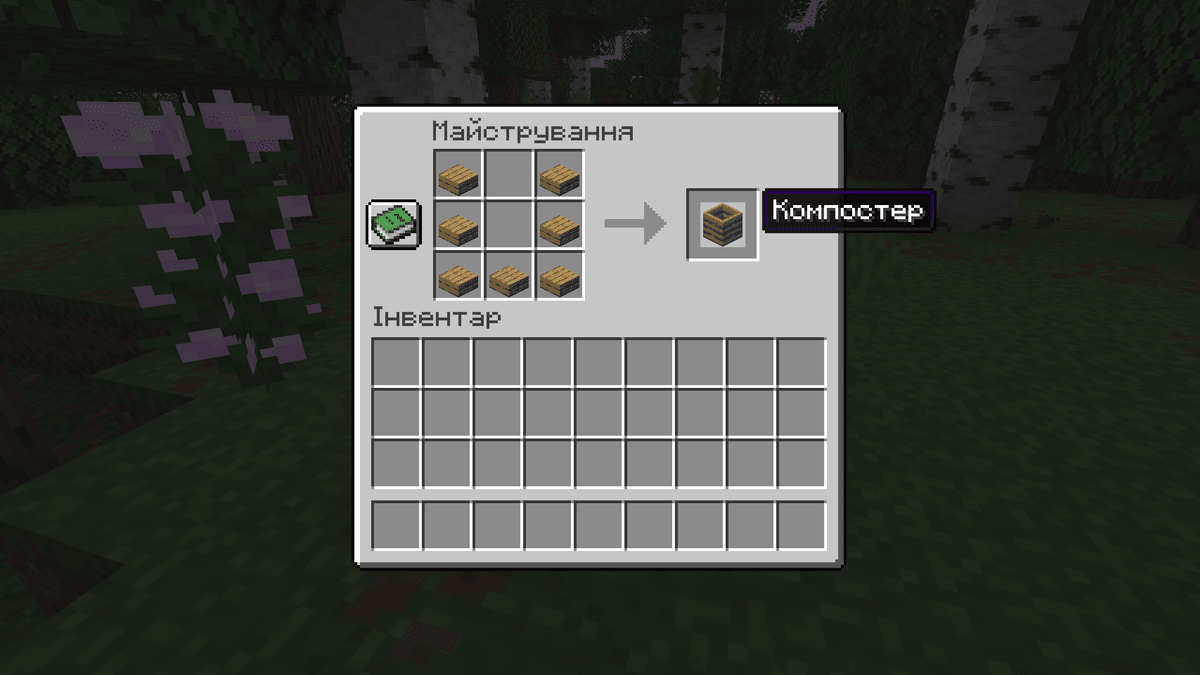
The composter recipe on the crafting table — 7 oak slabs, the center cells empty
Step 2. How the composter works
Inside the block there are 8 compost levels (0–7). A filled level looks like a layer of podzol. When the 7th level is reached, after about 1 second the top texture changes to finished compost — that's the signal that you can collect the bone meal.
Key mechanic: the first item thrown into an empty composter always raises the level with a 100% chance. All subsequent levels depend on the type of material — each item has its own chance to add a layer. Because of this it's best to start with cheap trash (seeds, leaves) rather than a cake.
Step 3. Chance table — what to throw in
All compostable items are divided into 5 groups by their chance to add one level per use. The higher the chance — the less trash per bone meal.
Chance | On average per bone meal | Items |
30% | ~23 | Seeds (wheat, melon, pumpkin, beetroot), saplings, leaves, short grass, dried kelp, kelp, sweet berries, moss carpet, pink petals, mangrove propagule, seagrass, hanging roots |
50% | ~14 | Dried kelp block, cactus, vines, tall grass, melon slices, sugar cane, nether sprouts, twisting vines, weeping vines, flowering azalea leaves, glow lichen |
65% | ~11 | Apple, azalea, beetroot, potato, wheat, carrot, cocoa beans, fern, large fern, flowers, mushrooms, lily pad, melon, pumpkin, moss block, nether wart, sea pickle, glow berries, big dripleaf, twisting vines roots, crimson roots |
85% | ~8 | Baked potato, bread, cookie, hay bale, mushroom block (red/brown), nether wart block, warped wart block, flowering azalea, torchflower, pitcher plant |
100% | 7 | Cake, pumpkin pie |
Step 4. Smaller is more efficient
Compression blocks give less compost than the individual items they're made of. Before throwing them in — break them down:
hay bale (85%) → 9 wheat (65% each). 9 wheat give on average ~5.85 levels, while the bale gives 0.85. The difference is almost 7 times.
Dried kelp block (50%) → 9 dried kelp (30% each). Just two kelp already have a 51% chance to add at least one level — that's more efficient than the block.
The exception is the cookie. One recipe from wheat and cocoa yields 8 at 85% each, while you can't turn them back into a block. Cookies are best left as they are.
Step 5. Automation with hoppers
The composter interacts with hoppers from two sides:
Hopper on top — pushes trash in automatically.
Hopper underneath — pulls the finished bone meal into a chest.
Basic layout: top chest → hopper down → composter → hopper down → bottom chest. You throw a stack of trash in from the top, and a minute later collect the bone meal from the bottom.
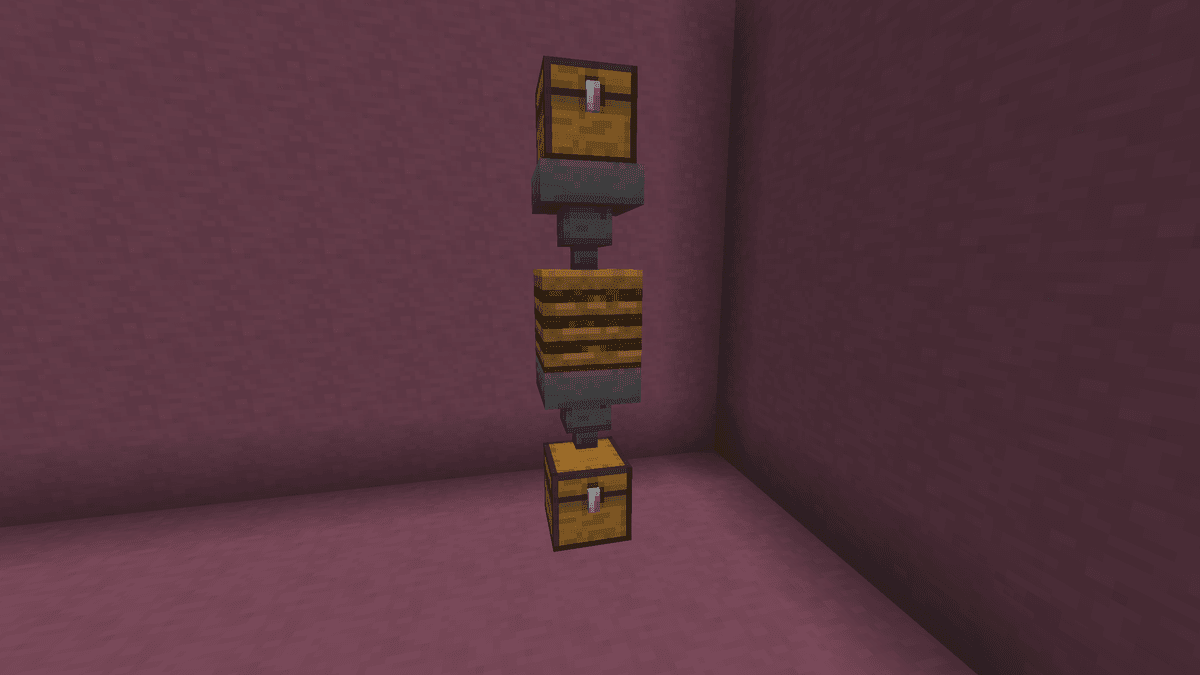
Automatic composter — top chest with wheat, hopper down, composter, hopper down, bottom chest
Step 6. Comparator signal
If you place a redstone comparator behind the composter, it emits a signal of strength 0–7 depending on the fill level:
0 — empty;
1–6 — fill layers (you can visually see the mass rising inside);
7 — bone meal ready to collect (a white texture appears on the surface).
This way you can make an automatic readiness indicator. For example, if you run a redstone line 7 blocks long from the comparator and place a redstone lamp at the end, it lights up exactly when the finished bone meal appears inside.
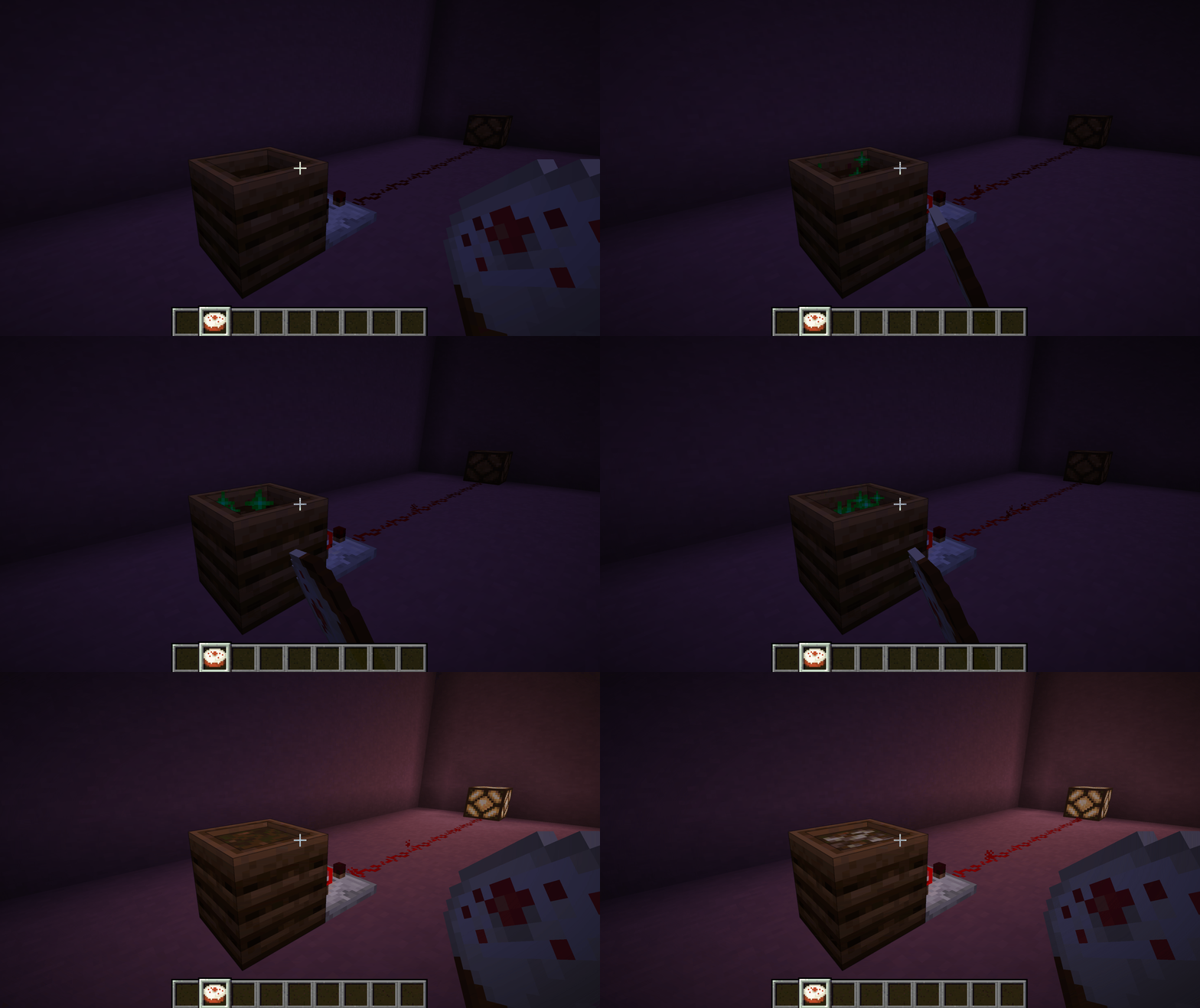
Next to the composter stands a comparator, from which a redstone track runs to a lamp; the player throws in items, the mass inside grows, and at the 7th (final) layer the lamp lights up brightly, signaling that it's ready
Common mistakes
Expensive food in an empty block. The first layer is always 100% — better to start with seeds, not a pie.
Expecting bone meal right after the 7th layer. The texture transitions to "ready" with a delay of about a second — click after the appearance changes, not immediately.
Trying to dump in bamboo or poisonous potatoes. These items are permanently excluded from the compostable tag — they only work as fuel in a furnace (bamboo) or for nothing at all (the poisonous ones).
Hopper from the side. A common fault in layouts. Only the top and bottom work.
Conclusion
The composter is a constant source of bone meal without farming skeletons — especially worthwhile for worlds with large automatic vegetable/seed farms, where the surplus of material goes unused anyway. It's suitable for survival, skyblock, peaceful survival mode and any scenarios where there's excess greenery.




Leave a comment
Links will be stripped
No comments yet. Be the first to share your thoughts.