
How to build an item sorter in Minecraft
Learn to build a vanilla 8-cell redstone item sorter in Minecraft using hoppers, comparators, and repeaters. Renamed filter blocks (41 per…
How to build an item sorter in Minecraft
An item sorter is a redstone contraption that automatically distributes an incoming flow of resources into separate chests by item type. In Minecraft, such a system removes the routine from large farms: everything that drops into a single input chest automatically diverges into storage, and unsorted remnants are collected separately. Below is a complete build of a working modular 8-cell sorter that is easy to scale.
Version: the build is purely vanilla, no mods, works on the current Java Edition.
What you will need
The amount of materials is calculated for 8 sorting cells. If you need more cells, each subsequent module adds one set of a hopper, comparator, repeater, torch, and chest.
Material | Quantity |
Iron Block | 48 |
Chest | 34 |
Hopper | 33 |
Coarse Dirt | 32 |
Redstone Dust | 24 |
Redstone Repeater | 8 |
Redstone Comparator | 8 |
Redstone Torch | 8 |
Anvil | 1 |
Iron blocks here are just a structural foundation for redstone, any solid block will do instead. Coarse dirt will be used for filter blocks (more on them in the setup step).
How it works
At the core of each module are two hoppers, one above the other. The bottom one is directed into the storage chest, the top one - towards the comparator. The comparator reads how full the filter hopper is and outputs a redstone signal of corresponding strength.
The signal strength from the hopper increases in steps: a certain number of items keeps the signal at one level, and the next item raises it by a step. The filter is built on this. The hopper is filled so that the signal stands slightly below the threshold. As long as it has exactly as many items as needed, the bottom hopper remains locked by the redstone torch and does not pull out the contents. When the required item appears in the stream, it is added to the stack, the signal jumps a step higher, the circuit briefly unlocks the bottom hopper - and the extra item goes into the chest. The signal returns to the original level, the hopper is locked again.
Items that do not match the filter cannot enter the occupied hopper slots and simply pass further along the top line to the next module. What didn't match any filter settles in the output chest.
Step 1. Chests and bottom hoppers
Place a row of 8 double chests - these are the storages for sorted items. On top of them, you can place another row of chests to double the volume of each cell. To each chest, while sneaking (Shift, so as not to open it), attach a hopper on the side so that it is directed inside the chest.
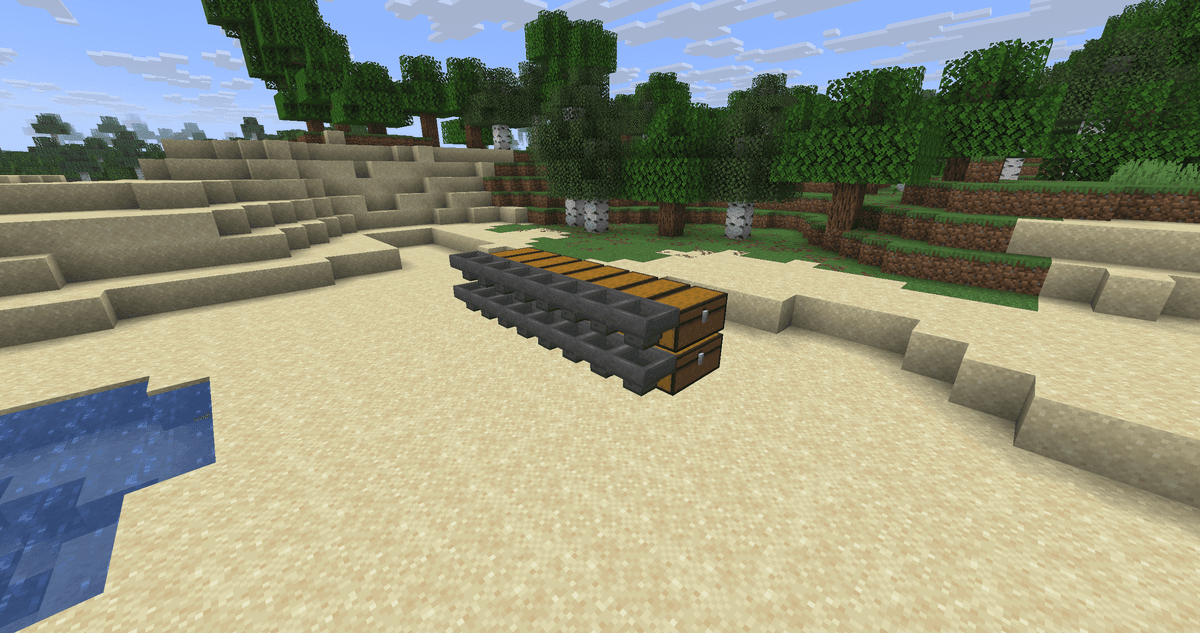
A row of double chests with hoppers attached to the side
Step 2. Blocks, torches and repeaters
Step back one block from the hoppers and lay out a row of 8 blocks. Hang a redstone torch on each block on the side of the hopper - it is this torch that will keep the bottom hopper locked. On the opposite side of the blocks, place a row of redstone repeaters facing the hoppers. Behind the repeaters, lay out another row of blocks.
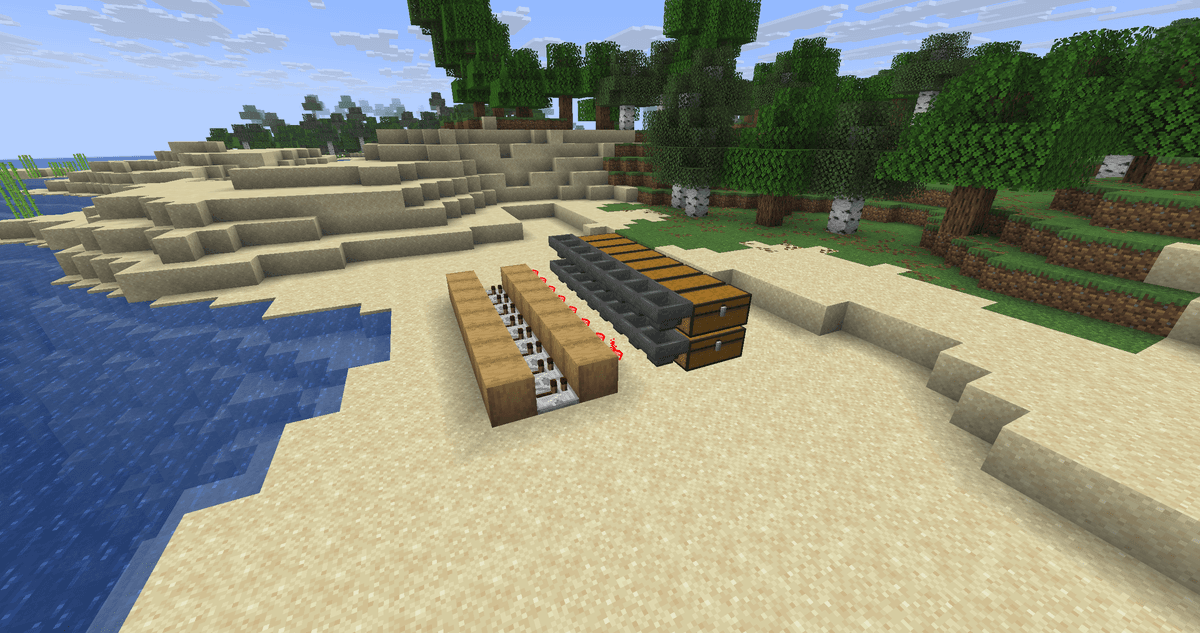
A row of blocks with redstone torches on one side and repeaters on the other
Step 3. Platform, comparators and dust
Cover the entire redstone circuit with a platform of blocks so that it connects with the top row of hoppers, but does not touch the back row of blocks. Next to each hopper, place a redstone comparator, with its signal pointing away from the hopper. Cover the rest of the platform with redstone dust so that the signal from the comparators reaches the repeaters.
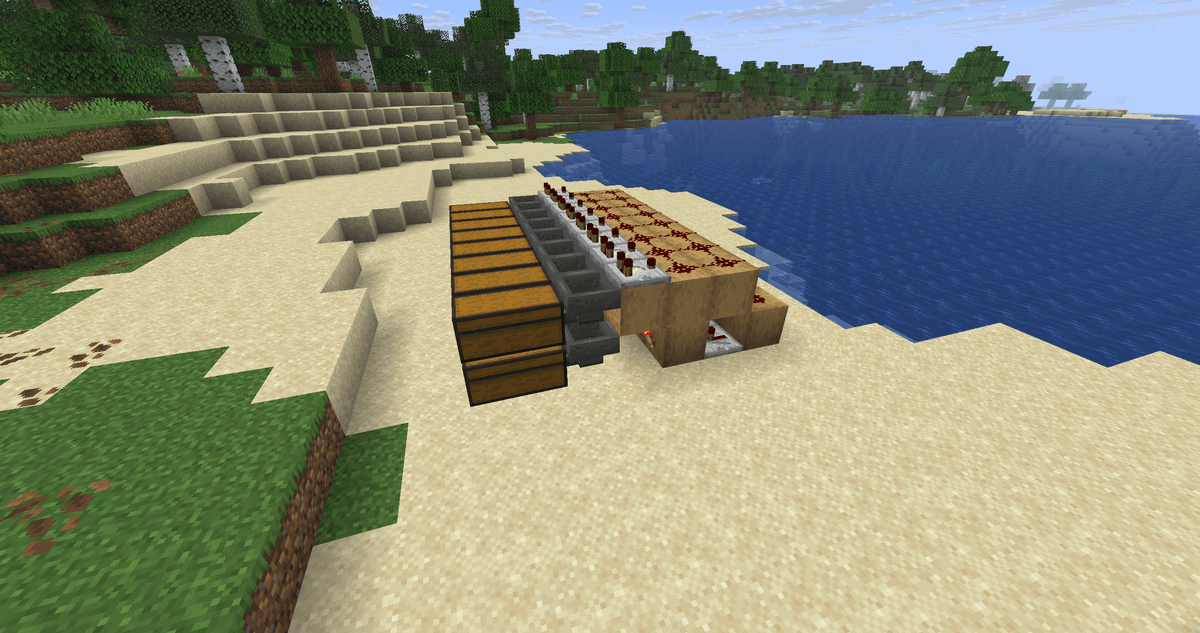
Platform with comparators near the hoppers and redstone dust paths on top
Step 4. Filter hoppers and input line
On the bottom hoppers, place another row of hoppers - these are the filter hoppers, directed towards the comparators. Above them, stretch a row of 9 hoppers that will carry items. On the last hopper in the row, place a chest - this is the output for unsorted remnants. On the opposite edge above the line, place another chest - this is the input where you drop items for sorting.
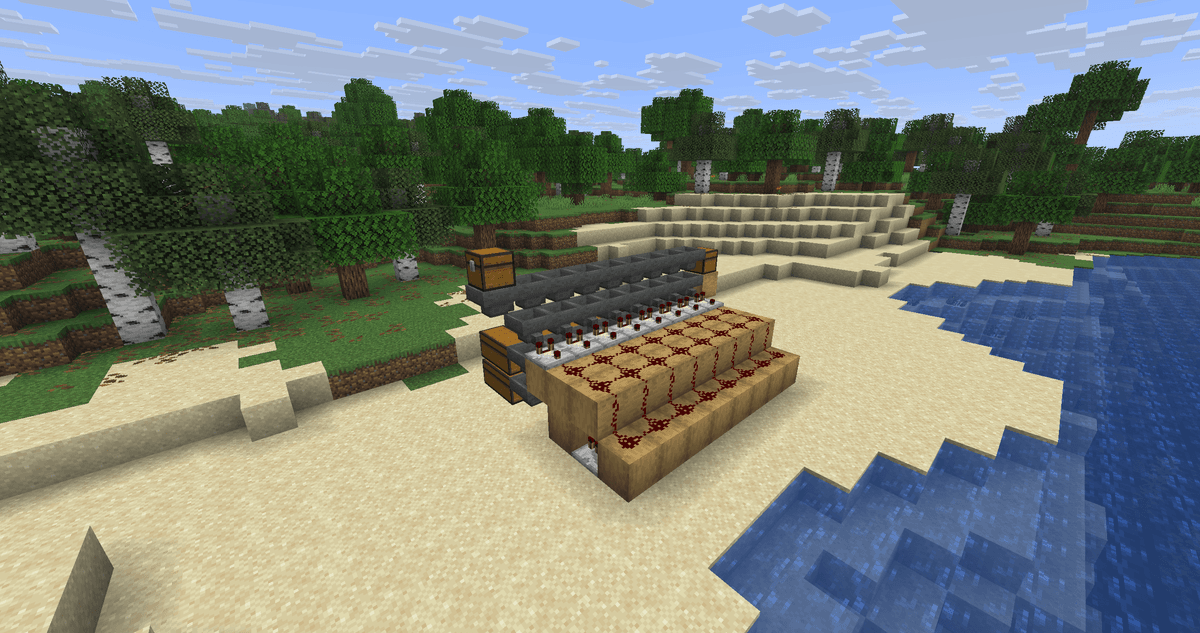
Completed structure with the top line of hoppers, input and output chests.
Step 5. Setting up the filters
This is the main step on which it depends whether the system will work. Take an anvil and rename 32 blocks of coarse dirt (any name, for example, filter). Renaming is necessary so that these blocks do not stack with the same items from the stream and do not mess up the comparator signal.
In each filter hopper (the one near the comparator), put 4 renamed blocks - one in four slots. The comparator should light up. In the free fifth slot, put the item that this cell will catch. For items with a stack of 64, 41 pieces are needed: the easiest way is to drop a full stack (64) - the hopper itself will leave 41, and the excess will drop into the chest. For items with a stack of 16 (for example, eggs), put about 10 pieces.
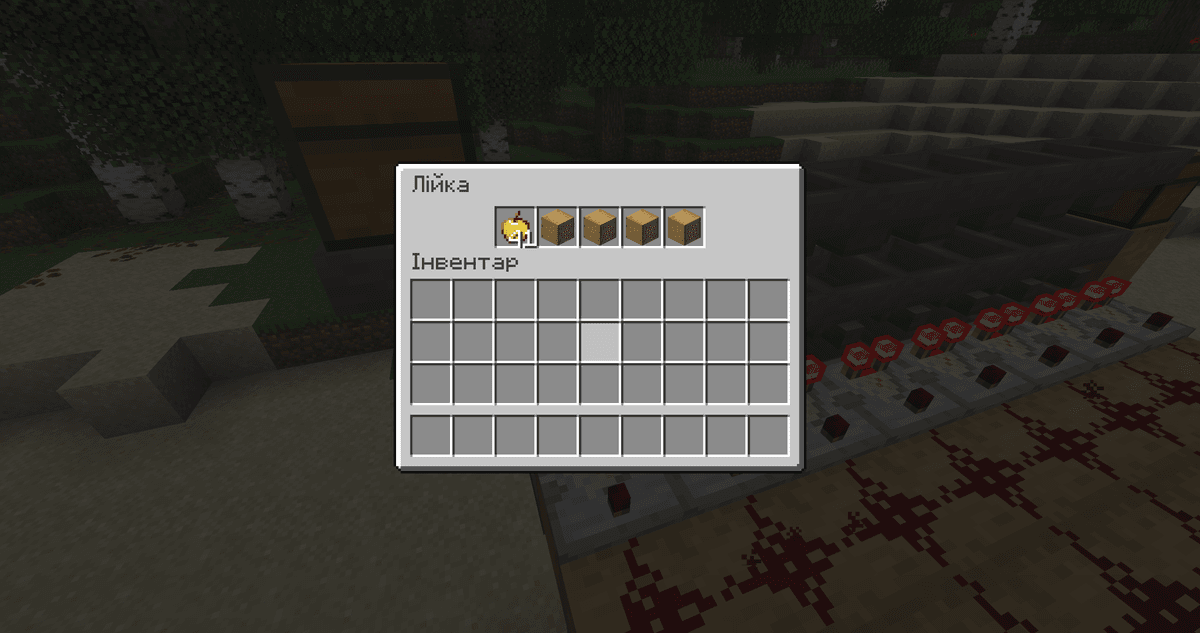
Filter hopper interface - 4 renamed blocks of coarse dirt and a stack of the item to sort.
Without the right amount of sample in the filter, the module will either catch nothing or pull its own sample into the chest. Exactly 41 (for a stack of 64) keeps the signal at the desired step.
After this, the sorter is ready: drop items into the input chest - and each will go to its cell.
Expanding the farm
The design is modular, so it can be extended in the same direction as much as desired. Each new module is one chest, two hoppers, a comparator, a repeater, a torch and a block for the circuit, plus one hopper to the top line. By lengthening the top row of hoppers, you add new cells without rebuilding the already assembled ones. For deeper storage under each cell, place double chests or output the hopper to a separate warehouse room.
Common mistakes
The most common reason for a non-working module is unrenamed filter blocks: identical items from the stream stack with them, the signal grows and breaks the sorting. The second is an arbitrary amount of sample in the filter instead of exactly 41 (for a stack of 64).
Neighboring modules can affect each other if a large volume of items flies into one of them at once or the storage overflows - the excess signal "leaks" to neighbors and unlocks their hoppers. Therefore, do not drop huge stacks into the input faster than the system can sort them, and free filled chests in time.
The standard filter only works with stackable items. For unstackable items (potions, tools, armor), this scheme will not work.
Conclusion
An item sorter provides automatic distribution of resources from a common stream into designated chests, which is why large farms stop cluttering the general storage. The method is optimal where there is a stable influx of stackable items: ore from mine farms, drops from mob farms, harvest from fields. Limitations - only stackable items and sensitivity to single large drops. Suitable for survival and cooperative servers, where the warehouse grows faster than you manage to sort by hand.
Leave a comment
Links will be stripped
No comments yet. Be the first to share your thoughts.